
 NeoForge
 Fabric
 Quilt
Quilt Forge
ForgePaintings++
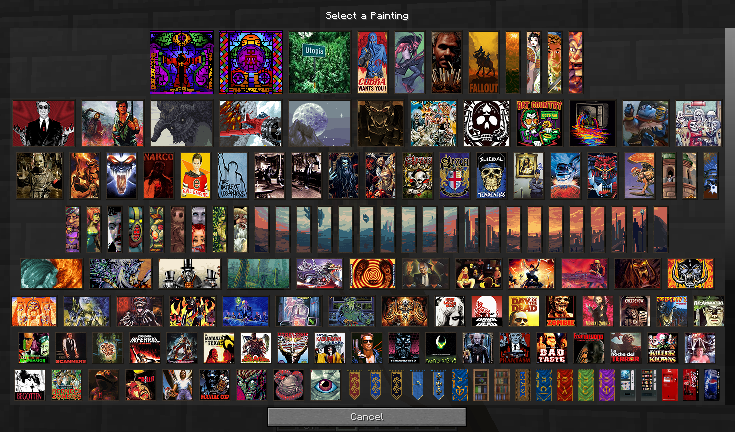
게임에 그림을 추가할 수 있게 해주고, 벽에 걸고 싶은 정확한 그림을 선택할 수 있는 멋진 선택 GUI를 제공하는 모드입니다.
파일
Forge : 여기를 클릭하세요
NeoForge : 여기를 클릭하세요
Fabric : 여기를 클릭하세요
FABRIC은 Fabric API와 Cloth Config API가 있어야 작동합니다
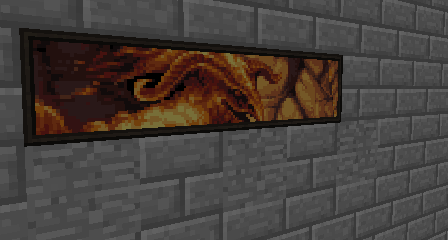
투명도 지원 (1.19+)
- 이 그림은 예시 제안입니다. 이 이미지의 그림은 모드에 포함되어 있지 않습니다
curseforge 앱을 사용하면 지원 모드가 자동으로 다운로드됩니다! 클라이언트를 전혀 사용하지 않는다면 여기에서 받으세요.
그림 더 추가하기
위키의 튜토리얼을 확인하세요.
Painting Pack Maker를 사용할 수도 있습니다: 마인크래프트 1.17 이상 버전용 Painting Pack을 만들 수 있는 시각적 인터페이스입니다. 여기에서 PPM 프로젝트 페이지를 방문하세요. 다운로드는 위의 프로젝트 페이지에서 가능합니다.
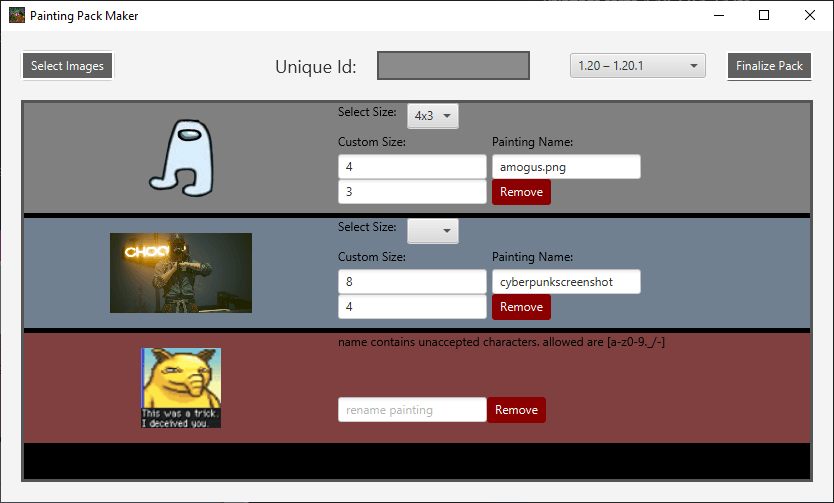
그림 리소스 팩
팩을 만드셨나요? 세상에 공유하고 싶으신가요? curseforge에 리소스팩을 게시하세요. 언제든지 저에게 pm을 보내거나 댓글에 링크를 남겨주시면 여기에 여러분의 팩을 소개해 드리겠습니다!
Absolem Jackdaw 기본 그림 팩
기본 그림들은 1.20.4 (12.0.0.5 이후)에서 기본 모드에서 제거되었으며, 100% 커스터마이징을 위해 그림 리소스팩으로 추가할 수 있습니다!
1.21 이전 리소스팩 https://curseforge.com/minecraft/texture-packs/painting-base-painting-pack
1.21 이상 데이터팩 https://curseforge.com/minecraft/data-packs/absolems-base-pack
Foreck의 Rotten 그림 팩
Foreck 제작 이 팩은 현재 전통적인 픽셀 아트 기법과 참고 자료를 사용하여 만든 모든 종류, 스타일, 크기의 그림 106개를 추가합니다. RotN 세계관의 장면과 캐릭터를 특징으로 하거나 다른 출처에서 영감을 받아 RotN의 세계에 맞게 각색했습니다. 모든 작품은 Foreck이 직접 손으로 만들었습니다. https://www.curseforge.com/minecraft/texture-packs/forecks-rotten-painting-pack
물약 가이드 그림
rootbeerdrinker1 제작 이 팩은 물약 제작을 위한 도표 가이드를 그린 그림 몇 개를 추가합니다! https://www.curseforge.com/minecraft/texture-packs/brewingcanvas-potion-guide
Baroque 팩
LykiaOokami 제작 바로크 스타일 그림들을 이 팩에서 찾을 수 있습니다. https://www.curseforge.com/minecraft/texture-packs/renaissance-and-baroque-painting-pack
Oliver Remund 그림 팩
Absolem Jackdaw(저本人)가 아티스트 Oliver Remund 본인의 동의를 받아 만든 그림 팩입니다. https://www.curseforge.com/minecraft/texture-packs/oliver-remund-painting-pack
원본 작품은 Remund의 웹사이트에서 확인하세요!
Leichenengel의 Fractals 그림 팩
Leichenengel이 직접 만든 그림 팩을 확인하세요. 모든 작품은 그가 직접 만들었습니다. 팩에는 70개 이상의 그림이 포함되어 있습니다! https://www.curseforge.com/minecraft/texture-packs/fractal-painting-pack-bright-and-colorful-part-1
여러분의 팩을 소개하고 싶으신가요? 링크를 댓글로 남기거나 pm을 보내주세요!
질문이 있으신가요? 그림 팩 문제가 있으신가요? 디스코드로 저에게 연락하세요!!
Paintings ++ 설치 방법
With Millida Launcher
Install Millida Launcher
The launcher is free: download it at millida.net/launcher and sign in with any nickname.
Click “Install” on this page
The launcher opens and installs the mod for Minecraft 1.12.1–1.21.11 on Fabric, Forge, NeoForge or Quilt automatically.
Launch the game
A profile with it appears in the launcher: click “Play”.
Manually
Install Fabric, Forge, NeoForge or Quilt
The loader must match the game version of the mod file, for example Minecraft 1.21.11. After installing it, a separate profile appears in your launcher.
Download the file for your version
In the version list above, pick the file paintings-neoforge-1.21.11-17.1.0.jar (102 KB) for your game version and loader.
Put it in the mods folder
The folder is inside .minecraft (Windows: %appdata%\.minecraft\mods). If it does not exist, create it.
Launch the loader profile
Open “Mods” in the main menu: Paintings ++ should be in the list.
Minecraft 1.21.11 runs on Java 21: with a different Java version the game may close right after launch.
버전
의존성 포함
| Minecraft | 로더 | 파일 | 날짜 | 작업 |
|---|---|---|---|---|
| 1.21.11 | NeoForge | Paintings ++-neo-1.21.11-17.1.0102 KB 2 | ||
| 1.21.11 | Fabric, Quilt | Paintings ++-fabric-1.21.11-17.1.0102 KB 47 | ||
| 1.12.1 | Forge | Legacy-PSG-1.12.2-1.1.0.1.jar69.8 KB | ||
| 1.20.4 | Fabric | Paintings-fabric-1.20.4-12.0.0.4.jar116 KB | ||
| 1.20.4 | NeoForge | Paintings-neoforge-1.20.4-12.0.0.4.jar121 KB | ||
| 1.19.2 | Forge | Paintings-forge-1.19.2-10.2.3.0.jar171 KB 1 | ||
| 1.14.4 | — | paintings-1.14.4-6.0.1.5.jar318 KB | ||
| 1.14.4 | — | paintings-1.14.4-6.0.1.3.jar318 KB |
리뷰
Paintings ++의 첫 평가를 남겨 보세요


