
 NeoForge
 Fabric
 Forge
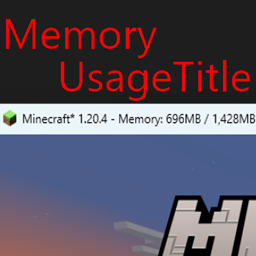
ForgeMemory Usage Title
Description
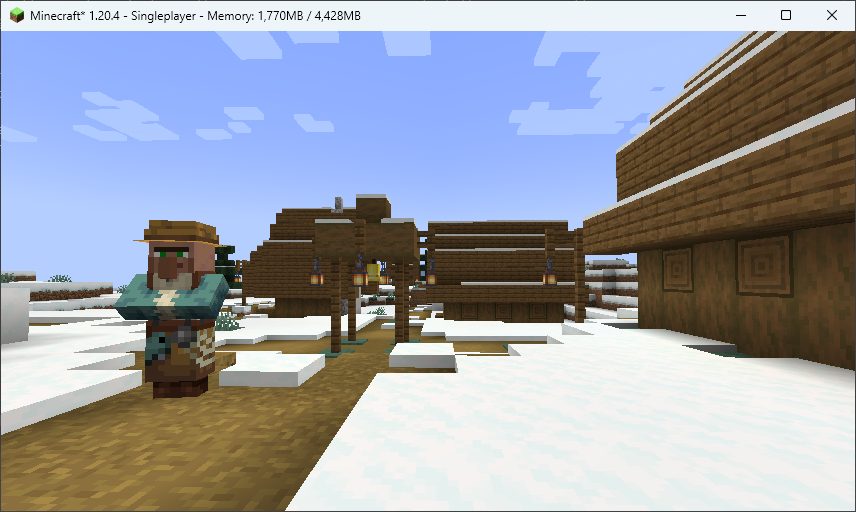
Displays Minecraft's memory usage in the title bar.
I created this because I wanted to display it in a place where it was easy to see without getting in the way.
Mod Loader: Fabric Loader, Minecraft Forge Loader License: MIT License Modpack: Useable
Memory Usage Title 설치 방법
With Millida Launcher
Install Millida Launcher
The launcher is free: download it at millida.net/launcher and sign in with any nickname.
Click “Install” on this page
The launcher opens and installs the mod for Minecraft 1.15–26.2 on Fabric, Forge or NeoForge automatically.
Launch the game
A profile with it appears in the launcher: click “Play”.
Manually
Install Fabric, Forge or NeoForge
The loader must match the game version of the mod file, for example Minecraft 26.2. After installing it, a separate profile appears in your launcher.
Download the file for your version
In the version list above, pick the file memoryusagetitle-neoforge-1.0.2.261-fix.1.jar (130 KB) for your game version and loader.
Put it in the mods folder
The folder is inside .minecraft (Windows: %appdata%\.minecraft\mods). If it does not exist, create it.
Launch the loader profile
Open “Mods” in the main menu: Memory Usage Title should be in the list.
버전
의존성 포함
| Minecraft | 로더 | 파일 | 날짜 | 작업 |
|---|---|---|---|---|
| 26.1 | NeoForge | memoryusagetitle-neoforge-1.0.2.261-fix.1.jar130 KB | ||
| 26.1 | Fabric | memoryusagetitle-fabric-1.0.2.261-fix.1.jar129 KB | ||
| 1.16.3 | Forge | memoryusagetitle-forge-1.0.1.jar131 KB 1 |
리뷰
Memory Usage Title의 첫 평가를 남겨 보세요


