

Minecraft 1.12.2, 1.16.5용 InventoryHUD+ 모드
주 인벤토리, 물약 효과, 장비를 HUD에 추가합니다. 그리고 몇 가지 다른 기능도요.
 Forge
 Fabric
 NeoForge
InventoryHUD+ 모드 정보
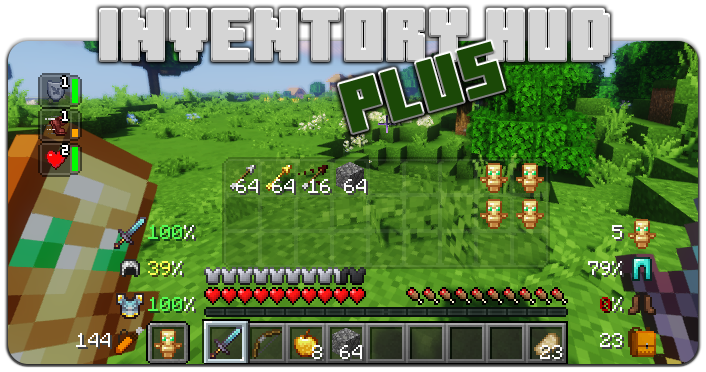
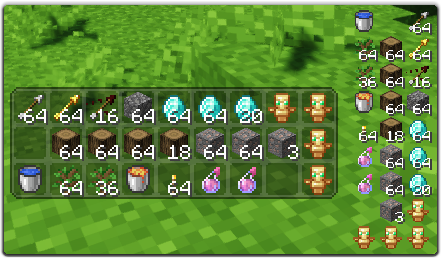
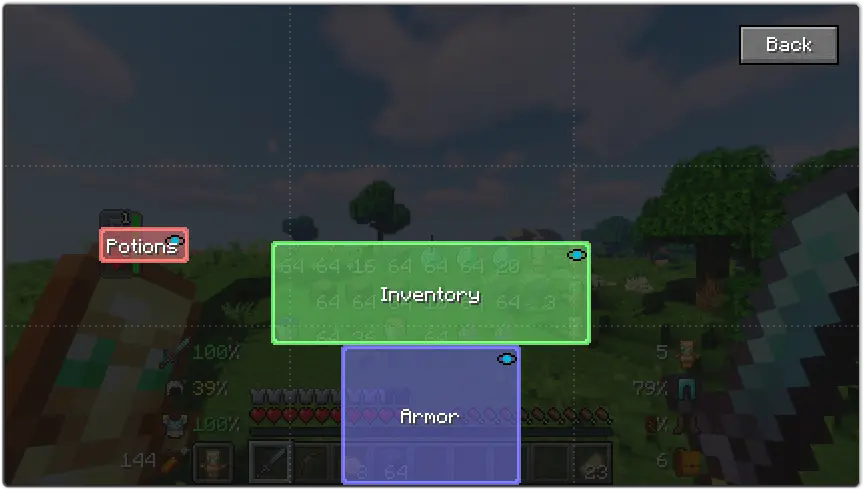
이 모드는 몇 가지 기능을 포함하고 있습니다. 먼저 인벤토리 HUD는 게임을 플레이하는 동안 인벤토리를 보여주며, 모드(미니/일반, 가로/세로)를 전환할 수 있고 배경 투명도 변경과 애니메이션 켜기/끄기도 가능합니다.
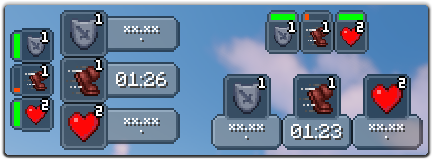
다음 기능은 포션 HUD로, 포션 효과를 타이머나 지속 시간 막대로 표시하며 미니 모드를 사용 중일 때 적용됩니다. 설정에서 효과 사이의 간격과 배경 투명도를 변경할 수 있고 가로 모드도 활성화할 수 있습니다.
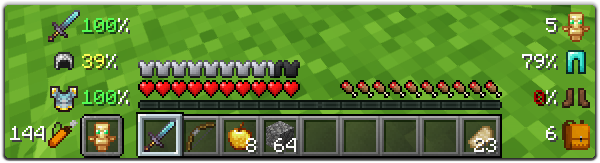
마지막으로 중요한 기능은 방어구 HUD로, 방어구와 장비의 내구도를 보여주며 인벤토리의 빈 슬롯 수와 화살 개수도 표시합니다. 이 HUD는 완전히 사용자 지정할 수 있어 크기, 피해 표시기 유형을 변경하거나 장비의 각 부분을 켜고 끌 수 있습니다.
설정에서 많은 옵션을 변경할 수 있습니다(메인 메뉴의 "Mod" 버튼을 누른 후 "Config"). 또한 각 HUD의 위치를 드래그 앤 드롭으로 간단히 변경할 수 있습니다. 게임 내 설정 화면을 열려면 키 바인드를 사용하면 됩니다(기본값은 "O").
이 모드를 더 좋게 만드는 데 도움을 주고 싶다면, 모드를 자신의 언어로 번역하여 json 파일을 저에게 보내주시면 됩니다.
원본 언어 파일은 여기에서 찾을 수 있습니다: enus.json
지원 언어
- 중국어 간체(중국 본토) (zhcn) (Satxm 님 감사합니다)
- 중국어 번체(대만) (zhtw) (yichifauzi 님 감사합니다)
- 체코어 (cscz) (Janys159 님 감사합니다)
- 영어 (enus)
- 프랑스어 (frfr) (Peperehobbits01 님 감사합니다)
- 독일어 (dede) (arrowlevel 님 감사합니다)
- 헝가리어 (huhu) (Kalmix88 님 감사합니다)
- 이탈리아어 (itit) (cranos96 님 감사합니다)
- 일본어 (jajp) (co91 님 감사합니다)
- 한국어 (kokr) (gueso-gato1355 님 감사합니다)
- 포르투갈어 - 브라질 (ptbr) (VitorLeonardo 님 감사합니다)
- 러시아어 (ruru)
- 스페인어 (eses) (Zeedif 님 감사합니다)
- 터키어 (trtr) (MefeBey 님 감사합니다)
- 우크라이나어 (ukua) (ElvisDanger 님 감사합니다)
InventoryHUD+ 설치 방법
With Millida Launcher
Install Millida Launcher
The launcher is free: download it at millida.net/launcher and sign in with any nickname.
Click “Install” on this page
The launcher opens and installs the mod for Minecraft 1.8–26.3 on Fabric, Forge or NeoForge automatically.
Launch the game
A profile with it appears in the launcher: click “Play”.
Manually
Install Fabric, Forge or NeoForge
The loader must match the game version of the mod file, for example Minecraft 26.3. After installing it, a separate profile appears in your launcher.
Download the file for your version
In the version list above, pick the file inventoryhud.forge.26.3-3.4.37.jar (231 KB) for your game version and loader.
Put it in the mods folder
The folder is inside .minecraft (Windows: %appdata%\.minecraft\mods). If it does not exist, create it.
Launch the loader profile
Open “Mods” in the main menu: InventoryHUD+ should be in the list.
InventoryHUD+ works on the player’s side only: there is no need to install it on a server.
버전
의존성 포함
| Minecraft | 로더 | 파일 | 날짜 | 작업 |
|---|---|---|---|---|
| 26.3 | Forge | 26.3231 KB 10 | ||
| 26.3 | Fabric | 26.3235 KB 35 | ||
| 26.3 | NeoForge | 26.3231 KB | ||
| 26.3 | Forge | 26.3231 KB 13 | ||
| 26.3 | Fabric | 26.3235 KB 74 | ||
| 26.3 | NeoForge | 26.3231 KB 10 | ||
| 26.2 | Forge | 26.2231 KB 7 | — | |
| 26.1 | Forge | 26.1227 KB | — |
FAQ
Which Minecraft versions does InventoryHUD+ work on?
There are files for 1.8–26.3, 14 versions in total. The newest is 26.3.
Is InventoryHUD+ for Forge or Fabric?
There are files for Fabric: 1.16.2–26.3, for Forge: 1.8–26.3 and for NeoForge: 26.3.
Does InventoryHUD+ need other mods?
The author lists no required dependencies: the Fabric, Forge or NeoForge loader is enough.
Do I need to install InventoryHUD+ on a server?
No. InventoryHUD+ works on the player’s side only: there is no need to install it on a server.
How do I download InventoryHUD+?
With Millida Launcher: it installs InventoryHUD+ into a modpack by itself, for the right game version and loader. The launcher is free.
리뷰
InventoryHUD+의 첫 평가를 남겨 보세요


