

 Fabric
 Forge
 NeoForge
 Quilt
 데이터 팩
DESCRIPTION
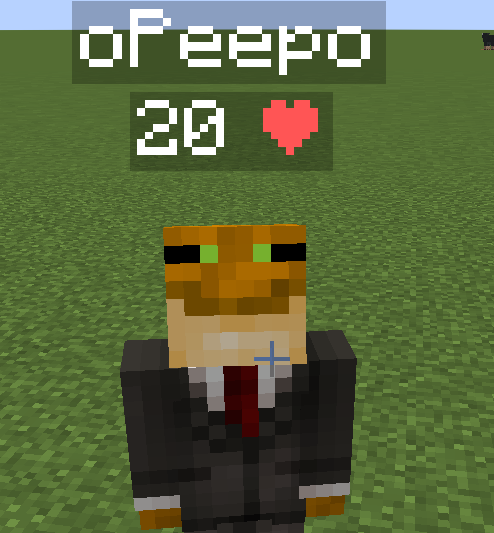
This data pack displays every player's health above their head. This can be useful on pvp servers, or any multiplayer server where you need to see other players' health for whatever reason.
INSTALLATION GUIDE
go to your saves folder located here on Windows:
C:\Users(your name)\AppData\Roaming\.minecraft\saves
put the zipped file in the data packs folder, and either restart your world or execute /reload
UNINSTALLATION GUIDE
run this command /function hp:uninstall, and then delete the data pack. Make sure to not reload (/reload or by restarting your world) after running the uninstall command until the data pack is deleted!
OTHER THINGS TO NOTE
- Keep in mind the number shown are health points and not hearts, 1 heart = 2 health points.
- this data pack only displays PLAYER health, not MOB health.
- for feedback, bug reports, or other help, join the discord server from the links section of this page!
Health Indicator 설치 방법
With Millida Launcher
Install Millida Launcher
The launcher is free: download it at millida.net/launcher and sign in with any nickname.
Click “Install” on this page
The launcher opens and installs the mod for Minecraft 1.14–26.3 on Fabric, Forge, NeoForge or Quilt automatically.
Launch the game
A profile with it appears in the launcher: click “Play”.
Manually
Install Fabric, Forge, NeoForge or Quilt
The loader must match the game version of the mod file, for example Minecraft 26.3. After installing it, a separate profile appears in your launcher.
Download the file for your version
In the version list above, pick the file health-indicator-4.jar (4 KB) for your game version and loader.
Put it in the mods folder
The folder is inside .minecraft (Windows: %appdata%\.minecraft\mods). If it does not exist, create it.
Launch the loader profile
Open “Mods” in the main menu: Health Indicator should be in the list.
On a server
A server on Fabric, Forge, NeoForge or Quilt
The mod only works on a server with the same loader and game version, for example 26.3.
File goes into the server’s mods folder
Stop the server, put the mod file into the mods folder and start the server again.
Use the “To server” button
On Millida Hosting, the button at the top of the page uploads the file to your server and restarts it for you.
버전
의존성 포함
| Minecraft | 로더 | 파일 | 날짜 | 작업 |
|---|---|---|---|---|
| 26.3 | Fabric, Forge, NeoForge, Quilt | 26.34.3 KB 97 | ||
| 26.3 | 데이터 팩 | 26.32.4 KB | ||
| 1.21.1 | Fabric, Forge, Quilt | 1.21.13.8 KB | ||
| 1.21.1 | 데이터 팩 | 1.21.11.7 KB | ||
| 1.20.6 | Fabric, Forge, Quilt | 1.20.64.2 KB | ||
| 1.20.6 | 데이터 팩 | 1.20.61.2 KB | ||
| 1.20.4 | 데이터 팩 | 1.20.41.8 KB |
FAQ
Which Minecraft versions does Health Indicator work on?
There are files for 1.14–26.3, 48 versions in total. The newest is 26.3.
Is Health Indicator for Forge or Fabric?
There are files for Fabric: 1.20.2–26.3, for Forge: 1.20.2–26.3, for NeoForge: 1.21–26.3 and for Quilt: 1.20.2–26.3.
Does Health Indicator need other mods?
The author lists no required dependencies: the Fabric, Forge, NeoForge or Quilt loader is enough.
Does Health Indicator work on a server?
Yes. Health Indicator works both in singleplayer and on a server.
Where can I download Health Indicator safely?
On this page: the file health-indicator-4.jar (4 KB) is stored on Millida’s server, with no link shorteners. SHA-1 checksum: b1bafb42f2e52e8d7b29f504f0052657f0bb66ea.
리뷰
Health Indicator의 첫 평가를 남겨 보세요


