

 NeoForge
 Forge
 Fabric
 Quilt
Flopper 모드 정보
이 모드는 Cyclops Core 라이브러리가 필요합니다!
Cyclops Discord 서버의 flopper 채널에서 저희와 이야기해 보세요!
초반 게임에서 유체를 옮기느라 너무 오래 고생했어요... 여기 Flopper, 즉 유체 호퍼가 있습니다!
Flopper는 Hopper가 아이템을 옮기듯 유체를 옮기는 초반 게임용 블록입니다. 위쪽(탱크 또는 세계)에서 유체를 받아 목표 방향(탱크 또는 세계)으로 밀어낼 수 있습니다.
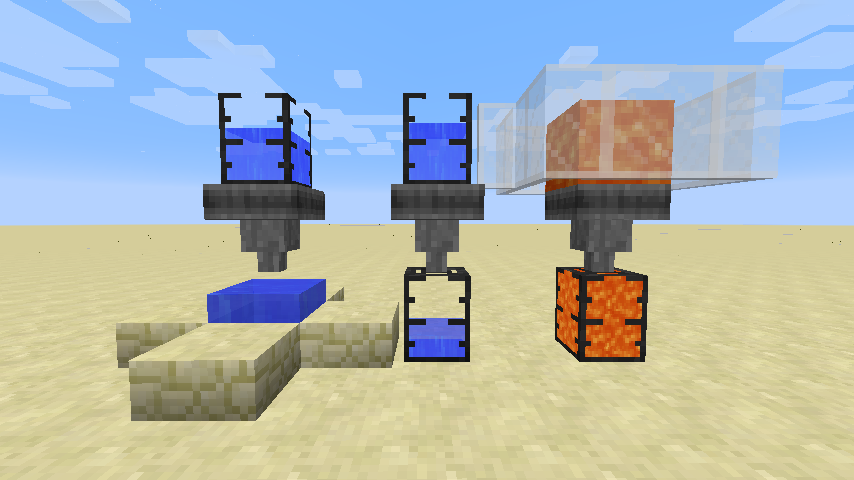
탱크는 항상 세계와의 상호작용보다 우선됩니다.
참고: 탱크는 이 모드에 포함되어 있지 않으며, EvilCraft의 Dark Tank입니다.
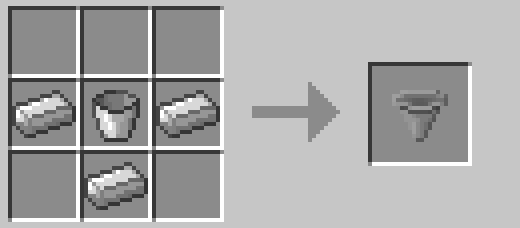
간단한 초반 게임용 조합법입니다.
이 블록에는 GUI가 없습니다. 어차피 GUI가 누구에게 필요하겠어요? 대신 블록을 우클릭하면 내용물을 표시할 수 있습니다. 담긴 유체도 동적으로 렌더링됩니다(비활성화 가능). 또한 우클릭으로 어떤 유체 탱크 아이템에서든 유체를 넣거나, Shift+우클릭으로 추출할 수 있습니다.
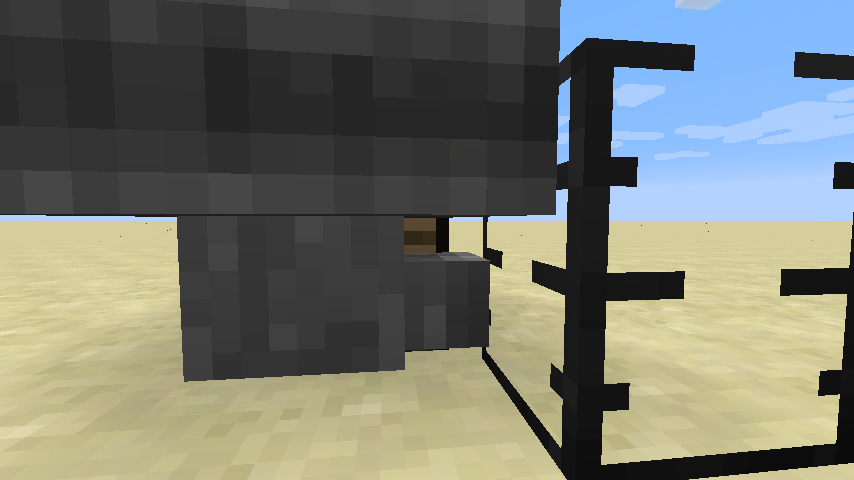
그리고 네, Flopper에는 뒤에 있는 블록을 클릭할 수 있게 해주는 적절한 충돌 상자가 있습니다.
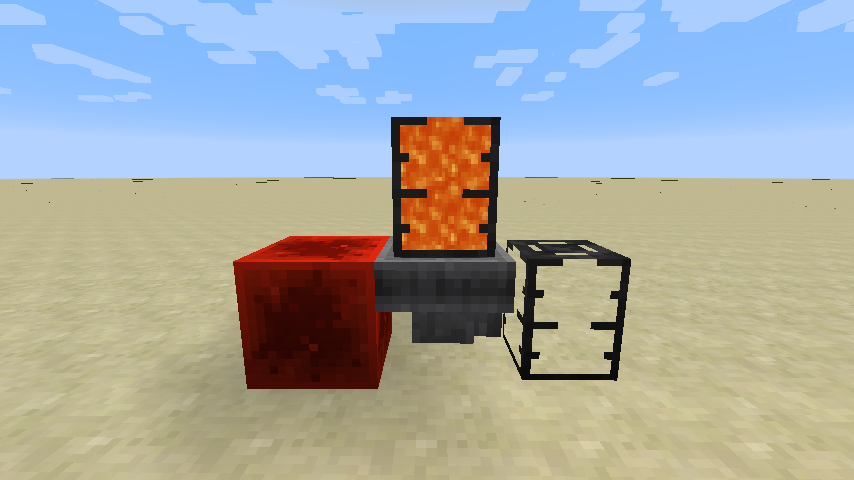
일반 Hopper와 마찬가지로 레드스톤 신호로 비활성화할 수 있습니다.
입력 유체 속도부터 세계와의 상호작용 쿨다운 시간까지 모든 것이 이 모드에서 설정 가능합니다! 다음은 설정 파일의 일부입니다:
machine { The maximum capacity in mB. I:flopper.capacityMb=5000 If the collision boxes should be made smaller to allow clicking behind the flopper. B:flopper.narrowCollision=true The rate at which fluids can be pulled from other tanks. I:flopper.pullFluidRate=100 If fluids should be pulled from the world. B:flopper.pullFluidsWorld=true The rate at which fluids can be pushed to other tanks. I:flopper.pushFluidRate=100 If fluids should be pushed into the world. B:flopper.pushFluidsWorld=true If the contained fluid should be rendered. B:flopper.renderFluid=true The number of ticks each flopper should sleep after interacting with tanks I:flopper.workCooldown=8 The number of ticks each flopper should sleep after picking up or placing fluids. I:flopper.workWorldCooldown=20 If neighbour-change events should be triggered when placing or picking up fluids to/from the world. B:flopper.worldPullPushNeighbourEvents=true If sounds should be placed when placing or picking up fluids to/from the world. B:flopper.worldPullPushSounds=true }
이 모드는 1.12 이전의 Funnels 모드에서 영감을 받았습니다.
이 모드는 익명화된 시작 데이터를 수집하며, 이는 설정 파일에서 비활성화할 수 있고 Minecraft의 snooper 설정을 따릅니다.

Bisect Hosting에서 서버를 임대할 때 추천 코드 cyclops를 사용해 저희를 지원하고 첫 달 25% 할인을 받으세요!
이 모드가 마음에 드신다면 Patreon에서 저를 후원해 주시면 감사하겠습니다!
Flopper 설치 방법
With Millida Launcher
Install Millida Launcher
The launcher is free: download it at millida.net/launcher and sign in with any nickname.
Click “Install” on this page
The launcher opens and installs the mod for Minecraft 1.12.2–26.3 on Fabric, Forge, NeoForge or Quilt automatically.
Launch the game
A profile with it appears in the launcher: click “Play”.
Manually
Install Fabric, Forge, NeoForge or Quilt
The loader must match the game version of the mod file, for example Minecraft 26.3. After installing it, a separate profile appears in your launcher.
Download the file for your version
In the version list above, pick the file flopper-26.3-neoforge-1.1.9-257.jar (59 KB) for your game version and loader.
Put it in the mods folder
The folder is inside .minecraft (Windows: %appdata%\.minecraft\mods). If it does not exist, create it.
Launch the loader profile
Open “Mods” in the main menu: Flopper should be in the list.
버전
의존성 포함
| Minecraft | 로더 | 파일 | 날짜 | 작업 |
|---|---|---|---|---|
| 26.3 | NeoForge | flopper-26.3-neoforge-1.1.9-257.jar59 KB | ||
| 26.3 | Forge | flopper-26.3-forge-1.1.9-257.jar55.2 KB 1 | ||
| 26.3 | Fabric, Quilt | flopper-26.3-fabric-1.1.9-257.jar61 KB 2 | ||
| 26.1.2 | Fabric, Quilt | flopper-26.1.2-fabric-1.1.9.jar60.7 KB | ||
| 26.1.2 | NeoForge | flopper-26.1.2-neoforge-1.1.9.jar59.3 KB | ||
| 26.1.2 | Forge | flopper-26.1.2-forge-1.1.9.jar55.5 KB | ||
| 1.12.2 | — | Flopper-1.12.2-1.0.2.jar37.5 KB |
FAQ
Which Minecraft versions does Flopper work on?
There are files for 26.3, 26.1.2, 1.12.2. The newest is 26.3.
Is Flopper for Forge or Fabric?
There are files for Fabric: 26.1.2–26.3, for Forge: 26.1.2–26.3, for NeoForge: 26.1.2–26.3 and for Quilt: 26.1.2–26.3.
Does Flopper need other mods?
The author lists no required dependencies: the Fabric, Forge, NeoForge or Quilt loader is enough.
Where can I download Flopper safely?
On this page: the file flopper-26.3-neoforge-1.1.9-257.jar (59 KB) is stored on Millida’s server, with no link shorteners. SHA-1 checksum: 0e87dfccad8ccc0dcb23a0c1603176ede86f0e9b.
리뷰
Flopper의 첫 평가를 남겨 보세요


