
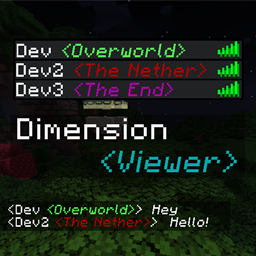
Minecraft 1.21.1, 1.21용 Dimension Viewer 모드
탭 목록에서 각 플레이어가 현재 어느 차원에 있는지 볼 수 있는 고도로 커스터마이징 가능한 서버 측 모드입니다.
 Fabric
 Forge
Forge NeoForge
Dimension Viewer
A highly customizable server-side Minecraft mod for viewing what dimension players are currently in from the tab list.
Now supporting Fabric, Forge & NeoForge!
Fabric version requires Fabric API (CurseForge or Modrinth)
Compatibility
Dimension Viewer should be compatible with all dimensions. There may be some cases where the mod name shown on hover is not formatted correctly due to the use of the modid to get which mod a dimension is from.
Mods that make changes to the tab list name format (or even the regular display name) will likely cause issues with this mod but at the moment I cannot think of any to test with. If you find any issues, please leave an issue! Thank you!
Features
Modded dimensions can now be coloured independently.
New in version 1.4.0
Dimension names can now be aliased to something else, allowing you to modify the name displayed per dimension.
New in version 2.1.0
Configure the mod without touching the config file with slash commands!
Configuration
By modifying the config file, you can change the colour of the text on a per-dimension basis, allow showing the dimension in chat messages and change the overall format of the dimension with the ability to use Minecraft text formatting such as underlining, bold and italic fonts.
The config file is located in [Server Folder]/config/dimensionviewer-common.toml for (Neo)Forge or [Server Folder]/config/dimensionviewer.json for Fabric.
Any changes made will be applied as soon as the config file is saved.
CurseForge did not like how this section was formatted so check out the Github page for how the mod should be configured instead!
Dimension Viewer 설치 방법
With Millida Launcher
Install Millida Launcher
The launcher is free: download it at millida.net/launcher and sign in with any nickname.
Click “Install” on this page
The launcher opens and installs the mod for Minecraft 1.21–1.21.4 on Fabric, Forge or NeoForge automatically.
Launch the game
A profile with it appears in the launcher: click “Play”.
Manually
Install Fabric, Forge or NeoForge
The loader must match the game version of the mod file, for example Minecraft 1.21.4. After installing it, a separate profile appears in your launcher.
Download the file for your version
In the version list above, pick the file dimensionviewer-fabric-1.21-2.2.1.jar (219 KB) for your game version and loader.
Put it in the mods folder
The folder is inside .minecraft (Windows: %appdata%\.minecraft\mods). If it does not exist, create it.
Launch the loader profile
Open “Mods” in the main menu: Dimension Viewer should be in the list.
Minecraft 1.21.4 runs on Java 21: with a different Java version the game may close right after launch.
버전
의존성 포함
| Minecraft | 로더 | 파일 | 날짜 | 작업 |
|---|---|---|---|---|
| 1.21 | Fabric | [1.21-1.21.4 Fabric] Dimension Viewer (2.2.1)219 KB | ||
| 1.21 | Forge | [1.21-1.21.4 Forge] Dimension Viewer (2.2.1)217 KB 1 | ||
| 1.21 | NeoForge | [1.21-1.21.4 NeoForge] Dimension Viewer (2.2.1)218 KB | ||
| 1.21 | Forge | [1.21] Dimension Viewer (1.4.0)197 KB | ||
| 1.21 | NeoForge | [1.21 NeoForge] Dimension Viewer (1.4.0)197 KB |
리뷰
Dimension Viewer의 첫 평가를 남겨 보세요


