
Minecraft 1.12.2, 1.19.2용 Damage Tilt 모드
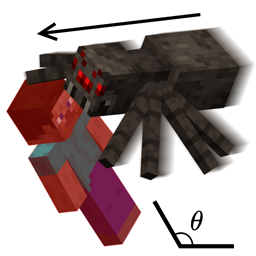
피해를 받은 방향으로 카메라를 기울입니다. 1.2.5 기능을 복원했습니다.
 Forge
Forge Fabric
Damage Tilt 모드 정보
Damage Tilt
Minecraft versions 1.19.4 and later do not need this mod!
Available for Forge and Fabric 1.14 - 1.19!
Also available for Forge 1.7.10, 1.8.9, 1.12.2
Click the spoiler box for download links!
Supported Minecraft Versions:
(Forge) 1.7.10 1.8.9 1.12.2 1.14.x 1.15.x 1.16.x 1.17.x 1.18.x 1.19.x
(Fabric) 1.14.x 1.15.x 1.16.x 1.17.x 1.18.x 1.19.x
Client Only Versions (for playing on servers without the mod)
(Forge) 1.8.9
Restores a long forgotten Minecraft feature: Damage Tilt!
Back in Minecraft 1.2.5, when you took damage, your camera angle would tilt in the direction of the damage.
This helped you figure out where the damage was coming from quickly (it's also a cool looking effect).
This mod restores that feature, as it was broken in the Minecraft 1.3.1 update many years ago.
The mod needs to be on both server and client to work.
Here's a quick demonstration video.
"Before" is without the mod: You can see the angle only tilts left or right.
"After" is with the mod: You can see the angle tilts in many different angles depending on where you get hit.
Here's a longer explanation / demonstration video by Shivaxi
Damage Tilt 설치 방법
With Millida Launcher
Install Millida Launcher
The launcher is free: download it at millida.net/launcher and sign in with any nickname.
Click “Install” on this page
The launcher opens and installs the mod for Minecraft 1.8.9–1.19.3 on Fabric or Forge automatically.
Launch the game
A profile with it appears in the launcher: click “Play”.
Manually
Install Fabric or Forge
The loader must match the game version of the mod file, for example Minecraft 1.19.3. After installing it, a separate profile appears in your launcher.
Download the file for your version
In the version list above, pick the file DamageTilt-1.19-forge-0.1.2.jar (9 KB) for your game version and loader.
Put it in the mods folder
The folder is inside .minecraft (Windows: %appdata%\.minecraft\mods). If it does not exist, create it.
Launch the loader profile
Open “Mods” in the main menu: Damage Tilt should be in the list.
Minecraft 1.19.3 runs on Java 17: with a different Java version the game may close right after launch.
버전
의존성 포함
| Minecraft | 로더 | 파일 | 날짜 | 작업 |
|---|---|---|---|---|
| 1.19.3 | Forge | DamageTilt-1.19-forge-0.1.2.jar9.4 KB | ||
| 1.19.3 | Fabric | DamageTilt-1.19-fabric-0.1.2.jar28.8 KB | ||
| 1.8.9 | — | DamageTilt-1.8.9-0.2.0-clientonly.jar19.4 KB | ||
| 1.12.2 | — | DamageTilt-1.12.2-0.1.0.jar8.4 KB |
FAQ
Which Minecraft versions does Damage Tilt work on?
There are files for 1.19.3, 1.19.2, 1.19.1, 1.19, 1.12.2, 1.8.9. The newest is 1.19.3.
Is Damage Tilt for Forge or Fabric?
There are files for Fabric: 1.19–1.19.3 and for Forge: 1.19–1.19.3. There are no files for NeoForge: a mod for another loader will not start.
Does Damage Tilt need other mods?
The author lists no required dependencies: the Fabric or Forge loader is enough.
Which Java does Damage Tilt need?
Minecraft 1.19.3 runs on Java 17. If the game closes right after launch, the usual cause is the wrong Java version in the profile settings.
Where can I download Damage Tilt safely?
On this page: the file DamageTilt-1.19-forge-0.1.2.jar (9 KB) is stored on Millida’s server, with no link shorteners. SHA-1 checksum: e338b4baba11111c58e0ef887b6a8c97bfa9a4d6.
리뷰
Damage Tilt의 첫 평가를 남겨 보세요


