

Minecraft 1.20.1용 Create Planetary Tweaks 모드
Create Planetary 모드팩을 위한 아이템과 조정을 추가합니다
 NeoForge
 Forge
ForgeCreate Planetary Tweaks 모드 정보
Features might come and go depending on changes needed for my modpack.
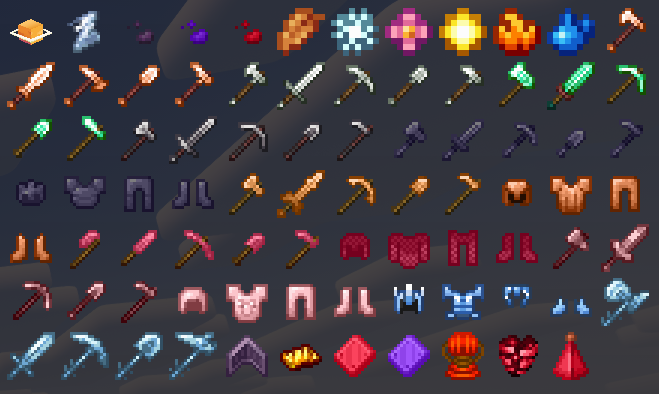
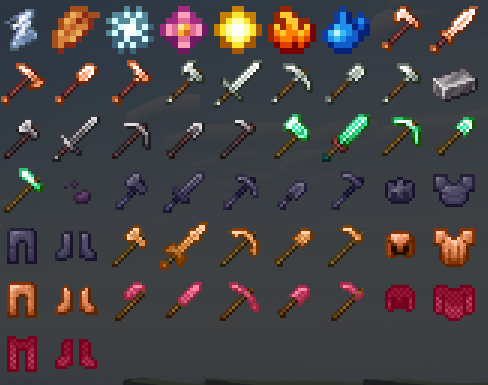
Latest version of the mod adds:
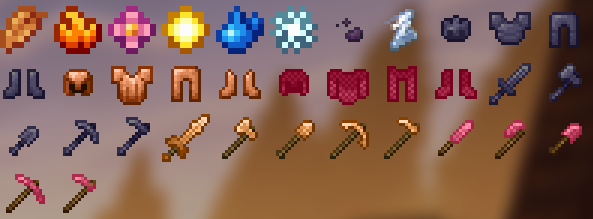
- Brass and Zinc Tools (does not add the ingot itself, recipes and items will only load if Create is loaded and Create Stuff Additions is not)
- Copper Tools (recipes and items will only load if Create Stuff Additions is not loaded)
- Void Worm Armor & Tools (recipes and items will only load if Create & Alex's Mobs is loaded)
- Desh, Calorite, Ostrum Armor & Tools (does not add the ingot itself, recipes and items will only load if Ad Astra is loaded)
- Unstable Ice Shard (recipes and items will only load if Create & Ad Astra is loaded)
- Serene Seasons season items for patchouli book usage (recipes and items will only load if Serene Seasons is loaded)
More things have been added in the latest patches, but I am too lazy to write them all down in detailed form. I recommend downloading to see. New armor and Tools were added, same for items for recipes, and tooltips
seo related:
cptweaks
cp tweaks
cp_tweaks
cp-teaks
planetary tweaks
Create Planetary Tweaks 설치 방법
With Millida Launcher
Install Millida Launcher
The launcher is free: download it at millida.net/launcher and sign in with any nickname.
Click “Install” on this page
The launcher opens and installs the mod for Minecraft 1.20.1 on Forge or NeoForge automatically.
Launch the game
A profile with it appears in the launcher: click “Play”.
Manually
Install Forge or NeoForge
The loader must match the game version of the mod file, for example Minecraft 1.20.1. After installing it, a separate profile appears in your launcher.
Download the file for your version
In the version list above, pick the file cp_tweaks-neoforge-1.20.1-1.1.0.jar (398 KB) for your game version and loader.
Put it in the mods folder
The folder is inside .minecraft (Windows: %appdata%\.minecraft\mods). If it does not exist, create it.
Launch the loader profile
Open “Mods” in the main menu: Create Planetary Tweaks should be in the list.
Minecraft 1.20.1 runs on Java 17: with a different Java version the game may close right after launch.
버전
의존성 포함
| Minecraft | 로더 | 파일 | 날짜 | 작업 |
|---|---|---|---|---|
| 1.20.1 | NeoForge | cp_tweaks-neoforge-1.20.1-1.1.0398 KB | ||
| 1.20.1 | Forge | cp_tweaks-forge-1.20.1-1.0.21.jar406 KB 3 |
FAQ
Which Minecraft versions does Create Planetary Tweaks work on?
Only Minecraft 1.20.1: there are no files for other versions.
Is Create Planetary Tweaks for Forge or Fabric?
There are files for Forge: 1.20.1 and for NeoForge: 1.20.1. There are no files for Fabric: a mod for another loader will not start.
Does Create Planetary Tweaks need other mods?
The author lists no required dependencies: the Forge or NeoForge loader is enough.
Which Java does Create Planetary Tweaks need?
Minecraft 1.20.1 runs on Java 17. If the game closes right after launch, the usual cause is the wrong Java version in the profile settings.
Where can I download Create Planetary Tweaks safely?
On this page: the file cp_tweaks-neoforge-1.20.1-1.1.0.jar (398 KB) is stored on Millida’s server, with no link shorteners. SHA-1 checksum: b00effe8c47876059e7fea213f8b47173a617862.
리뷰
Create Planetary Tweaks의 첫 평가를 남겨 보세요


