

Minecraft 1.21.1, 1.21.10용 Clean Tooltips 모드
깔끔하고 일관된 모습을 만들어 툴팁을 개선합니다! 내구도 툴팁 및 기타!
 Fabric
 NeoForge
Clean Tooltips
Ever felt like the default tooltips could be fancied up a bit? Then this is exactly what you're looking for.
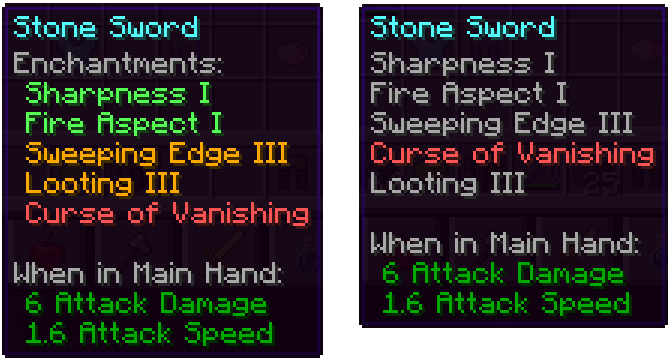
Mainly the mod overhauls the way enchantments get displayed in the tooltip:
- they now have their own "Enchantents:" subcategory
- color coding to easier tell apart good enchantments (green) and curses (red)
- max level enchantments will be displayed in gold
- curses are always ordered at the bottom of the list
With the mod installed: Without the mod installed (Vanila):
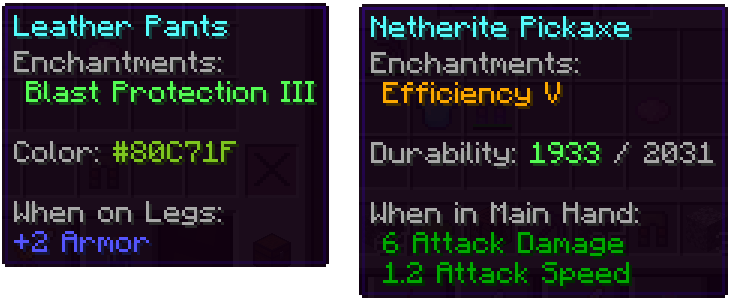
Besides that, other parts got also improved:
- the color line on dyed items now actually shows the used color
- damaged items show their remaining durability in the tooltip
We have many more ideas on how tooltips could be improved for future updates. Besides adding new features, the next updates will also add many configurability options.

Clean Tooltips 설치 방법
With Millida Launcher
Install Millida Launcher
The launcher is free: download it at millida.net/launcher and sign in with any nickname.
Click “Install” on this page
The launcher opens and installs the mod for Minecraft 1.21.1–1.21.10 on Fabric or NeoForge automatically, together with its dependencies: Forge Config API Port.
Launch the game
A profile with it appears in the launcher: click “Play”.
Manually
Install Fabric or NeoForge
The loader must match the game version of the mod file, for example Minecraft 1.21.10. After installing it, a separate profile appears in your launcher.
Download the file for your version
In the version list above, pick the file clean_tooltips-1.1-fabric-1.21.10.jar (23 KB) for your game version and loader.
Put it in the mods folder
The folder is inside .minecraft (Windows: %appdata%\.minecraft\mods). If it does not exist, create it. Required dependencies go there too: Forge Config API Port.
Launch the loader profile
Open “Mods” in the main menu: Clean Tooltips should be in the list.
Clean Tooltips works on the player’s side only: there is no need to install it on a server.
Minecraft 1.21.10 runs on Java 21: with a different Java version the game may close right after launch.
버전
의존성 포함
| Minecraft | 로더 | 파일 | 날짜 | 작업 |
|---|---|---|---|---|
| 1.21.10 | Fabric | 1.21.1023.1 KB | ||
| 1.21.10 | NeoForge | 1.21.1024.4 KB | ||
| 1.21.7 | NeoForge | 1.21.724.5 KB | ||
| 1.21.7 | Fabric | 1.21.723.1 KB | ||
| 1.21.1 | Fabric | 1.21.122.7 KB | ||
| 1.21.1 | NeoForge | 1.21.124.1 KB | ||
| 1.21.1 | Fabric | 1.21.122.5 KB | ||
| 1.21.1 | NeoForge | 1.21.123.9 KB |
실행에 필요한 것
리뷰
Clean Tooltips의 첫 평가를 남겨 보세요


