
- 조회수
- 9 조회수
- 업데이트됨
- 업데이트됨 18.10.2026
- 1.20.1
 Fabric
Deprecated
This project page is now deprecated. Fabric versions for Minecraft 1.20.4+ can be downloaded from the main project page. This page will stay available for modpacks and legacy versions.



📖 About:
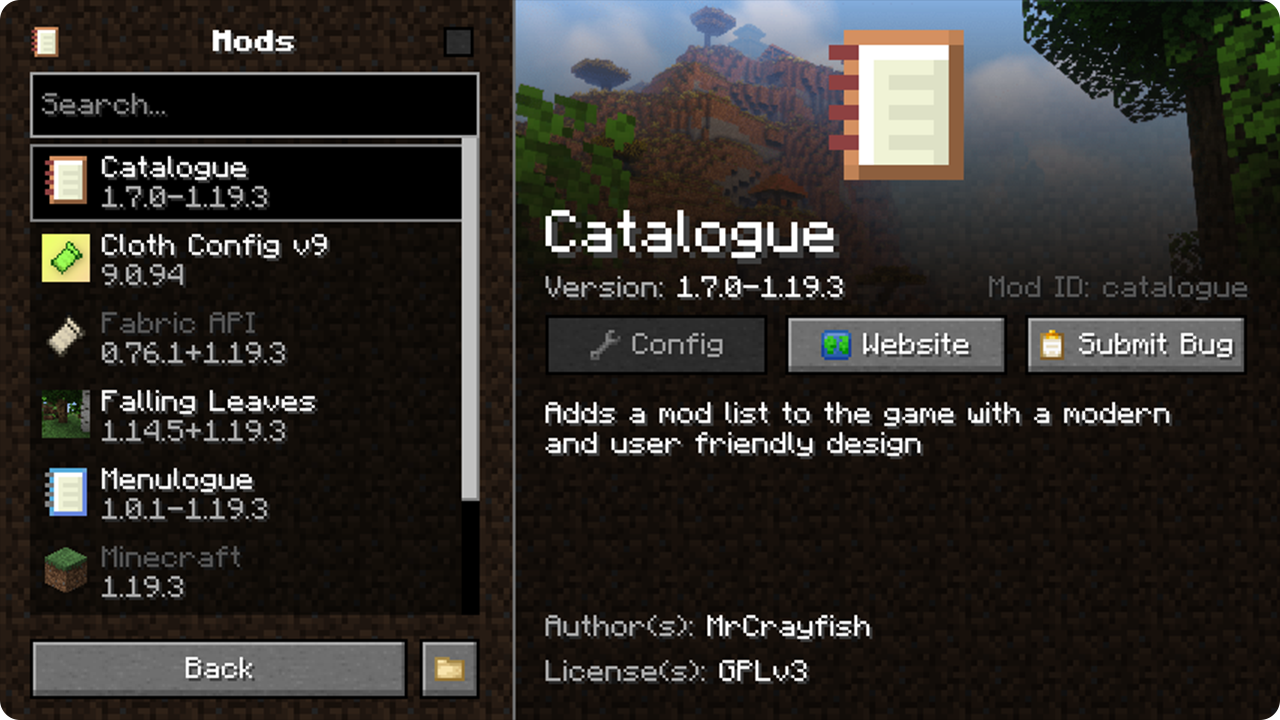
Catalogue for Fabric is a port of the original mod but has been modified and adapted specifically for Fabric. Catalogue provides a menu that displays a list of all mods installed, which can be accessed from the main menu or in-game. The new menu makes it easier to search installed mods, submit bugs and see relevant mod information. Since Catalogue is also available for Forge, this mod allows you to have a consistent experience regardless of the mod loader. Catalogue features a non-intrusive API for developers to open a configuration screen for their mod or even provide them for other mods.
🔧 If want to add support for Mod Menu's config entrypoint, install

Menulogue
📦 Developers:
Catalogue uses the icon definined in your fabric.mod.json as the icon shown next to your mod in the list, which means your mod is likely already supported. However Catalogue has a few extended options if you would like to further customise the branding for your mod and specify a config screen. Catalogue uses a non-intrusive API, which means you do not even need to include it in your workspace or even depend on the mod. To learn more about the features of the API, see the developer help page.
📷 Screenshots:
🙋‍♀️ Need Support or Want to Follow Mod Development:
The comment section isn't great for support, which is why MrCrayfish recommends you join the

Discord community. You can get help installing and configuring mods, resolving crashes and more! Plus you'll also get access to news about mod updates and development (before anywhere else!). Click the banner below to join 🔽

Catalogue (Fabric) 설치 방법
With Millida Launcher
Install Millida Launcher
The launcher is free: download it at millida.net/launcher and sign in with any nickname.
Click “Install” on this page
The launcher opens and installs the mod for Minecraft 1.20.1 on Fabric automatically.
Launch the game
A profile with it appears in the launcher: click “Play”.
Manually
Install Fabric
The loader must match the game version of the mod file, for example Minecraft 1.20.1. After installing it, a separate profile appears in your launcher.
Download the file for your version
In the version list above, pick the file catalogue-fabric-1.20.1-1.8.0.jar (234 KB) for your game version.
Put it in the mods folder
The folder is inside .minecraft (Windows: %appdata%\.minecraft\mods). If it does not exist, create it.
Launch the loader profile
Open “Mods” in the main menu: Catalogue (Fabric) should be in the list.
Minecraft 1.20.1 runs on Java 17: with a different Java version the game may close right after launch.
버전
의존성 포함
| Minecraft | 로더 | 파일 | 날짜 | 작업 |
|---|---|---|---|---|
| 1.20.1 | Fabric | Catalogue 1.8.0234 KB |
FAQ
Which Minecraft versions does Catalogue (Fabric) work on?
Only Minecraft 1.20.1: there are no files for other versions.
Is Catalogue (Fabric) for Forge or Fabric?
Only for Fabric: 1.20.1. There are no files for Forge or NeoForge: a mod for another loader will not start.
Does Catalogue (Fabric) need other mods?
The author lists no required dependencies: the Fabric loader is enough.
Which Java does Catalogue (Fabric) need?
Minecraft 1.20.1 runs on Java 17. If the game closes right after launch, the usual cause is the wrong Java version in the profile settings.
Where can I download Catalogue (Fabric) safely?
On this page: the file catalogue-fabric-1.20.1-1.8.0.jar (234 KB) is stored on Millida’s server, with no link shorteners. SHA-1 checksum: b36cf65a0e250e0e805f01c460cbb770398babca.
리뷰
Catalogue (Fabric)의 첫 평가를 남겨 보세요


