
Minecraft 26.3용 All Loot Drops 모드
👝 살아있는 엔티티가 가능한 모든 전리품을 설정 가능한 양으로 떨어뜨리며, 약탈 마법이 지원됩니다.
 Fabric
 Forge
Forge NeoForge
 Quilt
QuiltAll Loot Drops 모드 정보
All Loot Drops is a minimalistic mod that has entities always drop all their possible loot in a configurable amount. All loot drops are procedurally generated on first load, so every modded entity that has a loot table is compatible. There are config options to change the amount of loot that drops and if the looting enchant should have an effect.
All available config options:
keepOriginalLootQuantityIfHigher default true If for example Iron Golems drop more iron than the default lootQuantity setting, keep that original amount instead of nerfing it.
lootQuantity default 1, min 1, max 128 Determines the amount of loot dropped by each mob.
lootingEnchantAffectsQuantity default true If enabled, the looting enchant has a chance to increase the quantity of loot dropped. Per level a roll is done with the chance from 'lootingEnchantExtraQuantityChancePerLevel'. If the roll succeeds, 1 is added to the loot amount.
lootingEnchantExtraQuantityChance default 0.5, min 0, max 1.0 The chance a roll succeeds in adding 1 to the total loot amount.
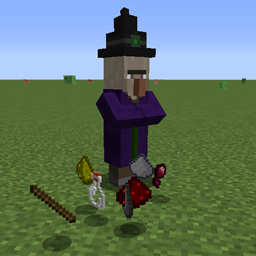
Simply Explained By default a Witch has the following drop table: Glass bottles (12.5% chance), Glowstone dust (12.5% chance), Gunpowder (12.5% chance), Redstone (12.5% chance), Spider eyes (12.5% chance), Sugar (12.5% chance) and Sticks (25% chance). With the mod enabled, you'll always receive lootQuantity amount of each whenever the entity drops its loot. If the sword used to kill the entity has the looting enchant, for each level it has lootingEnchantExtraQuantityChance to increase the amount with 1.
You may freely use this mod in any modpack, as long as the download remains hosted within the CurseForge or Modrinth ecosystem.
Serilum.com contains an overview and more information on all mods available.
Comments are disabled as I'm unable to keep track of them across so many separate mod pages. For issues, ideas, suggestions or anything else there is the Github repo. Thanks!
All Loot Drops 설치 방법
With Millida Launcher
Install Millida Launcher
The launcher is free: download it at millida.net/launcher and sign in with any nickname.
Click “Install” on this page
The launcher opens and installs the mod for Minecraft 1.19.3–26.3 on Fabric, Forge, NeoForge or Quilt automatically.
Launch the game
A profile with it appears in the launcher: click “Play”.
Manually
Install Fabric, Forge, NeoForge or Quilt
The loader must match the game version of the mod file, for example Minecraft 26.3. After installing it, a separate profile appears in your launcher.
Download the file for your version
In the version list above, pick the file alllootdrops-26.3.0-3.6.jar (47 KB) for your game version and loader.
Put it in the mods folder
The folder is inside .minecraft (Windows: %appdata%\.minecraft\mods). If it does not exist, create it.
Launch the loader profile
Open “Mods” in the main menu: All Loot Drops should be in the list.
버전
의존성 포함
| Minecraft | 로더 | 파일 | 날짜 | 작업 |
|---|---|---|---|---|
| 26.3 | Fabric, Forge, NeoForge, Quilt | [Fabric/Forge/Neo] 26.3.0-3.6 | All Loot Drops46.8 KB | ||
| 1.19.3 | Forge | alllootdrops_1.19.3-2.6.jar9.5 KB |
FAQ
Which Minecraft versions does All Loot Drops work on?
There are files for 26.3, 1.19.3. The newest is 26.3.
Is All Loot Drops for Forge or Fabric?
There are files for Fabric: 26.3, for Forge: 1.19.3–26.3, for NeoForge: 26.3 and for Quilt: 26.3.
Does All Loot Drops need other mods?
The author lists no required dependencies: the Fabric, Forge, NeoForge or Quilt loader is enough.
Where can I download All Loot Drops safely?
On this page: the file alllootdrops-26.3.0-3.6.jar (47 KB) is stored on Millida’s server, with no link shorteners. SHA-1 checksum: 72936ba68e51b123b32caccb3ed94d7a8c162e48.
리뷰
All Loot Drops의 첫 평가를 남겨 보세요


