

- 조회수
- 16 조회수
- 업데이트됨
- 업데이트됨 18.10.2026
- 1.19.2
 Forge
Forge
Ad Tetra! 모드 정보
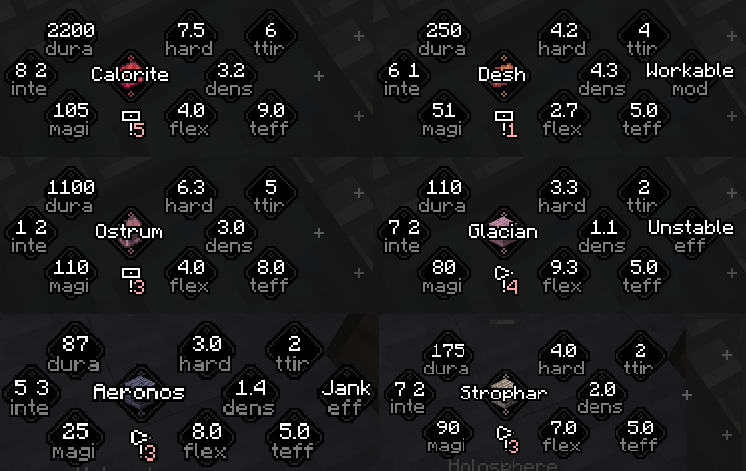
Tetra와 Ad Astra 사이의 호환성을 추가합니다! Ad Astra의 금속과 목재를 Tetra 도구로 만들 수 있게 해줍니다
질문? 의견? 궁금한 점? 디스코드에 참여해서 이야기해 보세요
Ad Tetra! 설치 방법
With Millida Launcher
Install Millida Launcher
The launcher is free: download it at millida.net/launcher and sign in with any nickname.
Click “Install” on this page
The launcher opens and installs the mod for Minecraft 1.19.2 on Forge automatically.
Launch the game
A profile with it appears in the launcher: click “Play”.
Manually
Install Forge
The loader must match the game version of the mod file, for example Minecraft 1.19.2. After installing it, a separate profile appears in your launcher.
Download the file for your version
In the version list above, pick the file adtetra-2.1.0 - 1.19.2.jar (7 KB) for your game version.
Put it in the mods folder
The folder is inside .minecraft (Windows: %appdata%\.minecraft\mods). If it does not exist, create it.
Launch the loader profile
Open “Mods” in the main menu: Ad Tetra! should be in the list.
Minecraft 1.19.2 runs on Java 17: with a different Java version the game may close right after launch.
버전
의존성 포함
| Minecraft | 로더 | 파일 | 날짜 | 작업 |
|---|---|---|---|---|
| 1.19.2 | Forge | adtetra-2.1.0 - 1.19.2.jar6.6 KB |
FAQ
Which Minecraft versions does Ad Tetra! work on?
Only Minecraft 1.19.2: there are no files for other versions.
Is Ad Tetra! for Forge or Fabric?
Only for Forge: 1.19.2. There are no files for Fabric or NeoForge: a mod for another loader will not start.
Does Ad Tetra! need other mods?
The author lists no required dependencies: the Forge loader is enough.
Which Java does Ad Tetra! need?
Minecraft 1.19.2 runs on Java 17. If the game closes right after launch, the usual cause is the wrong Java version in the profile settings.
Where can I download Ad Tetra! safely?
On this page: the file adtetra-2.1.0 - 1.19.2.jar (7 KB) is stored on Millida’s server, with no link shorteners. SHA-1 checksum: f6f8de2c1a2d5eb8cdb5abc52296c4bc8eef42cb.
리뷰
Ad Tetra!의 첫 평가를 남겨 보세요


