

Description
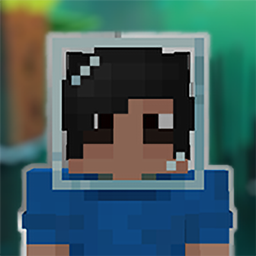
Wearable Items+ is a Data Pack/Mod that makes possible to wear a list of items/block on your helmet slot fully in survival mode through a simple craft recipe.
Important notes
- Do not put your block on ground if is placeable or it will lose its properties
- If you remove the data pack, the items already made will NOT lose its properties
- No Resource Packs needed
- Only works in 1.21.2 or above
- Only the basic Decorated Pot works
- Mod version available on Modrinth (link down below)
How it works
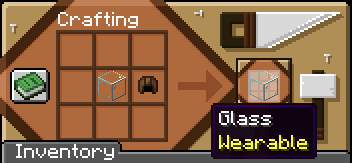
You only need to choose your item on the list below and put it on a craft grid with a leather cap (helmet) being a shapeless craft. After that, the item should show a "Wearable" tag.
Items list (Go images to see the items)
GENERAL (47)
- Amethyst Bud [all sizes]
- Amethyst Cluster
- Anvil [any durability]
- Azalea
- Barrel
- Big Dripleaf
- Bone
- Bush
- Cactus Flower
- Chest
- Cod
- Composter
- Crafter
- Decorated Pot
- Dispenser
- Dragon Egg
- Dropper
- Emerald
- End Rod
- Ender Chest
- Feather
- Firefly Bush
- Flowering Azalea
- Ghast Tear
- Gold Nugget
- Honey block
- Ice
- Iron Nugget
- Jack o'Lantern
- Lead
- Lightning Rod
- Mangrove Propagule
- Mangrove Roots
- Nether Star
- Observer
- Pointed Dripstone
- Respawn Anchor
- Restone Torch
- Scaffolding
- Slime Block
- Spore Blossom
- Spyglass
- Sunflower
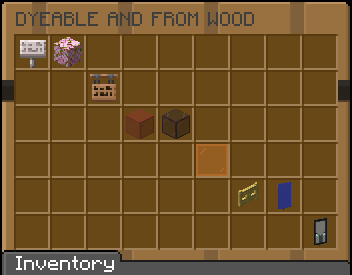
DYEABLE AND FROM WOOD (99)
- Sign [all woodtype]
- Leaves [all types]
- Hanging Sign [all woodtype]
- Glass [all colors + Tinted Glass]
- Glass Pane [all colors]
- Fence Gate [all woodtype]
- Banners [all colors + Ominous Banner]
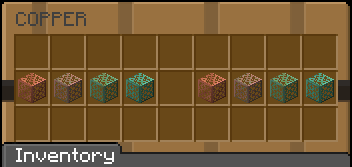
COPPER (8)
- Copper Grate [all oxidized and waxed stages]
CREATIVE EXCLUSIVES (3)
- Monster Spawner
- Trial Spawner
- Vault
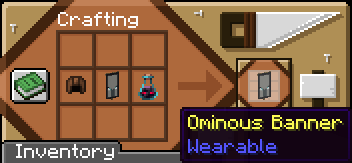
Ominous Banner
Ominous Banner is the only item that needs an additional item to craft, it being a Ominous Bottle of any level.
See More:
MODRINTH
PLANET MINECRAFT
Wearable Items+ 설치 방법
With Millida Launcher
Install Millida Launcher
The launcher is free: download it at millida.net/launcher and sign in with any nickname.
Click “Install” on this page
The launcher opens and installs the data pack for Minecraft 1.21.9–26.1.2 automatically.
Launch the game
A profile with it appears in the launcher: click “Play”.
Manually
Download the archive
Pick the file Wearable_Items+_1.21.9-26.1.zip (160 KB) for your game version.
New world: “Data Packs”
When creating a world, click “Data Packs”, drag the archive into the window, then move it to “Selected”.
Existing world: the datapacks folder
Put the archive into saves/<world>/datapacks and type /reload in game.
On a server
Archive goes into the server world’s datapacks
The world/datapacks folder on the server; players do not need to install anything.
Reload the data
Type /reload in the server console or restart the server.
Use the “To server” button
On Millida Hosting, the button at the top of the page uploads the file to your server and restarts it for you.
버전
의존성 포함
| Minecraft | 로더 | 파일 | 날짜 | 작업 |
|---|---|---|---|---|
| 1.21.9 | — | Wearable_Items+_1.21.9-26.1.zip160 KB |
FAQ
Which Minecraft versions does Wearable Items+ work on?
There are files for 26.1.2, 26.1.1, 26.1, 1.21.11, 1.21.10, 1.21.9. The newest is 26.1.2.
Does Wearable Items+ work on a server?
Yes: the data pack goes into the datapacks folder of the server world, and players do not need to install anything.
Where can I download Wearable Items+ safely?
On this page: the file Wearable_Items+_1.21.9-26.1.zip (160 KB) is stored on Millida’s server, with no link shorteners. SHA-1 checksum: 2ce7caa755ca1f50e0174e12b5371b61134750bf.
리뷰
Wearable Items+의 첫 평가를 남겨 보세요


