

Minecraft 1.21.1, 1.21용 Super Gamemode Switcher 데이터 팩
운영자 없이 게임 모드를 전환할 수 있게 해주는 서버 도구. 커스터마이즈 가능한 선택 & 관전자 발광
- 다운로드
- 1 다운로드
- 조회수
- 46 조회수
- 업데이트됨
- 업데이트됨 03.10.2024
- 1.21 — 26.2
 데이터 팩
데이터 팩- 클라이언트와 서버
Super Gamemode Switcher
Super Gamemode Switcher is a Datapack/Mod that allows you to have Players change gamemodes without Operator Privileges. This is uses /trigger commands to change gamemodes allowing you to let players be any gamemode with toggles to turn them on and off! In addition you can enable glowing for spectators.

Usecases?
Using a vanilla or lightly modded server can become a problem with permissions and allowing players to play a certain way. For example if you have a Creative server, normally players will have to play in only creative. This is especially useful if you run a Snapshot surver!
Commands
Commands used in this Datapack/mod
- /trigger GMSettings | While can be ran by any player, Settings allows for Operators to toggle on/off any Gamemode, or Spectator Glowing. More Information Below
- /trigger Creative | Alias of /trigger GMC
- /trigger Spectator | Alias of /trigger GMSP
- /trigger Survival | Alias of /trigger GMS
- /trigger Adventure | Alias of /trigger GMA
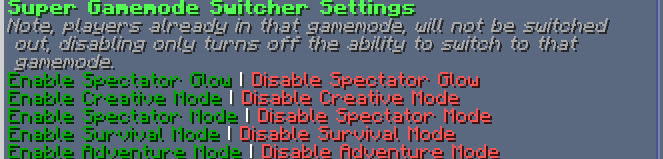
Super Gamemode Switcher Settings
Settings are divided up into 5 sections.
- Spectator Glow: Spectators invisible head glows for other Spectators. Does not affect players in other gamemodes. | OFF By Default
- Creative Mode: Sets the player who ran it into Creative Mode. | ON By Default
- Spectator Mode: Sets the player who ran it into Spectator Mode. | ON By Default
- Survival Mode: Sets the player who ran it into Survival Mode. | ON By Default
- Adventure Mode: Sets the player who ran it into Adventure Mode Mode. | ON By Default
In-Game View of the settings menu
Super Gamemode Switcher 설치 방법
With Millida Launcher
Install Millida Launcher
The launcher is free: download it at millida.net/launcher and sign in with any nickname.
Click “Install” on this page
The launcher opens and installs the data pack for Minecraft 1.21–26.2 automatically.
Launch the game
A profile with it appears in the launcher: click “Play”.
Manually
Download the archive
Pick the file SuperGamemodeSwitcherV1.zip (30 KB) for your game version.
New world: “Data Packs”
When creating a world, click “Data Packs”, drag the archive into the window, then move it to “Selected”.
Existing world: the datapacks folder
Put the archive into saves/<world>/datapacks and type /reload in game.
On a server
Archive goes into the server world’s datapacks
The world/datapacks folder on the server; players do not need to install anything.
Reload the data
Type /reload in the server console or restart the server.
Use the “To server” button
On Millida Hosting, the button at the top of the page uploads the file to your server and restarts it for you.
버전
의존성 포함
| Minecraft | 로더 | 파일 | 날짜 | 작업 |
|---|---|---|---|---|
| 26.2 | 데이터 팩 | 26.230 KB 1 | ||
| 26.1 | 데이터 팩 | 26.130 KB |
리뷰
Super Gamemode Switcher의 첫 평가를 남겨 보세요


