

Minecraft 1.20.1, 1.21.1용 Sponge Crafting 데이터 팩
제작 불가능한 스펀지 블록에 바닐라 친화적인 바다 테마 제작법을 추가합니다.
- 조회수
- 31 조회수
- 업데이트됨
- 업데이트됨 26.09.2026
- 1.13 — 26.1.1
 데이터 팩
데이터 팩- 클라이언트와 서버
Sponge Crafting 데이터 팩 정보
🌊 Craftable Sponge is a simple, lightweight datapack that finally gives the elusive Sponge a sensible crafting recipe, making it easier to acquire for large-scale water draining projects.
The new recipe is balanced to reflect the rarity and ocean-based origin of the Sponge:
1 - 2 - 3
A - Slimeball - Yellow Dye - Slimeball B - Yellow Dye - Dried Kelp Block - Yellow Dye C - Slimeball - Yellow Dye - Slimeball
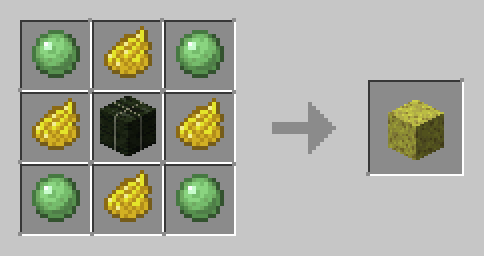
Required Ingredients:
- 4 * Yellow Dye
- 4 * Slimeball
- 1 * Dried Kelp Block
Why You Need This:
- Vanilla-Friendly: The recipe feels like it could be part of the base game.
- Utility: Makes acquiring Sponges more consistent for terraforming and building.
- Lightweight: Zero lag and extremely easy to install.
No more tedious Ocean Monument raids just for a few sponges! Start building your underwater base today!
Sponge Crafting 설치 방법
With Millida Launcher
Install Millida Launcher
The launcher is free: download it at millida.net/launcher and sign in with any nickname.
Click “Install” on this page
The launcher opens and installs the data pack for Minecraft 1.13–26.1.1 automatically.
Launch the game
A profile with it appears in the launcher: click “Play”.
Manually
Download the archive
Pick the file sponge-1.21.zip (1019 B) for your game version.
New world: “Data Packs”
When creating a world, click “Data Packs”, drag the archive into the window, then move it to “Selected”.
Existing world: the datapacks folder
Put the archive into saves/<world>/datapacks and type /reload in game.
On a server
Archive goes into the server world’s datapacks
The world/datapacks folder on the server; players do not need to install anything.
Reload the data
Type /reload in the server console or restart the server.
Use the “To server” button
On Millida Hosting, the button at the top of the page uploads the file to your server and restarts it for you.
버전
의존성 포함
| Minecraft | 로더 | 파일 | 날짜 | 작업 |
|---|---|---|---|---|
| 26.1.1 | 데이터 팩 | 26.1.11019 B | ||
| 1.18.2 | 데이터 팩 | 1.18.21.1 KB | ||
| 1.17.1 | 데이터 팩 | 1.17.11.1 KB | ||
| 1.16.5 | 데이터 팩 | 1.16.51.1 KB | ||
| 1.15.2 | 데이터 팩 | 1.15.21.1 KB | ||
| 1.14.4 | 데이터 팩 | 1.14.41.1 KB |
FAQ
Which Minecraft versions does Sponge Crafting work on?
There are files for 1.13–26.1.1, 48 versions in total. The newest is 26.1.1.
Does Sponge Crafting work on a server?
Yes: the data pack goes into the datapacks folder of the server world, and players do not need to install anything.
Where can I download Sponge Crafting safely?
On this page: the file sponge-1.21.zip (1019 B) is stored on Millida’s server, with no link shorteners. SHA-1 checksum: 696879f200d2b4042cb76fae88694194d1530042.
리뷰
Sponge Crafting의 첫 평가를 남겨 보세요


