

Minecraft 1.20.1, 1.16.5용 Simply Lock 데이터 팩
SimplyLock - Chest Locker로 바닐라 경험을 향상시키세요
- 조회수
- 49 조회수
- 업데이트됨
- 업데이트됨 18.02.2024
- 1.14 — 1.20.4
 데이터 팩
데이터 팩- 클라이언트와 서버
SimplyLock
Enhance Vannila Experience with Minecraft Chest Locker!
PLEASE, READ THE TURTORIAL - THIS MOD USE SPECIAL MECHANIC TO WORKS!

Support
Platform: Mod(Forge,Fabric,Quilt), Datapack Version : 1.14 - 1.20

Turtorial
- Requirement: Locker, Book and Quill
Step 1: Crafting Locker
- Method 1: Normal Crafting Recipe
Method 1 using Recipe Unlocker Advancement, it's not compatible with some mods like NERB ( Not Enough Recipe Book ). Try Method 2
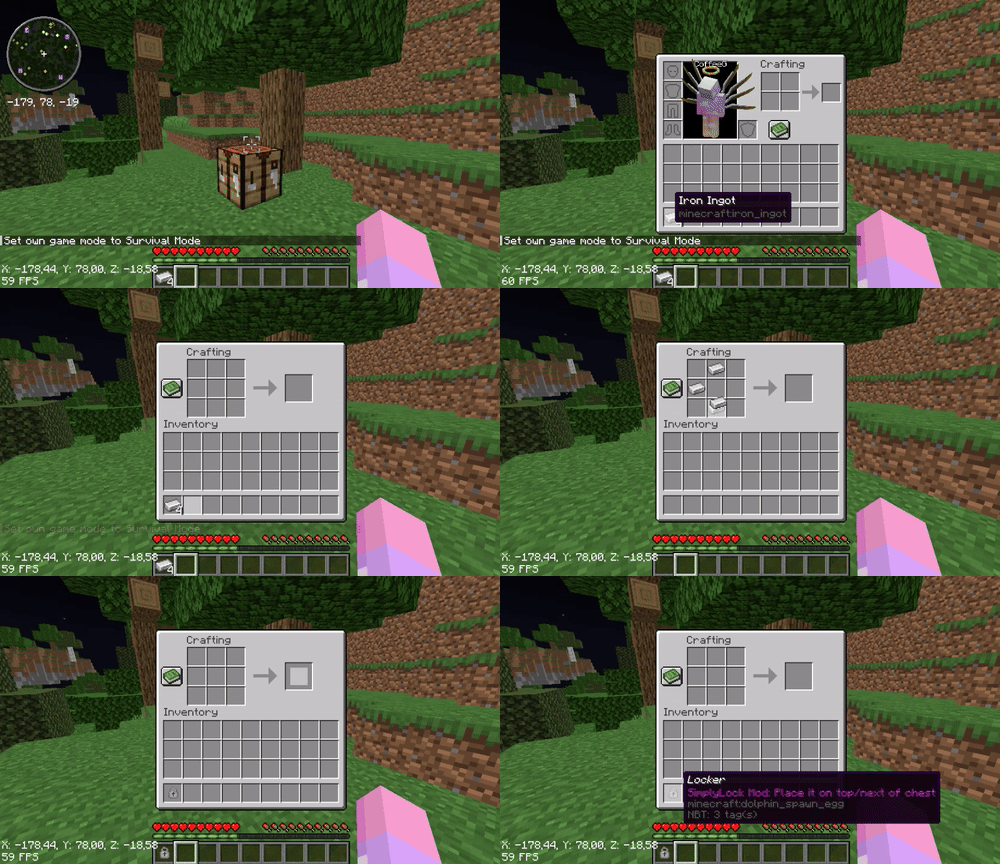
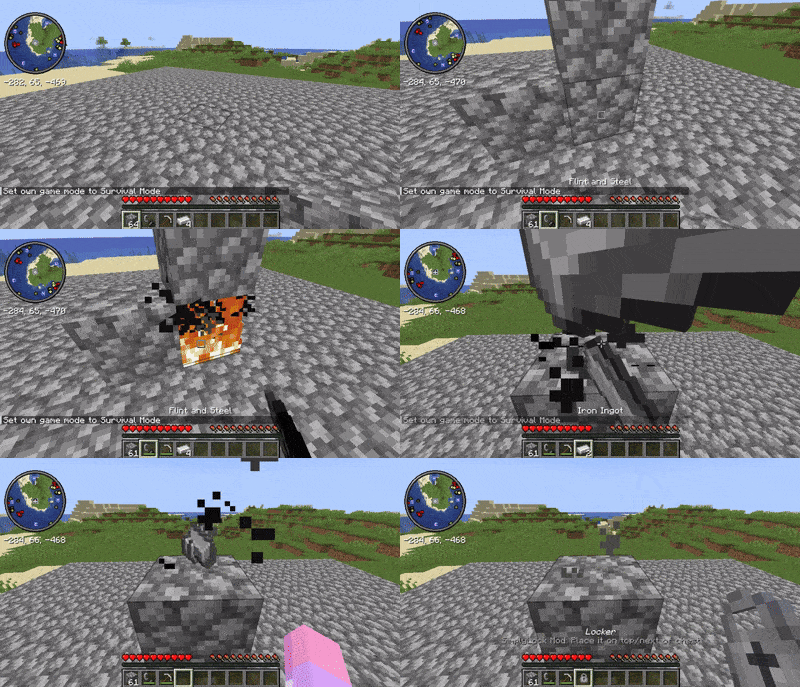
- Method 2: Drop crafting
You must setup like the demo
Step 2: Creating Password
Write your Password into the Book and Quill (DON'T SIGN THE BOOK)
Step 3: Adding Lock into Chest
- Place the Book and Quill to the FIRST slot of the chest.
- And then place the Locker on the top or next to the chest.
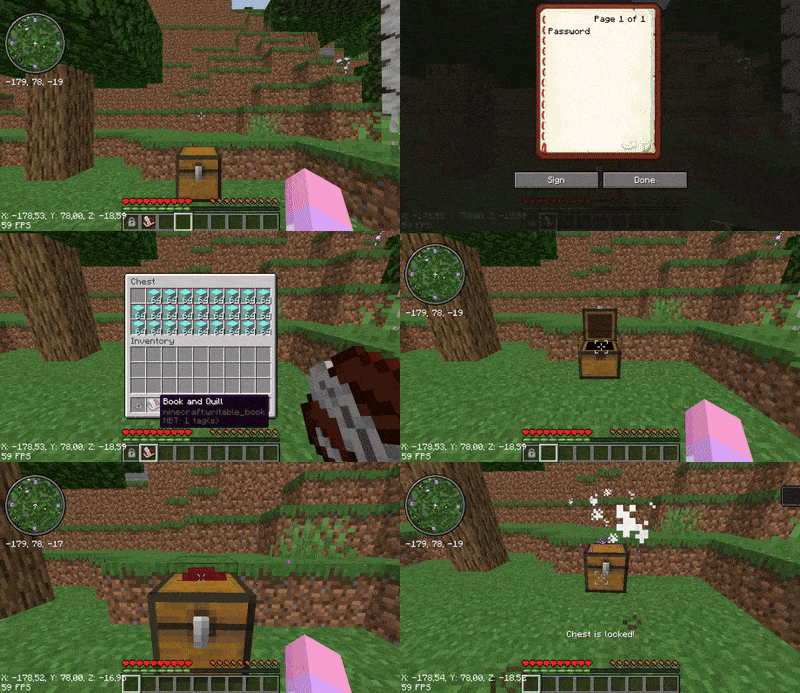
Note
After locking the chest, ANY items with the same NAME as the PASSWORD you entered in the Book can open the chest
To remove the lock, use the key to open the locked chest, and then remove the Book from the first slot. And then place the Locker on top or next to the chest again
The locked chest is unbreakable by the player, but an explosion from the TNT or Creeper can still break it. You would better water-log the chest
Credits
Thanks to Starwarrior25 for the Locker and Datapack icons.
Simply Lock 설치 방법
With Millida Launcher
Install Millida Launcher
The launcher is free: download it at millida.net/launcher and sign in with any nickname.
Click “Install” on this page
The launcher opens and installs the data pack for Minecraft 1.14–1.20.4 automatically.
Launch the game
A profile with it appears in the launcher: click “Play”.
Manually
Download the archive
Pick the file SimplyLock-DP-1.1.zip (32 KB) for your game version.
New world: “Data Packs”
When creating a world, click “Data Packs”, drag the archive into the window, then move it to “Selected”.
Existing world: the datapacks folder
Put the archive into saves/<world>/datapacks and type /reload in game.
On a server
Archive goes into the server world’s datapacks
The world/datapacks folder on the server; players do not need to install anything.
Reload the data
Type /reload in the server console or restart the server.
Use the “To server” button
On Millida Hosting, the button at the top of the page uploads the file to your server and restarts it for you.
버전
의존성 포함
| Minecraft | 로더 | 파일 | 날짜 | 작업 |
|---|---|---|---|---|
| 1.18.2 | 데이터 팩 | 1.18.232.4 KB | ||
| 1.17.1 | 데이터 팩 | 1.17.132.4 KB | ||
| 1.16.5 | 데이터 팩 | 1.16.532.4 KB | ||
| 1.15.2 | 데이터 팩 | 1.15.232.4 KB | ||
| 1.14.4 | 데이터 팩 | 1.14.432.4 KB |
리뷰
Simply Lock의 첫 평가를 남겨 보세요


