

Minecraft 1.21.1, 1.21용 Keep Inventory Orbs 데이터 팩
완전한 서버 사이드 크로스 플랫폼 방식으로 무덤 개념을 구현하여 사망 시 인벤토리를 저장하는 '오브'를 도입합니다.
- 조회수
- 42 조회수
- 업데이트됨
- 업데이트됨 26.09.2026
- 1.21 — 26.3
 데이터 팩
데이터 팩- 클라이언트와 서버
Keep Inventory Orbs
A cross-platform fully *_server-side_* approach to the gravestone concept introducing 'orbs' to store your inventory upon death.
Cross-platform, compatible with Minecraft Bedrock Players!
(as long as the datapack/mod is installed on a Java server)

Upon death:
- An Orb will spawn that will keep your inventory safe. [Incompatible with Backpack mods]
- A compass to help you locate your last orb will be given to you. [Customizable]
Recovering Inventory:
- When an Orb is broken, it will attempt to restore its inventory only to its owner.
If the Orb's owner is not nearby (within 6 blocks), nothing will happen and the orb will not break.
Orb Stealing is [OFF] by default. To steal an Orb that is not yours, an Admin needs to enable it in the Menu [see below]
- Orbs will re-equip your armor and items exactly into the slot they were.
If the slot is occupied by something else, the item will drop in the player's position.
Orb behavior:
- Orbs will always spawn on the player's death position
- Orbs will spawn in the world's minimum height if the player dies in the void
- Orbs will never despawn.
- Orbs have gravity and will fall if they have no support.
- Orbs will move upwards if they are inside of a block.
- Orbs cannot be moved by pistons
Server-side advantages
If you are a server owner or admin, installing this datapack/mod into the server makes it work for everyone!
There is no need to install it on the client side!
Menu (for Server Admins)
The following command opens the built-in Chat Menu:
_/function #keep_inventory_orbs:menu_
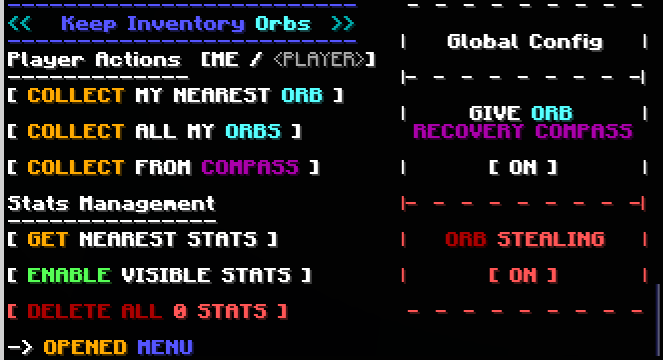
Orb Stealing
Orb Stealing will enable all players to steal an Orb even if it is not theirs
Buttons:
- Toggle [ON/OFF] orb stealing for all players
Give Orb Recovery Compass
Toggles whether players will receive an orb recovery compass pointing towards their last orb after respawning
Buttons:
- Toggle [ON/OFF] orb recovery compass for all players
Player Actions
These actions will apply to yourself or to a specified ****.
To toggle between these, click the [ME / ] section.
Buttons:
- Collect My Nearest Orb
- Collects your nearest orb within loaded chunks
- Collect All My Orbs
- Collects all your orbs within loaded chunks
- Collect From Compass
- Collects the orb nearest to the death location indicated by the orb recovery compass held in the player's hand, even in unloaded chunks.
Stats Management
Orbs keep 'Stats' with information about the player's death. These stats are kept even after the orbs are collected.
Buttons:
- Get Nearest Stats
- Shows the Stats from the nearest Stats/Orb
- Gives you options to:
- Show the inventory saved by the Stats/Orbs
- Collect/Destroy/Respawn specific Orbs
- Erase specific Stats
- Enable/Disible Visible Stats
- When enabled, shows particles locating Stats/Orb within 16 blocks, and points towards the nearest selected one
- Delete All Stats
- Counts all Stats/Orb in currently loaded chunks and deletes them
Keep Inventory Orbs 설치 방법
With Millida Launcher
Install Millida Launcher
The launcher is free: download it at millida.net/launcher and sign in with any nickname.
Click “Install” on this page
The launcher opens and installs the data pack for Minecraft 1.21–26.3 automatically.
Launch the game
A profile with it appears in the launcher: click “Play”.
Manually
Download the archive
Pick the file KeepInventoryOrbs_v1.4.zip (138 KB) for your game version.
New world: “Data Packs”
When creating a world, click “Data Packs”, drag the archive into the window, then move it to “Selected”.
Existing world: the datapacks folder
Put the archive into saves/<world>/datapacks and type /reload in game.
On a server
Archive goes into the server world’s datapacks
The world/datapacks folder on the server; players do not need to install anything.
Reload the data
Type /reload in the server console or restart the server.
Use the “To server” button
On Millida Hosting, the button at the top of the page uploads the file to your server and restarts it for you.
버전
의존성 포함
| Minecraft | 로더 | 파일 | 날짜 | 작업 |
|---|---|---|---|---|
| 26.3 | 데이터 팩 | 26.3138 KB | ||
| 26.2 | 데이터 팩 | 26.2131 KB | ||
| 26.1 | 데이터 팩 | 26.1131 KB |
리뷰
Keep Inventory Orbs의 첫 평가를 남겨 보세요


