

Minecraft 1.20.1, 1.21.1용 Enchantment Descriptions Java 데이터 팩
이 리소스 팩은 모든 마법 부여에 대한 자세한 설명을 게임 내에서 직접 제공하여 Minecraft의 마법 부여 시스템을 향상시킵니다. 초보자든 숙련자든 장비에 마법을 부여할 때 더 나은 선택을 할 수 있도록 도와줍니다.
 데이터 팩
데이터 팩 바닐라 게임
Enchantment Descriptions
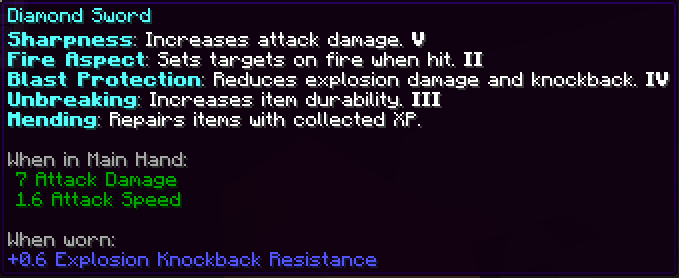
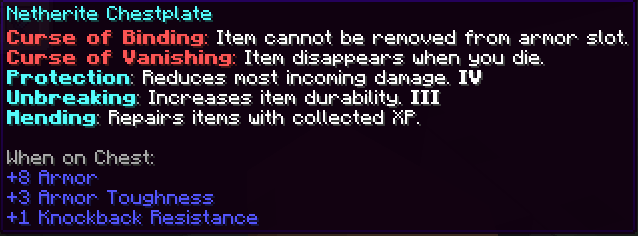
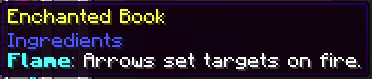
A simple but powerful resource pack that adds detailed enchantment descriptions to tooltips in Minecraft Java Edition. No more guessing what each enchantment does—this pack shows you all relevant information directly in-game.

🎨 Screenshots


Installation (Resource Pack - .zip)
- Download the .zip file.
- Place it in your resourcepacks folder.
- Launch Minecraft → Options → Resource Packs → Enable the pack.
4.

Installation (Mod Version - .jar)
To install the .jar version of Enchantment Descriptions:
- Make sure you have Minecraft Forge or Fabric installed.
- Download the latest .jar file from the Files section.
- Place the .jar file into your mods/ folder, located in:
- Windows: %appdata%\.minecraft\mods
- macOS: ~/Library/Application Support/minecraft/mods
- Linux: ~/.minecraft/mods
- Launch Minecraft using the appropriate mod loader.
- Enjoy detailed enchantment tooltips in-game!
This is a client-side visual aid only — it does not affect gameplay or servers.
Report if you find any mistranslation or bug
Enchantment Descriptions Java 설치 방법
With Millida Launcher
Install Millida Launcher
The launcher is free: download it at millida.net/launcher and sign in with any nickname.
Click “Install” on this page
The launcher opens and installs the data pack for Minecraft 1.14–1.21.9 automatically.
Launch the game
A profile with it appears in the launcher: click “Play”.
Manually
Download the archive
Pick the file Enchantment_Descriptions.zip (1.7 MB) for your game version.
New world: “Data Packs”
When creating a world, click “Data Packs”, drag the archive into the window, then move it to “Selected”.
Existing world: the datapacks folder
Put the archive into saves/<world>/datapacks and type /reload in game.
On a server
Archive goes into the server world’s datapacks
The world/datapacks folder on the server; players do not need to install anything.
Reload the data
Type /reload in the server console or restart the server.
Use the “To server” button
On Millida Hosting, the button at the top of the page uploads the file to your server and restarts it for you.
버전
의존성 포함
| Minecraft | 로더 | 파일 | 날짜 | 작업 |
|---|---|---|---|---|
| 1.21 | 데이터 팩 | 1.211.7 MB | ||
| 1.20.1 | 데이터 팩 | 1.20.11.7 MB | ||
| 1.19.2 | 데이터 팩 | 1.19.21.7 MB | ||
| 1.17.1 | 데이터 팩 | 1.17.11.7 MB | ||
| 1.15.2 | 데이터 팩 | 1.15.21.7 MB | ||
| 1.14.4 | 데이터 팩 | 1.14.41.7 MB | ||
| 1.18.2 | 데이터 팩 | 1.18.21.7 MB | — | |
| 1.16.5 | 데이터 팩 | 1.16.51.7 MB | — |
리뷰
Enchantment Descriptions Java의 첫 평가를 남겨 보세요


