

Minecraft 26.3용 Waypoints Teleport 애드온
특정 위치를 웨이포인트로 저장하고 나중에 즉시 그곳으로 텔레포트하세요.
부터 quillphen · CurseForge
Waypoints Teleport
Save, teleport to, and manage named waypoints across all dimensions
Download both the resource and behaviour pack for crafting the waypoint rod
else bp is enough when using /wp to open menu

Features
Commands
Command Effect
/wp Open the Waypoints main menu
/wprod Get a Waypoint Rod
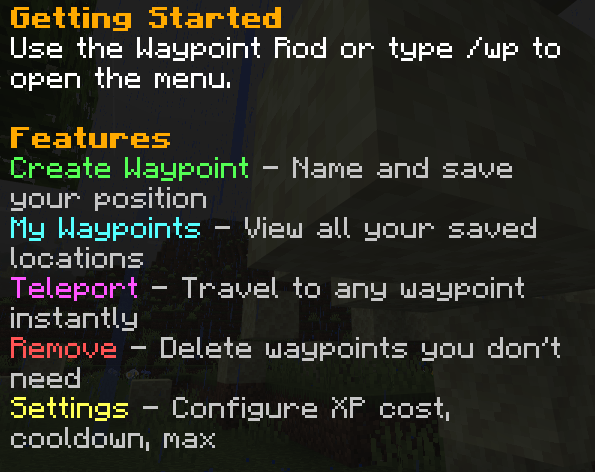
Getting Started
Obtaining the Waypoint Rod
Craft it: (new)
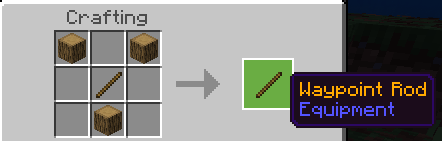
- R = Oak_Log, S = Stick
Or use /wprod to receive one directly.
Using the Menu
- Right-click (use) the Waypoint Rod, or type /wp
- Choose from:
- Create Waypoint Enter a name and save your position
- My Waypoints View all saved locations
- Teleport Select a waypoint to travel to
- Remove Delete waypoints
- Settings Adjust XP cost, cooldown, and limits
Settings
Open Settings from the main menu to change:
- XP Cost per Teleport - Choose from preset values (0, 1, 2, 3, 5, 10 levels)
- Cooldown - Choose from preset values (0, 5, 10, 15, 30, 60 seconds)
- Max Waypoints - Choose from preset values (5, 10, 20, 30, 40, 50)
버전
| Minecraft | 로더 | 파일 | 날짜 | 작업 |
|---|---|---|---|---|
| 1.21.101 | — | Waypoints.mcaddon200 KB |
리뷰
Waypoints Teleport의 첫 평가를 남겨 보세요
댓글 0
댓글을 작성하려면 로그인하세요로그인
