
Minecraft 1.21.132용 Camera Master - Cinematic Views 애드온
32가지 커스텀 시네마틱 모드로 Minecraft 카메라를 완전히 제어하세요. 명령어를 하나도 입력하지 않고 동적인 공중 뷰, 연속 궤도, 커스텀 게임플레이 각도 사이를 손쉽게 전환하여 완벽한 영상이나 스크린샷을 찍을 수 있습니다.
Camera Master - Cinematic Views 애드온 정보
Racing Raftaar
CAMERA MASTER
32 cinematic camera modes - shoot your world like a filmmaker
v1.0.0 Bedrock Edition Free Beta APIs Required
What is Camera Master?
Minecraft's default camera options are pretty limited - first person, third person, that is about it. Camera Master fixes that by giving you 32 different camera modes organized across 7 categories, all accessible through a single item. Whether you want a cinematic orbit shot, a bird's eye drone view, a Hollywood hero angle or just a smoother follow cam, it is all in here.
I built this mainly for screenshots and recording. The cinematic pan mode cycles through 4 different angles automatically, the orbit modes do a full 360 rotation around your character, and the special effects section has things like a shake cam and screenshot mode that positions the camera at a clean distance with a stable locked view.
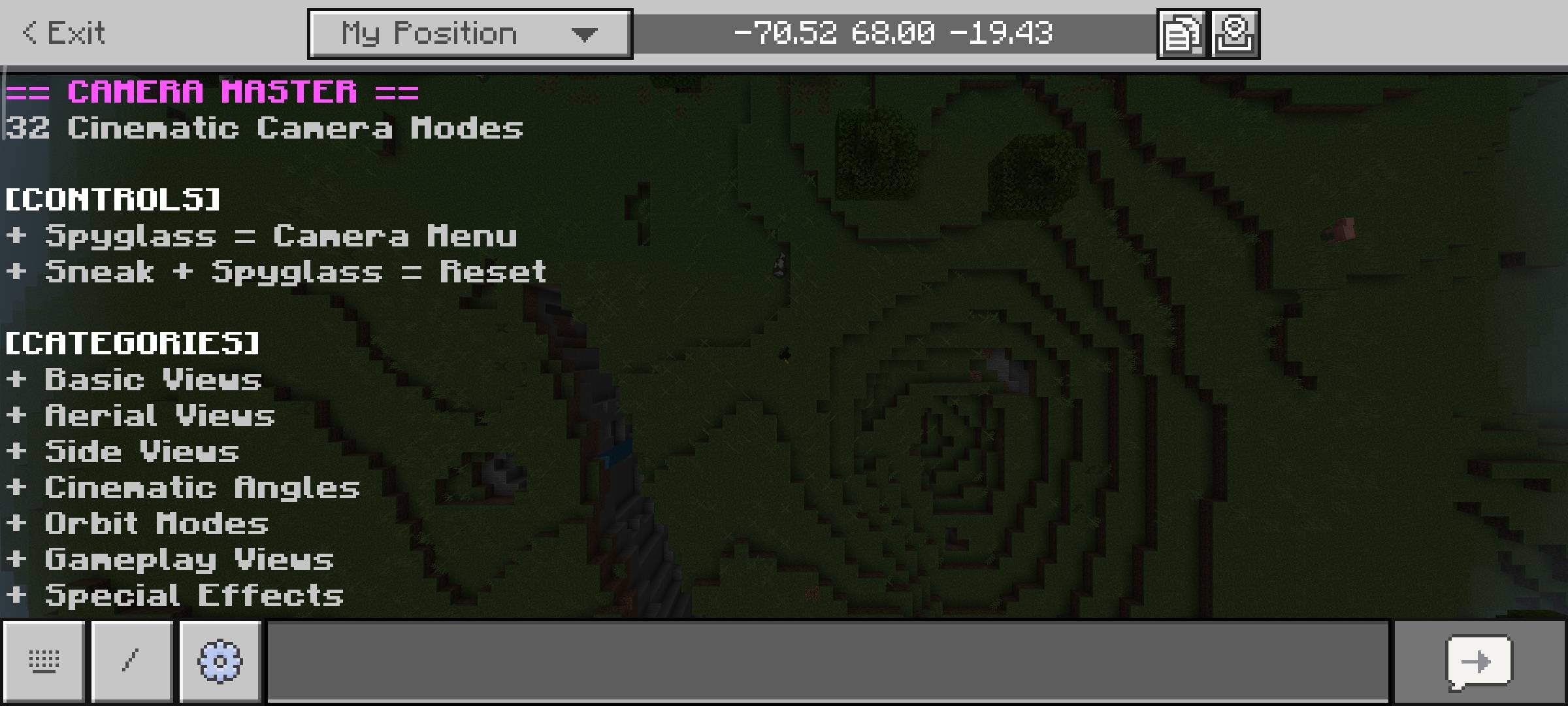
Everything is controlled with a Spyglass. Use it to open the camera menu, sneak and use it to instantly reset back to normal. You can also adjust transition speed, distance multiplier and smooth easing through the settings panel - so the camera movements can be as fast or cinematic as you need.
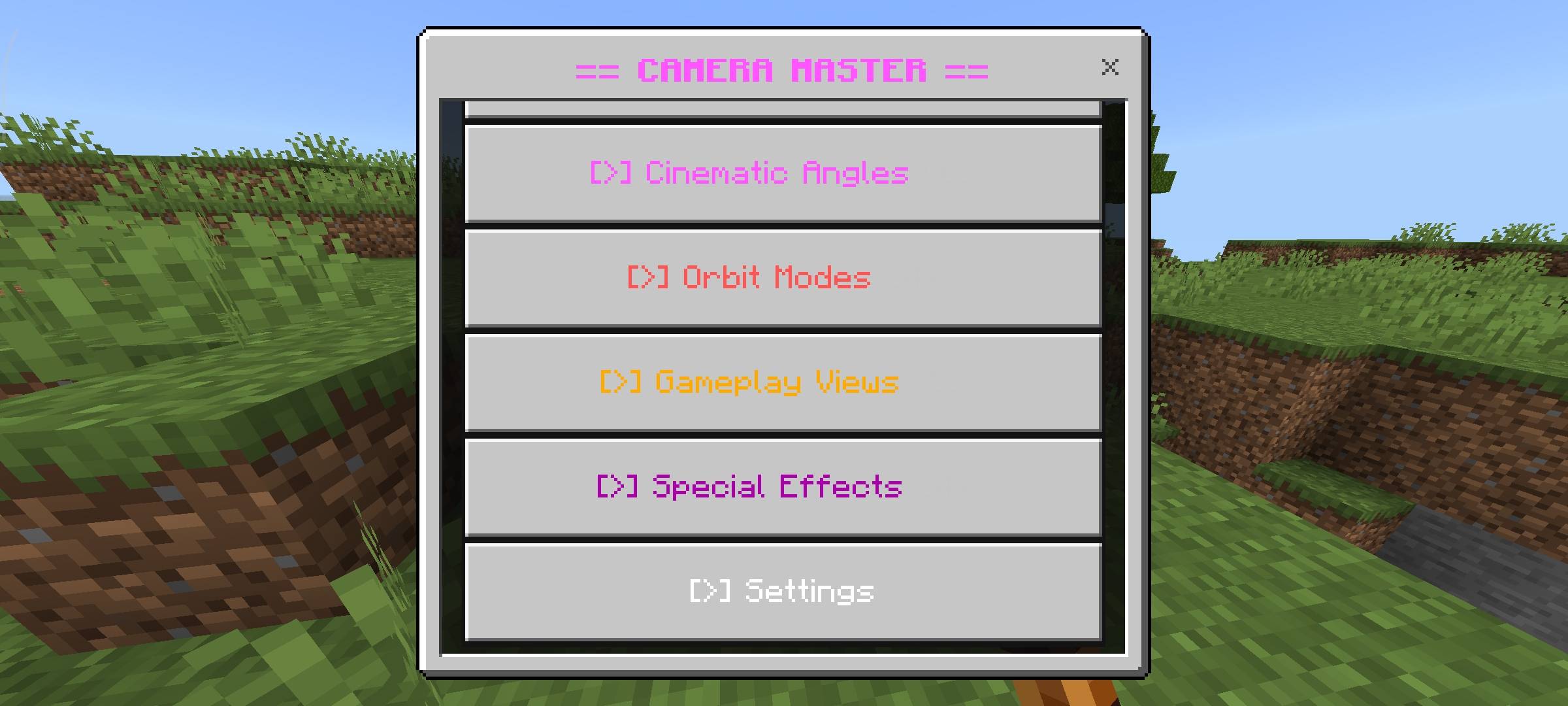
32 Camera Modes - 7 Categories
All modes are available from the in-game menu. No commands needed.
Basic Views First Person, Third Person Back, Third Person Front, Free Camera
Aerial Views Drone Low (+5), Drone Medium (+10), Drone High (+20), Bird's Eye, Satellite (+30)
Side Views Left Side, Right Side, Front View, Back Wide - platformer style perspectives
Cinematic Angles Hero Shot, Villain Shot, Dutch Angle, Close Up (2 blocks), Wide Shot, Extreme Wide (25 blocks)
Orbit Modes Orbit Slow (30s), Orbit Medium (15s), Orbit Fast (8s) - full 360 rotation around player
Gameplay Views Combat Cam, Build Cam, Explore Cam, Mining Cam, Parkour Cam
Special Effects Smooth Follow, Shake Cam, Screenshot Mode, Cinematic Pan (auto multi-angle)
Features
- 32 Camera Modes - organized across 7 categories, all in one menu
- Orbit Modes - camera rotates in a full 360 circle around your player continuously
- Cinematic Pan - automatically cycles through 4 different angles with smooth transitions
- Smooth Follow - camera tracks behind you with smooth easing as you move
- Shake Cam - adds camera shake effect for impact moments or dramatic scenes
- Screenshot Mode - locks camera at a clean stable angle away from player for screenshots
- Smooth Easing - all transitions use InOutSine or Linear easing for fluid camera movement
- Settings Panel - adjust transition speed (0.5s to 3s), distance multiplier (0.5x to 2x), easing toggle
- Mode Name Display - shows the current camera mode name on screen when switching
- Instant Reset - sneak and use Spyglass to immediately return to normal camera at any time
- Per-Player Settings - each player's preferences save separately, works in multiplayer
- Persistent Data - settings save across sessions via Dynamic Properties
How to Use
Hold a Spyglass in your hand - the action bar will show the controls. Everything runs through a single item, no commands at all.
Action Control
Open Camera Menu Use Spyglass
Reset Camera to Normal Sneak + Use Spyglass
Open Settings Camera Menu - Settings
Requirements
Minecraft Version
1.21.0 or higher
Experiment Required
Beta APIs - ON
Platform
Bedrock Edition
Pack Type
Behaviour Pack (.mcpack)
Terms of Use
This addon is free to use but please respect the work that went into it.
- Do not repost or republish this addon on any website, platform or app without permission.
- Do not claim this addon as your own work.
- You are free to use it in your worlds, servers and YouTube videos - just give credit to Racing Raftaar.
- Modifying and redistributing without permission is not allowed.
More addons, updates and dev stuff on my blog and community:
Blog - YouTube - Discord
Blog YouTube Discord
Beta APIs Notice
This addon requires Beta APIs to be enabled in your world settings under Experiments. Without it the addon will not load at all. This is a Minecraft requirement for all Script API addons - it is not a bug with the addon.
AI Enhancement Notice
The thumbnail and screenshots used in this post have been AI-enhanced for better visual presentation. In-game visuals may look different. All gameplay features shown are real and functional.
버전
| Minecraft | 로더 | 파일 | 날짜 | 작업 |
|---|---|---|---|---|
| 1.21.124 | — | Camera_Master_2.0.0.mcpack20.3 KB |
리뷰
Camera Master - Cinematic Views의 첫 평가를 남겨 보세요
