
Low Flame リソースパックについて
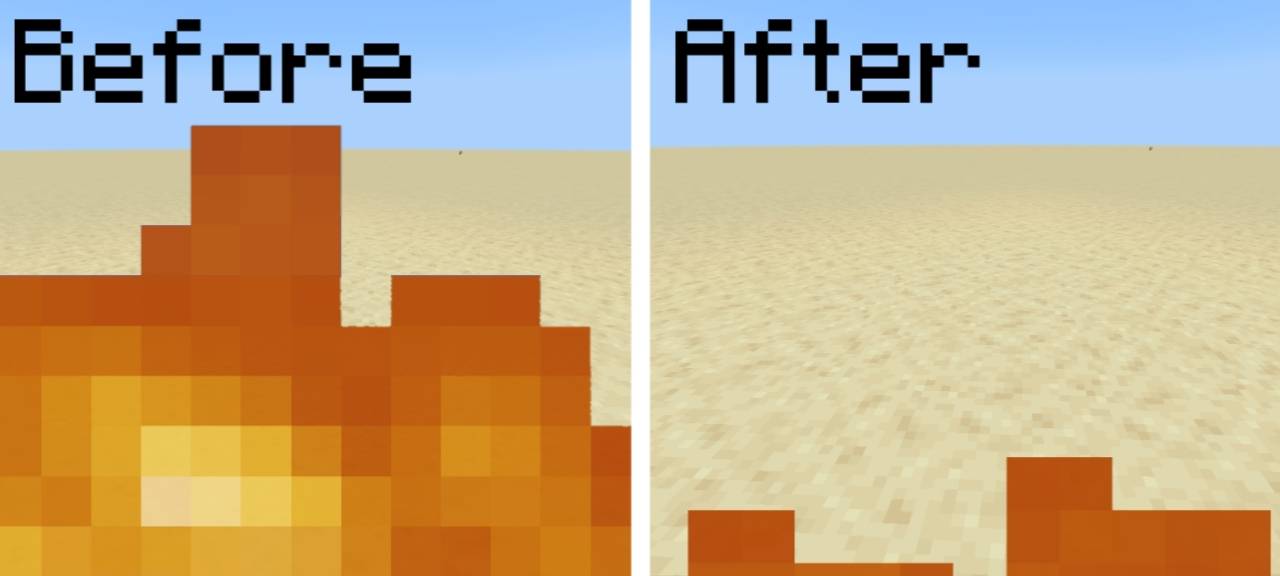
This texture pack reduces the height of fire animations, making flames shorter while keeping them visible. By lowering fire, it minimizes visual obstruction-helping players see enemies, loot, or blocks more clearly in fire-heavy areas like the Nether or burning structures. The flames still behave normally, ensuring gameplay isn’t disrupted, just cleaner. Ideal for players who find default fire too distracting but still want flame effects.
Low Flameのインストール方法
With Millida Launcher
Install Millida Launcher
The launcher is free: download it at millida.net/launcher and sign in with any nickname.
Click “Install” on this page
The launcher opens and installs the resource pack for Minecraft 26.3–26.40 automatically.
Launch the game
A profile with it appears in the launcher: click “Play”.
Manually
Download the archive
Pick the file LowFlames.mcpack (151 KB) for your game version. No need to unpack it.
Put it in the resourcepacks folder
The easiest way: “Options”, then “Resource Packs”, then “Open Pack Folder”, and drag the archive there.
Enable the pack
In the same window, move the pack to the right-hand “Selected” column and click “Done”.
バージョン
依存関係あり
| Minecraft | ローダー | ファイル | 日付 | 操作 |
|---|---|---|---|---|
| 26.3 | — | MainFile_1.21151 KB 6 |
FAQ
Which Minecraft versions does Low Flame work on?
There are files for 26.3–26.40, 8 versions in total. The newest is 26.40.
Where can I download Low Flame safely?
On this page: the file LowFlames.mcpack (151 KB) is stored on Millida’s server, with no link shorteners. SHA-1 checksum: e13e2355d07ec222074c8c18a0152bcad9f9ad45.
レビュー
Low Flameの最初の評価を書きませんか



