

Minecraft 1.20.1, 1.21.1用Full Brightness リソースパック
「Full Brightness」でMinecraft体験を変えよう!
- ダウンロード
- 23 ダウンロード
- 閲覧
- 110 閲覧
- 更新日
- 更新日 03.09.2026
- 1.12 — 1.21.10
 バニラゲーム
- クライアント
Full Brightness リソースパックについて
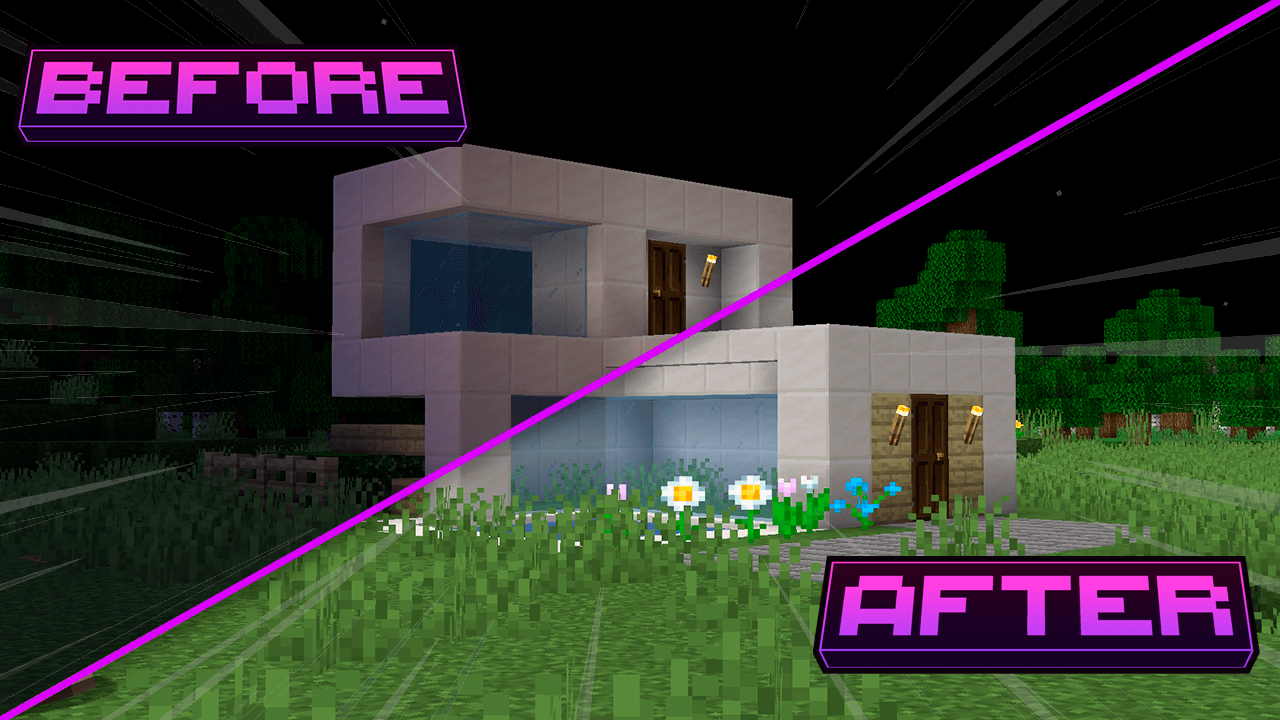
Full Brightness
Transform your Minecraft experience with "Full Brightness"! This innovative texture increases the ambient brightness, allowing you to see clearly underwater, in dark caves, and during the night. Say goodbye to darkness and explore the world like never before!
Features:
-Brightness Boost: Elevates the overall brightness of the game, providing visibility in dark areas. -Underwater Vision: Become an underwater explorer! See clearly even in the depths of the water. -Illuminated Caves: Venture into caves and mines without fear, with a clear view of the resources and dangers around you. -Radiant Nights: Navigate through the night as if it were day, without the need for lanterns or torches. -Compatible with Other Resources: Works well with other texture packs, allowing you to mix styles.
Requirements:
OptiFine: This texture requires OptiFine to function correctly. Make sure to install it before adding the texture pack.
Feel free to let me know if you need any more assistance!
Full Brightnessのインストール方法
With Millida Launcher
Install Millida Launcher
The launcher is free: download it at millida.net/launcher and sign in with any nickname.
Click “Install” on this page
The launcher opens and installs the resource pack for Minecraft 1.12–1.21.10 automatically.
Launch the game
A profile with it appears in the launcher: click “Play”.
Manually
Download the archive
Pick the file Full Brigtness.zip (13 KB) for your game version. No need to unpack it.
Put it in the resourcepacks folder
The easiest way: “Options”, then “Resource Packs”, then “Open Pack Folder”, and drag the archive there.
Enable the pack
In the same window, move the pack to the right-hand “Selected” column and click “Done”.
バージョン
依存関係あり
| Minecraft | ローダー | ファイル | 日付 | 操作 |
|---|---|---|---|---|
| 1.21 | — | 1.2112.8 KB 22 | ||
| 1.19.2 | — | 1.19.212.8 KB | — | |
| 1.18.2 | — | 1.18.212.8 KB | — | |
| 1.16.5 | — | 1.16.512.8 KB | — | |
| 1.12.2 | — | 1.12.212.8 KB | — |
FAQ
Which Minecraft versions does Full Brightness work on?
There are files for 1.12–1.21.10, 48 versions in total. The newest is 1.21.10.
Does Full Brightness need mods?
No, the resource pack works in the plain game without loaders: put it into the resourcepacks folder and enable it in the options.
Where can I download Full Brightness safely?
On this page: the file Full Brigtness.zip (13 KB) is stored on Millida’s server, with no link shorteners. SHA-1 checksum: cc20faed16306d9c139ca6cb5fb4a5f0646172fb.
レビュー
Full Brightnessの最初の評価を書きませんか



