

Minecraft 1.20.1, 1.21.1用Cobblemon Interface: Recolored リソースパック
Cobblemon Interfaceリソースパックの色を、CobblemonのポケモンのHPバーと経験値バーの色に合わせて変更します。
- 閲覧
- 52 閲覧
- 更新日
- 更新日 03.09.2026
- 1.20 — 1.21.1
 バニラゲーム
- クライアント
‼️ Archived ‼️
The textures have been added to the base Cobblemon Interface resourcepack and can be accessed by using respackopts mod to change the resourcepack config.

Cobblemon Interface: Recolored
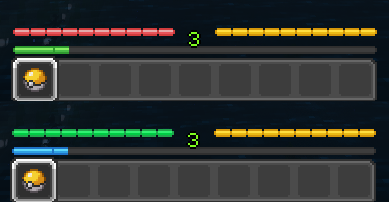
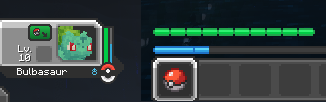
An optional addon to Cobblemon Interface resourcepack that changes the health and experience bars to pair with the colors used in Pokémon's HP and EXP in Cobblemon.

Comparison
Before -> After
Matching Colors
on the Official Cobblemon Discord Server
Cobblemon Interface: Recoloredのインストール方法
With Millida Launcher
Install Millida Launcher
The launcher is free: download it at millida.net/launcher and sign in with any nickname.
Click “Install” on this page
The launcher opens and installs the resource pack for Minecraft 1.20–1.21.1 automatically, together with its dependencies: Cobblemon Interface.
Launch the game
A profile with it appears in the launcher: click “Play”.
Manually
Download the archive
Pick the file Cobblemon Interface Recolored v1.0.1.zip (15 KB) for your game version. No need to unpack it.
Put it in the resourcepacks folder
The easiest way: “Options”, then “Resource Packs”, then “Open Pack Folder”, and drag the archive there.
Enable the pack
In the same window, move the pack to the right-hand “Selected” column and click “Done”.
バージョン
依存関係あり
| Minecraft | ローダー | ファイル | 操作 |
|---|---|---|---|
| 1.21 | — | 1.2114.5 KB | |
| 1.20.1 | — | 1.20.114.5 KB |
動作に必要なもの
レビュー
Cobblemon Interface: Recoloredの最初の評価を書きませんか


