

Minecraft 1.20.1, 1.21.1用missing textures シェーダー
どこにでもピンク/黒のmissing textureが適用された、高速でシンプル、設定可能なシェーダー
 Fabric
 OptiFine
Missing Textures shader
This shader makes every block in the game have the pink/black squares missing texture. It also has settings to customize it:
- r g b values for the pink parts
- missing sun/moon texture
- keep terrain colors
- keep original colors
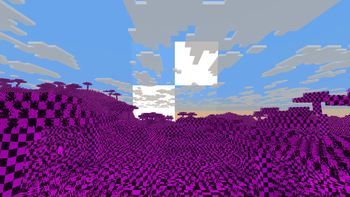
The shader should be compatible with every version of Optifine and Iris

missing texturesのインストール方法
With Millida Launcher
Install Millida Launcher
The launcher is free: download it at millida.net/launcher and sign in with any nickname.
Click “Install” on this page
The launcher opens and installs the shaders for Minecraft 1.7.10–1.21.11 automatically.
Launch the game
A profile with it appears in the launcher: click “Play”.
Manually
Install Iris or OptiFine
Without a shader mod the game cannot see shaders. Install it for the same Minecraft version.
Download the shader archive
Pick the file MissingTextures_1.0.zip (4 KB) and do not unpack it.
Put it in the shaderpacks folder
“Options”, then “Video Settings”, then “Shader Packs”, then “Open Shader Pack Folder”, and drag the archive there.
Select the shaders
In the same window, click the pack name and “Apply”.
バージョン
依存関係あり
| Minecraft | ローダー | ファイル | 日付 | 操作 |
|---|---|---|---|---|
| 1.17.1 | Iris, OptiFine | 1.17.14.5 KB | ||
| 1.15.2 | Iris, OptiFine | 1.15.24.5 KB | ||
| 1.14.4 | Iris, OptiFine | 1.14.44.5 KB | ||
| 1.7.10 | Iris, OptiFine | 1.7.104.5 KB | ||
| 1.21.11 | Iris, OptiFine | 1.21.114.5 KB | — | |
| 1.21 | Iris, OptiFine | 1.214.5 KB | — | |
| 1.20.1 | Iris, OptiFine | 1.20.14.5 KB | — | |
| 1.19.2 | Iris, OptiFine | 1.19.24.5 KB | — |
レビュー
missing texturesの最初の評価を書きませんか


