

 Fabric
 OptiFine
Basic Lighting
About
Basic Lighting is my first shader. It improves Minecraft's lighting while keeping the vanilla look. The goal is to provide a simple visual enhancement without significantly changing the game.
Settings are not currently available. Please report bugs or compatibility issues in the comments.

Features
- Face Lighting: Block faces turned toward the sun receive additional light.
- Face Lighting is applied to blocks, entities, and clouds.
- Dark Nights: Nighttime lighting can become up to 50% darker.
- Water Deformation: Water now has small ripples.
Curseforge Link
CurseForge: https://www.curseforge.com/minecraft/shaders/basic-lighing
Screenshots
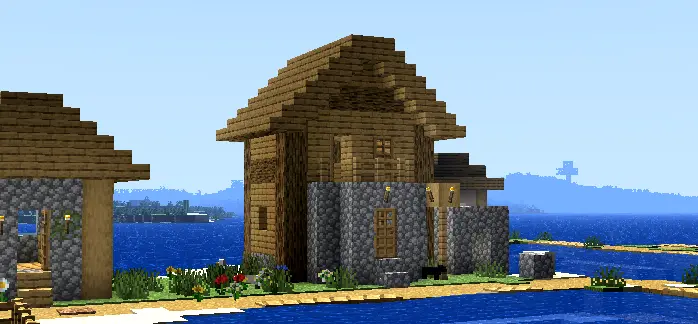
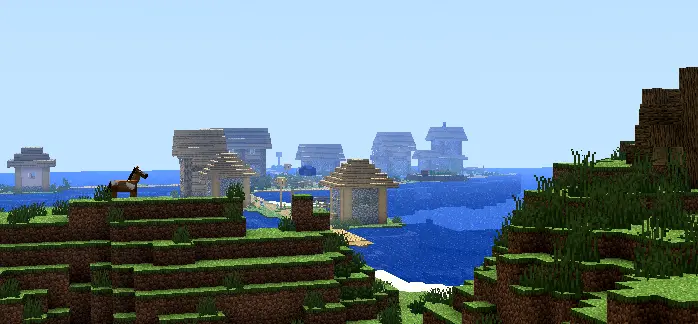
Basic Lightingのインストール方法
With Millida Launcher
Install Millida Launcher
The launcher is free: download it at millida.net/launcher and sign in with any nickname.
Click “Install” on this page
The launcher opens and installs the shaders for Minecraft 1.12–26.2 automatically.
Launch the game
A profile with it appears in the launcher: click “Play”.
Manually
Install Iris or OptiFine
Without a shader mod the game cannot see shaders. Install it for the same Minecraft version.
Download the shader archive
Pick the file Basic Lighing fl2w2e2c2s2 x2.zip (9 KB) and do not unpack it.
Put it in the shaderpacks folder
“Options”, then “Video Settings”, then “Shader Packs”, then “Open Shader Pack Folder”, and drag the archive there.
Select the shaders
In the same window, click the pack name and “Apply”.
バージョン
依存関係あり
| Minecraft | ローダー | ファイル | 日付 | 操作 |
|---|---|---|---|---|
| 26.2 | Iris, OptiFine | 26.29.2 KB | ||
| 26.1 | Iris, OptiFine | 26.19.2 KB | ||
| 1.21.11 | Iris, OptiFine | 1.21.119.2 KB | ||
| 1.21 | Iris, OptiFine | 1.219.2 KB | ||
| 1.20.1 | Iris, OptiFine | 1.20.19.2 KB | ||
| 1.19.2 | Iris, OptiFine | 1.19.29.2 KB | ||
| 1.18.2 | Iris, OptiFine | 1.18.29.2 KB | ||
| 1.17.1 | Iris, OptiFine | 1.17.19.2 KB |
レビュー
Basic Lightingの最初の評価を書きませんか


