
Minecraft 1.7.2用xpShop プラグイン
プレイヤーは売買やEXPの送信が可能(Register、iConomy5、iConomy6、Vault)
Link to the german overview of xpShop: klick here
General:
Players can buy, send, and sell experience points which can be used to enchant items. Also it can display the player's amount of XP. XP levels can be sold and bought with sign shops.
This plugin will automatically update itself if “autodownload” is set to true in the config file and will force an update if a bug is found! Macht es das auch, wenn autodownload auf false ist?
Players can send XP to each other across multiple servers. To use this feature, you need a database that can be accessed from each server. You then enter this database into each config file and set “usedbtomanageXP” to true.
You do not need MySQL, however, you can use MySQL to manage XP between one or more servers. To do this you must use the same MySQL Database on all of the servers.
COMMANDS for ADMINS that use the database:
/xpShop reset <player> - Resets the xp of that player in the database
/xpShop setXP <player> - Sets the xp of that player in the database
Features:
- players can fill glass-bottles with XP/EXP
- players can buy/sell XP/EXP using a command
- players can buy/sell XP/EXP-levels using a command
- players can look up their own amount of XP or XP-level.
- players can look up other players' amounts of XP or XP-levels.
- players can lookup their own XP/EXP-level amount
- players can lookup the XP/EXP-level amount of others
- players can send XP/EXP to other players.
- players can teleport themselves to an other player for XP/EXP.
- players can teleport players to themselves for XP/EXP.
- players can repair tools for xp.
- admin can repair tools for free.
- players can create safes to store XP/EXP in signs.
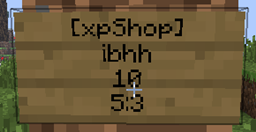
- players can create xpShops to sell and buy XP/EXP with sign. They work like SignShops.
- admins can create xpShop adminshops to sell and buy XP/EXP with sign.
- admins can set a player's amount of XP.
- admins can view the logs ingame. :) (/xpShop showdebug)
Planned features:
Tutorials here
Installation instructions:
The language can be chosen and modified in the config.yml file.
To install the plugin, drop it into the plugin folder.
Economy System Dependencies Permissions Dependencies
iConomy 5 PermissionsEX
iConomy 6 BukkitPermissions
Vault GroupManager
Register bPermissions
Links:
Link Description
Wiki The github wiki of xpShop
SignShop Wiki Explanation of the shop feature.
xpShopSafe Wiki Explanation of the safe feature.
Commands and Permission nodes A list of all commands and Permissions nodes:
Source code + API full code
Default config config.yml with comments
GUI:
To edit the config while the server is running, type "xpShop gui" into the console.
Source code
Please ask before using the code, I am a friendly person :)
Link to github.com
Sending of statistical data
This plugin uses mcstats.org to gather statistical data. The data is collected anonymously and ALL data is visible to everyone. Follow the link at the statistics banner and you'll see the collected data.
If you don't want any data to be sent, disable statistic sending in the Metrics folder/configuration.
Debug files and error reports
This plugin creates debug files to make the finding of errors easier for me. If a error occurs the plugin may report it to me. All error reports are visible on my tracker. Klick here.
You can modify /disable this behavior in the configuration file. Set senddebugfile to false if you don't want to send debugfiles to me.
Set senderrorreport to false if you don't want to send any debug/errors to me.
xpShopのインストール方法
A server on Paper or Spigot
The plugin runs on the server core for Minecraft 1.6.4–1.7.2; players do not need to install anything.
File goes into the plugins folder
Download the file xpShop.jar (235 KB) and put it into the server’s plugins folder.
Restart the server
On startup the plugin creates its own settings folder in plugins.
Use the “To server” button
On Millida Hosting, the button at the top of the page uploads the file to your server and restarts it for you.
Minecraft 1.7.2 runs on Java 8: with a different Java version the game may close right after launch.
バージョン
依存関係あり
| Minecraft | ローダー | ファイル | 日付 | 操作 |
|---|---|---|---|---|
| 1.7.2 | — | xpShop v12.2235 KB |
FAQ
Which Minecraft versions does xpShop work on?
There are files for 1.7.2, 1.6.4. The newest is 1.7.2.
Do players need to install xpShop?
No, the plugin goes only on the server, into the plugins folder: players do not need to download anything.
Which Java does xpShop need?
Minecraft 1.7.2 runs on Java 8. If the game closes right after launch, the usual cause is the wrong Java version in the profile settings.
Where can I download xpShop safely?
On this page: the file xpShop.jar (235 KB) is stored on Millida’s server, with no link shorteners. SHA-1 checksum: 99766a01af5b9a7853c840d0103ef4467563032e.
レビュー
xpShopの最初の評価を書きませんか


