

QwickTree v 2.2.4
What Is QwickTree?
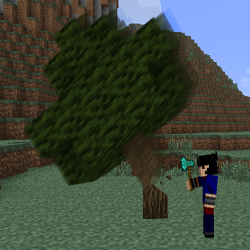
QwickTree is a permission supporting plugin that will harvest the whole tree when the bottom block it destroyed with specific tools (see the default config)

Features
- Harvests the whole tree when the bottom block of the tree is destroyed with config definable items (stone axes or better, by default);
- Checks within a certain area of the tree for common "house" blocks - so your log cabin can stay standing! Can be changed in the config. NOTE: This will not stop them from destroying the tree, but it will stop the player from harvesting the whole tree.
- Replants Sapling when the tree is chopped down - replants all 4 sapling in large Jungle trees!
- Permissions support. Permissions can also be disabled in the config.
- Now supports protect regions. (Only tested with WorldGuard so far)
- Ability to Disable & Enable the plugin in-game all users, or individual users without needing to reboot the server or mess with permissions.
- Drop vines when they are attached to or near the tree.
- Bottom level of leaves are not destroyed on Jungle trees only.
- Tree Specific drops, e.g. Only Oak Trees drop apples.
- Ability to stop QwickTree from chopping down tree types.
- Damage support for the entire tree - so chopping down a Jungle tree won't act like you only hit one block! All items that take damage will be damaged - even a bow or golden helmet!
- Maximum size limit for a tree. Your sacred 10,000 block tree is safe from vandals.
- Logging in grief-logging plugins - so you can see who chopped down the tree. (Only specific plugins supported so far, see below for details)
Plugin Support
Currently, QT supports most protection plugins and the following:
Anti-Grief/Logging
- CoreProtect
If you have any suggestions for integration with other plugins, let me know!
Setup
Config
The Default Configuration is as shown here.
Commands & Permissions
To see a list of commands, and the permissions, see here.
Errors, Defects or improvements
All issues and enhancements are tracked in GitHub. To view all tickets, click on tickets above. If you're having any issues with QwickTree, please start by looking at the troubleshooting steps.
Metrics
This plugin utilizes Hidendra's plugin metrics system, which anonymously collects and sends the following information to mcstats.org:
- A unique identifier
- The server's version of Java
- Whether the server is in offline or online mode
- The plugin's version
- The server's version
- The OS version/name and architecture
- The core count for the CPU
- The number of players online
- The Metrics version
Opting out of this service can be done by editing plugins/Plugin Metrics/config.yml and changing opt-out to true. You can see the presentable data on mcstats.org/plugin/QwickTree
Source Code
The source code is available on GitHub: github.com/gorbb/QwickTree. Please feel free to make alterations or amendments as you see fit.
QwickTreeのインストール方法
A server on Paper or Spigot
The plugin runs on the server core for Minecraft 1.8.1–1.13; players do not need to install anything.
File goes into the plugins folder
Download the file QwickTree.jar (58 KB) and put it into the server’s plugins folder.
Restart the server
On startup the plugin creates its own settings folder in plugins.
Use the “To server” button
On Millida Hosting, the button at the top of the page uploads the file to your server and restarts it for you.
Minecraft 1.13 runs on Java 8: with a different Java version the game may close right after launch.
バージョン
依存関係あり
| Minecraft | ローダー | ファイル | 日付 | 操作 |
|---|---|---|---|---|
| 1.13 | — | QwickTree 2.2.658 KB | ||
| 1.8.1 | — | QwickTree v2.157.8 KB |
レビュー
QwickTreeの最初の評価を書きませんか


