
Minecraft 1.14用PrivateChests プラグイン
プライベートチェストなどのストレージブロック向けの強力で安全な荒らし対策ツール。
PrivateChests
A Powerful and secure anti-grief tool for storage blocks
Usage
- Place a storage block (Chest, Furnace, Crafting table, Brewing stand, etc.)
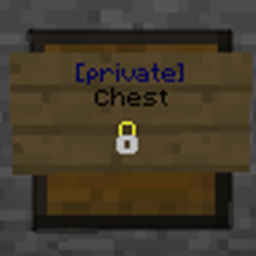
- Place an empty sign on the block, for double chests place on both chest blocks.
- Optional: Instead of having the sign blank, write "[private]" on the first line and then the names of authorized people on the following lines
Note about 1.14: In 1.14 it will currently only work with oak signs, if people would like for it to work with all signs i will make it compatible with alle types of signs. Also download the correct version, the 1.14 version will not work on earlier versions of minecraft.
Features
- Protect all your Chests, Trapped chests, Crafting tables, Brewing stands, Enchantment tables, Droppers, Hoppers, Dispensers, Furnaces, Beacons, Cauldrons and Beds. (Any block can be protected through configuration)
- Easy to set up and easy to use (No configuration or permissions needed for basic usage)
- Explosion protection (Creepers, TNT, etc)
- Hopper protection
- Break protection
- Double chest protection (Makes it impossible for people not authorized to connect to a protected chest, double chests needs to be protected on both chests)
- Bed protection (Makes it so people can't sleep in your bed to change their spawn point. Just as double chests, beds need one sign for each block it occupies)
- Autmatically remove private signs when a player is away from the server for a long time (confiurable amount of time, feature is disabled by default)
- Allows users to recive alerts when an admin is searching through their chest (can be removed through permisions)
- Allows you to change what needs to be on the first line of the sign for the block to become a private block
Permissions
- privatechests.private: Allows a user to create a private sign, set by default
- privatechests.alert: Allows a user to recive an alert when an admin is using their protected blocks
- privatechests.admin.ignore: Allows a user to interact with blocks made private by other users
- privatechests.admin.noalert: Allows an admin to interact with a block without the owner being notified
More Usage Information and Restrictions:
- Only players on the protection sign are allowed to place a hopper directly under a protected storage block.
- Minecart hoppers are not able to pull items out of protected storage blocks.
- It is not possible for a person not on the protection sign to place a sign adjacent to a storage block.
- You can have as much as 4 signs on each block and 6 on double chests, allowing 12 people to access normal blocks and 18 to double chests.
- People who don't have the "privatechests.private" permission can not place wall signs with "[private]" on the first line.
PrivateChestsのインストール方法
A server on Paper or Spigot
The plugin runs on the server core for Minecraft 1.14; players do not need to install anything.
File goes into the plugins folder
Download the file PrivateChests.jar (22 KB) and put it into the server’s plugins folder.
Restart the server
On startup the plugin creates its own settings folder in plugins.
Use the “To server” button
On Millida Hosting, the button at the top of the page uploads the file to your server and restarts it for you.
Minecraft 1.14 runs on Java 8: with a different Java version the game may close right after launch.
バージョン
依存関係あり
| Minecraft | ローダー | ファイル | 日付 | 操作 |
|---|---|---|---|---|
| 1.14 | — | 1.14 and later21.8 KB |
レビュー
PrivateChestsの最初の評価を書きませんか



