
Block That Command
This plugin for the Owner of the server And The Owner can add a command to block list command in config
Features
- Blocking command
- You Can Add a command to block in the config
Commands and Permissions
Command Function Permission
/btc about About of the plugin
/btc reload reload the plugin btc.reload
/btc add add command btc.add
/btc remove remove command btc.remove
/btc list see the commands btc.list
if you have btc.bypass you can do all commands
Configuration
- %p Get The Player Name.
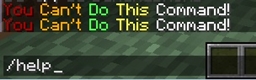
Msg: §4You §6Can't §aDo §eThis §fCommand!
Commands:
- - pl
- - plugins
- - help
Installation
- Download the plugin
- Drop the plugin to the plugins list in the config
- Reload the server
- Enjoy XD
Block That Commandのインストール方法
A server on Paper or Spigot
The plugin runs on the server core; players do not need to install anything.
File goes into the plugins folder
Download the file Block_That_Command_v1.2.jar (6 KB) and put it into the server’s plugins folder.
Restart the server
On startup the plugin creates its own settings folder in plugins.
Use the “To server” button
On Millida Hosting, the button at the top of the page uploads the file to your server and restarts it for you.
バージョン
依存関係あり
| Minecraft | ローダー | ファイル | 日付 | 操作 |
|---|---|---|---|---|
| — | — | Block that command v1.26.4 KB |
レビュー
Block That Commandの最初の評価を書きませんか


