
- ダウンロード
- 1 ダウンロード
- 閲覧
- 22 閲覧
- 更新日
- 更新日 17.10.2026
- 1.12.2 — 1.16.5
 Forge
Forge
Woot MODについて
注意:
1.15/1.16はゲーム内ガイドブック用にPatchouliをサポートしています
1.12はゲーム内ガイドブック用にGuide-APIをサポートしています
変更履歴
1.16の変更履歴 https://github.com/Ipsis/Woot/blob/1.16.x/CHANGELOG.md
1.15の変更履歴 https://github.com/Ipsis/Woot/blob/1.15.x/CHANGELOG.md
1.12の変更履歴 https://github.com/Ipsis/Woot/wiki/Woot-Changelog-1.12
RGShaによるMod紹介
Minecraftでモブファームを建てた経験は誰にでもあるでしょう。
どれも結局は同じことに行き着きます。
- モブをスポーンさせる
- モブを倒す
- XPとドロップを回収する
- 大量にスポーンするエンティティに対処する
Wootは少し違うやり方をします.....ワールドにモブを一切スポーンさせません....何ですって?!
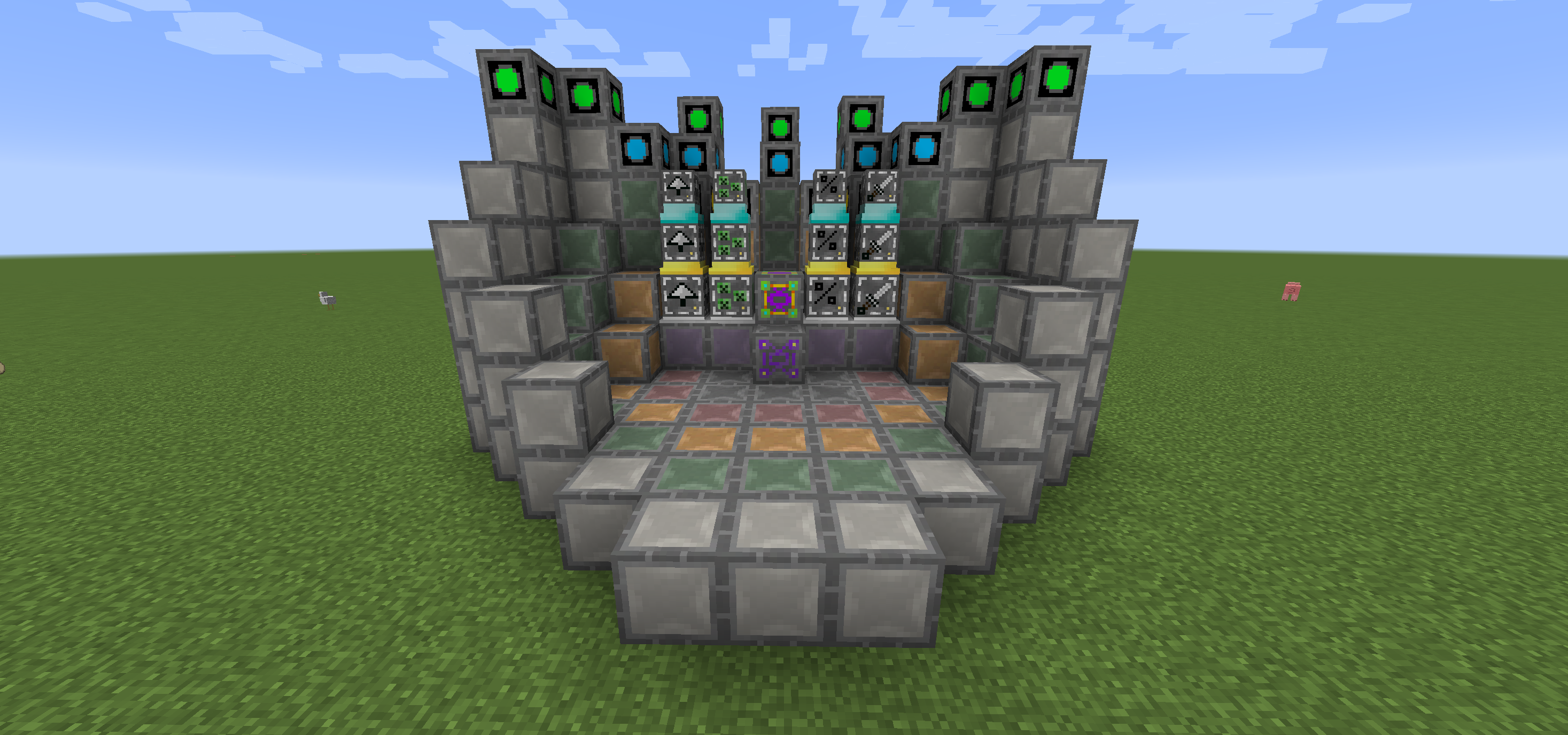
Wootでは工場を建ててから、好きなモブでプログラムします。あとは電力と、そのモブが生成するはずだったドロップを入れるインベントリを与えるだけです。
上位のモブに対応するため、工場には複数のティアがあります。そう、Witherをスポーンさせるには大きな工場が必要なのです!
もう少し楽にするため、各ティアのマルチブロックでブロックをどこに置くべきかを示すレイアウトブロックがあります。
工場をアップグレードして追加の恩恵を得ることもできますが、いずれも追加の電力を消費します。
- Looting I/II/III - モブの撃破にLootingを適用
- Rate I/II/III - モブのスポーンを速くする
- Mass I/II/III - より多くのモブをスポーンさせる
- Decapitate I/II/III - 頭のドロップ率を上げる
- XP I/II/III - XPシャードを生成する
- Efficiency I/II/III - 工場の電力コストを少し下げる
- BloodMagic I/II/III - 儀式によるLife Essenceの生成
https://github.com/Ipsis/Woot/wiki
http://www.minecraftforum.net/forums/mapping-and-modding/minecraft-mods/2659457-woot-the-alternative-mob-factory

Wootのインストール方法
With Millida Launcher
Install Millida Launcher
The launcher is free: download it at millida.net/launcher and sign in with any nickname.
Click “Install” on this page
The launcher opens and installs the mod for Minecraft 1.12.2–1.16.5 on Forge automatically.
Launch the game
A profile with it appears in the launcher: click “Play”.
Manually
Install Forge
The loader must match the game version of the mod file, for example Minecraft 1.16.5. After installing it, a separate profile appears in your launcher.
Download the file for your version
In the version list above, pick the file woot-1.16.5-1.0.8.4.jar (1.1 MB) for your game version.
Put it in the mods folder
The folder is inside .minecraft (Windows: %appdata%\.minecraft\mods). If it does not exist, create it.
Launch the loader profile
Open “Mods” in the main menu: Woot should be in the list.
Minecraft 1.16.5 runs on Java 8: with a different Java version the game may close right after launch.
バージョン
依存関係あり
| Minecraft | ローダー | ファイル | 日付 | 操作 |
|---|---|---|---|---|
| 1.16.5 | Forge | woot-1.16.5-1.0.8.4.jar1.1 MB 1 | ||
| 1.16.2 | Forge | woot-1.16.2-1.0.0.0.jar903 KB | ||
| 1.15.2 | — | woot-1.15.2-1.1.1.0.jar888 KB | ||
| 1.12.2 | — | woot-1.12.2-1.4.11.jar859 KB | ||
| 1.12.2 | — | woot-1.12.2-0.0.10.jar741 KB |
レビュー
Wootの最初の評価を書きませんか


