

Minecraft 1.20.1, 1.21.1用Waystones MOD
ウェイストーンからウェイストーンへテレポート、または魔法の巻物を作成してワープ。
 NeoForge
 Fabric
 Forge
ForgeWaystones MODについて
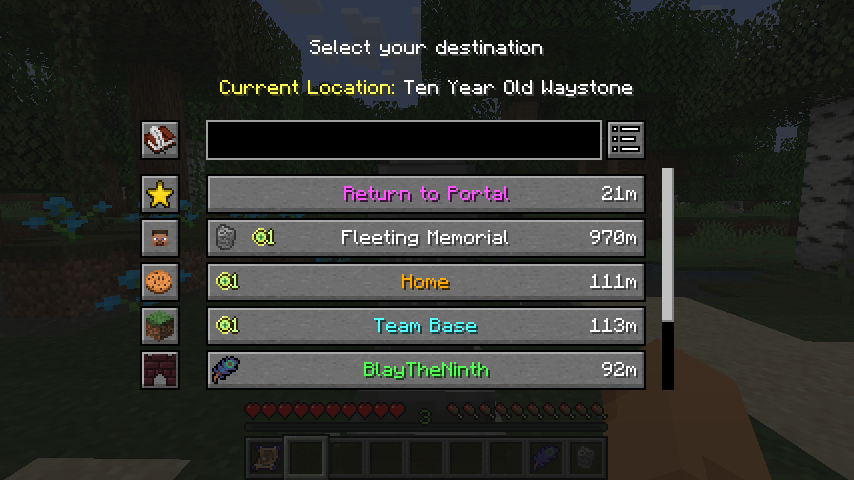
このMODは、プレイヤーが一度起動した後に戻ることができるウェイストーンブロックを追加します。戻る手段は、ワープスクロール、充電可能なワープストーン、または既存のウェイストーンを使って別のウェイストーンへ移動する方法があります。
サバイバルモード、アドベンチャーマップ、マルチプレイヤーサーバーで、/warpや/homeコマンドの代替として使用できます。ウェイストーンは全プレイヤーが利用できるように設定でき、追加アイテムなしでワープできるように設定可能なインベントリボタンを用意することもできます。

このMODにはBalmが必要で、MODと一緒にインストールする必要があります。
Minecraft 26.1以降では、Shogiも必要です。これは高度に設定可能なワープ条件や、私のMOD全体にわたる多くのルールベースの設定を支えています。
- クラフト可能なウェイストーン、ワーププレート、ワープスクロール
- ウェイストーンを使ってある場所から別の場所へテレポート
- コミュニティハブや友人との共有のためのグローバルウェイストーン
- インベントリ内のオプションのテレポートボタン
- 村にあるウェイストーン構造物
KrzairによるMOD紹介
含まれているリターンスクロールとワープストーンのアイテムアイコンは@JoeCreatesによるもので、CC-BY-SA 3.0ライセンスの下でここで公開されています。

Waystonesのインストール方法
With Millida Launcher
Install Millida Launcher
The launcher is free: download it at millida.net/launcher and sign in with any nickname.
Click “Install” on this page
The launcher opens and installs the mod for Minecraft 1.16.5–26.3 on Fabric, Forge or NeoForge automatically, together with its dependencies: Balm, Fabric API, Dependency.
Launch the game
A profile with it appears in the launcher: click “Play”.
Manually
Install Fabric, Forge or NeoForge
The loader must match the game version of the mod file, for example Minecraft 26.3. After installing it, a separate profile appears in your launcher.
Download the file for your version
In the version list above, pick the file waystones-neoforge-26.3-26.3.0.1.jar (1.1 MB) for your game version and loader.
Put it in the mods folder
The folder is inside .minecraft (Windows: %appdata%\.minecraft\mods). If it does not exist, create it. Required dependencies go there too: Balm, Fabric API, Dependency.
Launch the loader profile
Open “Mods” in the main menu: Waystones should be in the list.
On a server
A server on Fabric, Forge or NeoForge
The mod only works on a server with the same loader and game version, for example 26.3.
File goes into the server’s mods folder
Stop the server, put the mod file into the mods folder and start the server again.
Use the “To server” button
On Millida Hosting, the button at the top of the page uploads the file to your server and restarts it for you.
バージョン
依存関係あり
| Minecraft | ローダー | ファイル | 日付 | 操作 |
|---|---|---|---|---|
| 1.21.1 | NeoForge | 1.21.11.2 MB 96 | ||
| 1.21.1 | Fabric | 1.21.11.2 MB 44 | ||
| 1.21.1 | Forge | 1.21.11.2 MB 19 | ||
| 26.3 | NeoForge | 26.31.1 MB 7 | ||
| 26.3 | Fabric | 26.31.2 MB 121 | ||
| 1.21.1 | NeoForge | 1.21.11.2 MB 1 | ||
| 1.21.1 | Forge | 1.21.11.2 MB | ||
| 1.21.1 | Fabric | 1.21.11.2 MB |
動作に必要なもの
- Balm必須
- Fabric API必須
- Dependency必須
FAQ
Which Minecraft versions does Waystones work on?
There are files for 1.16.5–26.3, 14 versions in total. The newest is 26.3.
Is Waystones for Forge or Fabric?
There are files for Fabric: 1.18–26.3, for Forge: 1.16.5–1.21.1 and for NeoForge: 1.21–26.3.
What does Waystones need to work?
Required: Balm, Fabric API, Dependency. Without them the mod will not start: dependencies go into the same mods folder.
Does Waystones work on a server?
Yes. Waystones works both in singleplayer and on a server.
Where can I download Waystones safely?
On this page: the file waystones-neoforge-26.3-26.3.0.1.jar (1.1 MB) is stored on Millida’s server, with no link shorteners. SHA-1 checksum: c30ff7476f23e87dcd20e1577c003e084c01ba76.
レビュー
Waystonesの最初の評価を書きませんか


