
- 閲覧
- 24 閲覧
- 更新日
- 更新日 17.10.2026
- 1.15.2
 Forge
Forge
Tiny Progressions MODについて
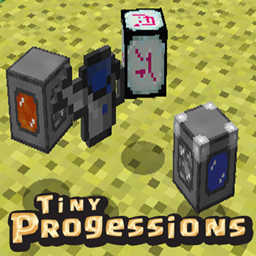
Tiny Progressionsは、ゲームプレイを強化するブロックとアイテムを追加します。主なコンセプトは、低レベルの自動化と利便性でプレイヤーを支援し、さらに中盤から終盤の要素も追加することです。
特徴:
- じょうろ
- 丸石生成器
- 成長クリスタル
- 菌糸の種
- エメラルドのリンゴ
- ダイヤモンドのリンゴ
- 救急キット
- 木炭ブロック
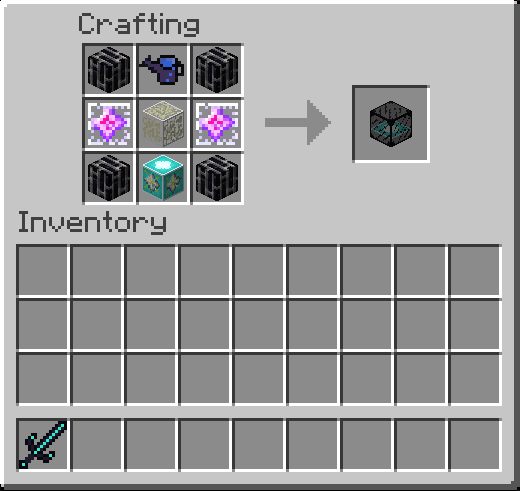
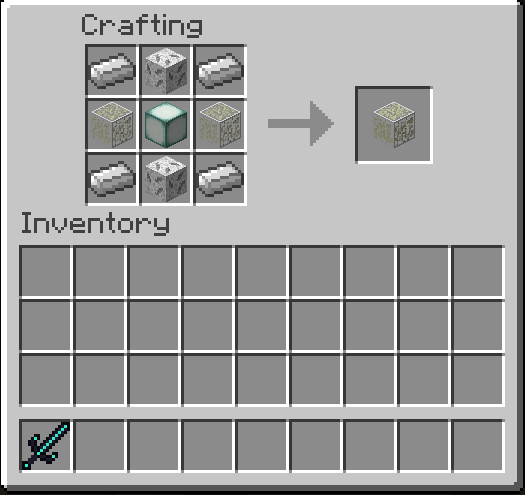
- ウィザー耐性ガラス
- ウィザー耐性黒曜石
- 圧縮した肉ブロック
- 圧縮した骨ブロック
- 圧縮したネザースターブロック
- 圧縮した火打石ブロック
- 強化黒曜石インゴット
- 閃緑岩、花崗岩、安山岩のレンガブロック
- 石の棒と松明
- エンダー鉱石とダスト
- Notchのリンゴのレシピまたは金のリンゴの進行
- 滑らかなエンドストーン
- 石の防具
- 火打石の防具
- オークの防具
- 骨の防具
- バースデーピッケル
- バニラ風の大鎌、バトルアックス、マルチツール、そしてリーチが延びた槍。
- エメラルドと黒曜石のツール
大鎌の新しい右クリック機能:
- 草ブロック = 土
- 草の道 = 土
- 土 = 耕地
- 粗い土 = 土 = 耕地
- ポドゾル = 粗い土 = 土 = 耕地
- 菌糸 = 粗い土 = 土 = 耕地
- これらは剣としても使えるようになりました!
- また、3x3の範囲で作物を収穫し、種を植え直します!
詳細情報:
- じょうろ: 作物や苗木に骨粉を使う必要をなくすための2段階のじょうろ。
- 丸石生成器: 丸石の自動化のための5段階の丸石生成器。各段階で出力速度が上がります。ホッパーやパイプを使って生成器から丸石を取り出せます。
- 成長クリスタル: 9ブロックの半径で作物の成長を促進するために使われます。燃料は不要で、作物の生産量を増やすのに役立ちます。
- 設定: 設定可能な項目がたくさんあり、一部の項目はデフォルトで無効になっています。
Tiny Progressionsは私の他のMODと併用できます:
Knob Control
Magma Monsters
古い情報:
インストール:
古いレビュー:
コメントはすべてCurseForgeに投稿してください
私たちのDiscordコミュニティに参加したい場合は、ぜひご参加ください。参加すると、より早くヘルプを受けたり問題を報告したりできます。
私とこのMODを支援したい場合は、ぜひお願いします。
Patreon: https://www.patreon.com/kashdeya
Github: https://github.com/Kashdeya/Tiny-Progressions/issues
Modpackポリシー: あなたのModpackに自由に含めることができます。
Tiny Progressionsのインストール方法
With Millida Launcher
Install Millida Launcher
The launcher is free: download it at millida.net/launcher and sign in with any nickname.
Click “Install” on this page
The launcher opens and installs the mod for Minecraft 1.15.2 on Forge automatically.
Launch the game
A profile with it appears in the launcher: click “Play”.
Manually
Install Forge
The loader must match the game version of the mod file, for example Minecraft 1.15.2. After installing it, a separate profile appears in your launcher.
Download the file for your version
In the version list above, pick the file tinyprogressions-1.15.2-4.0.8.jar (1.3 MB) for your game version.
Put it in the mods folder
The folder is inside .minecraft (Windows: %appdata%\.minecraft\mods). If it does not exist, create it.
Launch the loader profile
Open “Mods” in the main menu: Tiny Progressions should be in the list.
Minecraft 1.15.2 runs on Java 8: with a different Java version the game may close right after launch.
バージョン
依存関係あり
| Minecraft | ローダー | ファイル | 日付 | 操作 |
|---|---|---|---|---|
| 1.15.2 | Forge | Tiny Progressions 4.0.8 (HotFix)1.3 MB | ||
| 1.15.2 | — | Tiny Progressions 4.0.41.3 MB | ||
| 1.15.2 | — | Tiny Progressions 4.0.31.3 MB | ||
| 1.15.2 | Forge | Tiny Progressions 4.0.01.3 MB |
FAQ
Which Minecraft versions does Tiny Progressions work on?
Only Minecraft 1.15.2: there are no files for other versions.
Is Tiny Progressions for Forge or Fabric?
Only for Forge: 1.15.2. There are no files for Fabric or NeoForge: a mod for another loader will not start.
Does Tiny Progressions need other mods?
The author lists no required dependencies: the Forge loader is enough.
Which Java does Tiny Progressions need?
Minecraft 1.15.2 runs on Java 8. If the game closes right after launch, the usual cause is the wrong Java version in the profile settings.
Where can I download Tiny Progressions safely?
On this page: the file tinyprogressions-1.15.2-4.0.8.jar (1.3 MB) is stored on Millida’s server, with no link shorteners. SHA-1 checksum: acb7e58c5c5f84d45dab1118a1a2be837d9d395a.
レビュー
Tiny Progressionsの最初の評価を書きませんか


