

 NeoForge
 Fabric
 Forge
Time in a Bottle MODについて
コード MangoRage を使用すると、すべての購入が 20% オフになります https://sodiumhosting.com/mangorage
鉱石がようやく精錬し終わるのを待つのにうんざりしていませんか?小麦が育つのを見ながら餓死しそうですか?(理論上の)ペンキが乾くのを見るのに飽きてきましたか?時間を無駄にするのはやめて、Time In A Bottle を使い始めましょう!かまど、作物、醸造台など、ティック可能なブロックをクリックするだけです!
機能
- ブロックがティックされる速度を加速!
- 時間を受動的に収集
- 使いやすい管理者コマンド
- TIAB Curio Support Mod による Curio とキーバインドのサポート
- Forge、Fabric、NeoForge をサポート!(1.20.6+)
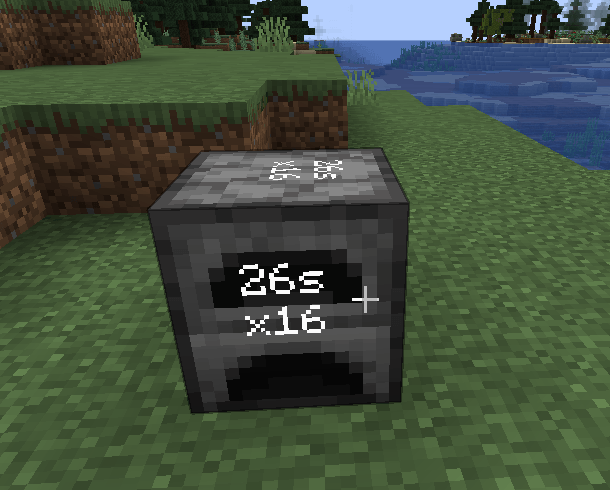
超高速かまど
クラフトレシピ
コマンドを使用してボトルから時間を追加/削除
小麦を素早く育てる!
使用方法
まず「Time in a bottle」アイテムが必要です。
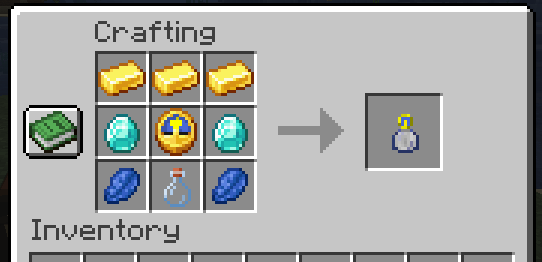
入手したら、時間が増えるのを待ちます。
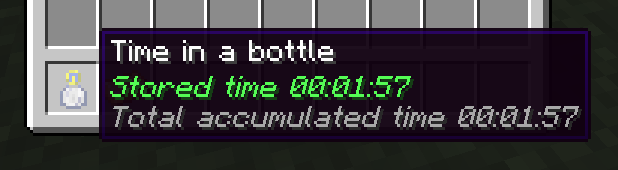
時間が増えたら、右クリック(かまどのようなブロックには Shift 右クリック)すると、ブロックが加速されます!クリックするたびに適用される速度が倍になり、30 秒間持続します。
コマンド
ボトルから時間を追加/削除するコマンドが 1 つあります
/tiab <addTime/removeTime> <seconds>
必要な時間
「x2」ごとに 30 秒の保存時間が必要です。クリックするたびに以下の時間が必要です。
x2 - 30 秒 x4 - 30 秒 x8 - 60 秒 x16 - 120 秒 x32 - 240 秒 x64 - 480 秒 など
設定
設定ファイルは <world folder>/serverconfig/tiab-server.toml にあります
Max Stored Time Possible in ticks maxstoredtime = 622080000 Ticks constant in ticks ticksconst = 20 Each use Duration in seconds eachuseduration = 30 Define maximum time the items can be used continuously. Corresponding to maximum times faster: Eg. 2^8=256 maxratemulti = 8
注意
1.20.1 以降のみがサポートされています。それ以前のバージョンでは、これのフォーク元である Time in a bottle standalone を使用してください。
私を支援したい場合は、寄付するか Patreon に登録してください。
サポート
サポートは Discord サーバーまたは GitHub リポジトリで提供されます
クレジット
haoict による Time in a bottle standalone からのフォーク
元のアイデアは Lumien231 による Random Things Mod から来ています
説明は JustDoom が作成 ;)
Time in a Bottleのインストール方法
With Millida Launcher
Install Millida Launcher
The launcher is free: download it at millida.net/launcher and sign in with any nickname.
Click “Install” on this page
The launcher opens and installs the mod for Minecraft 1.20.1–26.3 on Fabric, Forge or NeoForge automatically.
Launch the game
A profile with it appears in the launcher: click “Play”.
Manually
Install Fabric, Forge or NeoForge
The loader must match the game version of the mod file, for example Minecraft 26.3. After installing it, a separate profile appears in your launcher.
Download the file for your version
In the version list above, pick the file tiab-neoforge-8.0.0.jar (74 KB) for your game version and loader.
Put it in the mods folder
The folder is inside .minecraft (Windows: %appdata%\.minecraft\mods). If it does not exist, create it.
Launch the loader profile
Open “Mods” in the main menu: Time in a Bottle should be in the list.
バージョン
依存関係あり
| Minecraft | ローダー | ファイル | 日付 | 操作 |
|---|---|---|---|---|
| 1.20.1 | Forge | Time in a bottle 4.1.156.1 KB 1 | ||
| 26.1 | NeoForge | Time in a bottle 8.0.074.1 KB 3 | ||
| 26.1 | Fabric | Time in a bottle 8.0.078.4 KB 29 |
FAQ
Which Minecraft versions does Time in a Bottle work on?
There are files for 26.3, 26.2, 26.1.2, 26.1.1, 26.1, 1.20.1. The newest is 26.3.
Is Time in a Bottle for Forge or Fabric?
There are files for Fabric: 26.1–26.3, for Forge: 1.20.1 and for NeoForge: 26.1–26.3.
Does Time in a Bottle need other mods?
The author lists no required dependencies: the Fabric, Forge or NeoForge loader is enough.
How do I download Time in a Bottle?
With Millida Launcher: it installs Time in a Bottle into a modpack by itself, for the right game version and loader. The launcher is free.
レビュー
Time in a Bottleの最初の評価を書きませんか


