

Minecraft 1.20.1, 26.3用Structure Essentials MOD
構造物のための必須機能:より速い探索、距離の調整、近くの構造物コマンド、構造物バイオームの自動互換、構造物の重複防止、ランダムソースのクラッシュ防止、デバッグログなど
 Fabric
 NeoForge
 Forge
ForgeStructure Essentials MODについて
Structure Essentialsは、構造物の高速検索、距離調整、構造物の重複防止から、ランダムソースのクラッシュ防止、デバッグログ、構造物/フィーチャーのパフォーマンス記録など、構造物に関するさまざまなユーティリティを提供します。
検索の強化:
- 構造物検索の高速化: 構造物の検索速度を向上させ、宝の地図を使用する際などのサーバーラグスパイクを軽減します。
- 構造物検索のタイムアウト: 設定可能な時間制限を設けることで、長時間の検索によるサーバークラッシュを防ぎます。
- 検索距離の設定: 地図検索距離、グローバル構造物検索距離、locateコマンド距離を調整できます。
互換性の強化:
- 間隔/分離の制御: 設定からすべての構造物の距離要件を一度に調整できます
- 構造物の重複: 設定で他の構造物との最小距離を設定し、重複を防ぎます
- 構造物バイオームの自動互換: 構造物の生成を自動的に検出して適合するバイオームを含めるよう調整し、構造物modとバイオームmod間の互換性を向上させます。
- バイオーム類似性要件の厳格さ制御を含みます。
信頼性の向上:
- 一部のmodでクラッシュを引き起こす可能性のある不適切な間隔/分離値を修正します
- 構造物配置のトラブルシューティング用にオプションのデバッグログを有効にします
- クラッシュせずに構造物の削除/名前変更を可能にします
- レガシーランダムソースのエラーを防ぎます。
コマンドユーティリティ:
- /structureessentials getStructuresNearby - 近くの構造物を一覧表示します。
- /structureessentials getBiomeTags - バイオームに関連するタグを表示します。
- /structureessentials getBiomesForTag - 特定のタグにリンクされたバイオームを表示します。
- /structureessentials getSimilarForBiome - 指定したバイオームに類似するバイオームとタグを提案します。
- /structureessentials showGenerationTimes - ワールド生成中にかかった時間で構造物とフィーチャーを一覧表示します
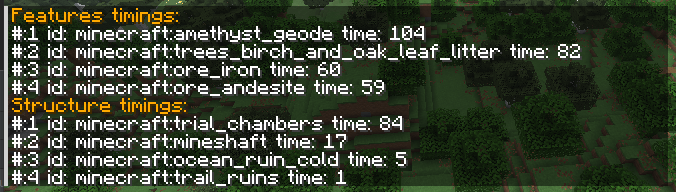
新しいバージョンではCupboard依存関係のインストールが必要です
すべての設定は完全に構成可能で、パフォーマンスとゲームプレイのバランスを細かく調整できます:
- structureSearchTimeout: 構造物の最大検索時間を設定します
- useFastStructureLookup: より高速な構造物検索を切り替えます
- spacingSeparationModifier: 構造物の生成密度を調整します
- autoBiomeCompat: バイオームと構造物の互換性を自動的に処理します
- disableLegacyRandomCrashes: レガシーランダム原因によるクラッシュを防ぎます
既知の非互換性はなく、どのmodとも問題なく動作するはずです。
クライアントとサーバーの両方にインストールする必要はなく、ほとんどの機能はサーバー(シングルプレイヤーの内部サーバーも含む)に影響します
このmodを気に入っていただけたら、開発の支援をご検討ください。どんな支援も大変ありがたく、より多くの時間をこれに費やす助けになります。
Patreonで支援していただくか、ただこのmodを広めていただくだけでも構いません。
Structure Essentialsのインストール方法
With Millida Launcher
Install Millida Launcher
The launcher is free: download it at millida.net/launcher and sign in with any nickname.
Click “Install” on this page
The launcher opens and installs the mod for Minecraft 1.20.1–26.3 on Fabric, Forge or NeoForge automatically.
Launch the game
A profile with it appears in the launcher: click “Play”.
Manually
Install Fabric, Forge or NeoForge
The loader must match the game version of the mod file, for example Minecraft 26.3. After installing it, a separate profile appears in your launcher.
Download the file for your version
In the version list above, pick the file structureessentials-fabric-26.3-5.0.jar (59 KB) for your game version and loader.
Put it in the mods folder
The folder is inside .minecraft (Windows: %appdata%\.minecraft\mods). If it does not exist, create it.
Launch the loader profile
Open “Mods” in the main menu: Structure Essentials should be in the list.
バージョン
依存関係あり
| Minecraft | ローダー | ファイル | 日付 | 操作 |
|---|---|---|---|---|
| 26.3 | Fabric | structureessentials-fabric-26.3-5.0.jar58.6 KB 25 | ||
| 26.3 | NeoForge | structureessentials-26.3-5.0.jar59 KB 3 | ||
| 1.20.1 | Forge, NeoForge | structureessentials-1.20.1-5.0.jar61.5 KB 7 |
FAQ
Which Minecraft versions does Structure Essentials work on?
There are files for 26.3, 1.20.1. The newest is 26.3.
Is Structure Essentials for Forge or Fabric?
There are files for Fabric: 26.3, for Forge: 1.20.1 and for NeoForge: 1.20.1–26.3.
Does Structure Essentials need other mods?
The author lists no required dependencies: the Fabric, Forge or NeoForge loader is enough.
Where can I download Structure Essentials safely?
On this page: the file structureessentials-fabric-26.3-5.0.jar (59 KB) is stored on Millida’s server, with no link shorteners. SHA-1 checksum: c7f6b31246c71efc5b9bb86a47d496feb7dfd4a5.
レビュー
Structure Essentialsの最初の評価を書きませんか


