
Minecraft 1.7.10用Steve's Carts 2 MOD
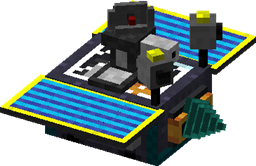
Minecraftにモジュール式トロッコを導入。トロッコに採掘、農業、太陽光発電、モブへの射撃、アイテムのクラフトなど、さまざまなことをさせられます。
Steve's Carts 2 MODについて
Steve's Carts 2 は、この MOD のクレジットを明記し、ゲーム内アイテムを現実のお金で販売しない限り、あなたのサーバーや MOD パック(公開・非公開を問わず)で自由に使用できます。
Steve's Carts 2のインストール方法
With Millida Launcher
Install Millida Launcher
The launcher is free: download it at millida.net/launcher and sign in with any nickname.
Click “Install” on this page
The launcher opens and installs the mod for Minecraft 1.7.10 automatically.
Launch the game
A profile with it appears in the launcher: click “Play”.
Manually
Download the file for your version
In the version list above, pick the file StevesCarts2.0.0.b18.jar (2.4 MB) for your game version.
Put it in the mods folder
The folder is inside .minecraft (Windows: %appdata%\.minecraft\mods). If it does not exist, create it.
Launch the loader profile
Open “Mods” in the main menu: Steve's Carts 2 should be in the list.
Minecraft 1.7.10 runs on Java 8: with a different Java version the game may close right after launch.
バージョン
依存関係あり
| Minecraft | ローダー | ファイル | 日付 | 操作 |
|---|---|---|---|---|
| 1.7.10 | — | StevesCarts2.0.0.b18.jar2.4 MB |
FAQ
Which Minecraft versions does Steve's Carts 2 work on?
Only Minecraft 1.7.10: there are no files for other versions.
Which Java does Steve's Carts 2 need?
Minecraft 1.7.10 runs on Java 8. If the game closes right after launch, the usual cause is the wrong Java version in the profile settings.
Where can I download Steve's Carts 2 safely?
On this page: the file StevesCarts2.0.0.b18.jar (2.4 MB) is stored on Millida’s server, with no link shorteners. SHA-1 checksum: 8cef6d96120bbb8f90e7e111207b74b38df79af9.
レビュー
Steve's Carts 2の最初の評価を書きませんか


