

Minecraft 26.2用Status Effect Bars MOD
ステータス効果のオーバーレイにカスタマイズ可能なバーを追加し、効果の残り時間を表示します。
 Fabric
 Quilt
QuiltStatus Effect Bars MODについて
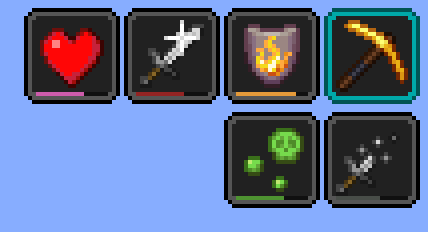
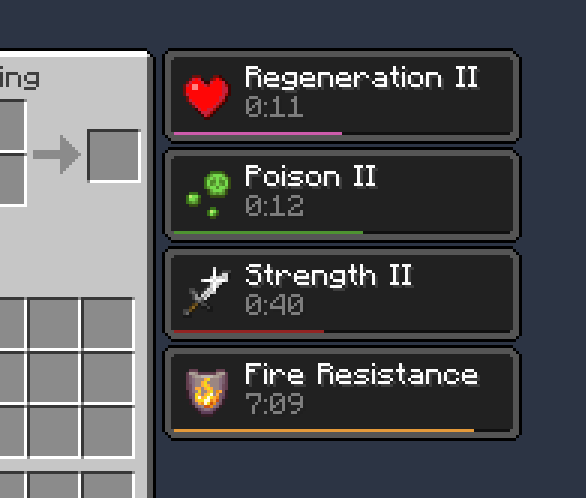
ステータス効果のオーバーレイとインベントリに、効果の残り時間を示す小さくカスタマイズ可能なバーを追加するクライアントサイドのFabric MODです。
特徴:

- かわいい小さなバー
- 色とバーの位置を編集するための設定画面
- バーを自動的に非表示にできる特定のケースで clutter を減らす (例: ビーコンの効果や非常に長い持続時間の効果)
[Cloth Config] が必要です。設定画面は Mod Menu を使用してアクセスできます。
クレジット
- SkyUIのアクティブ効果HUDに触発された可能性があります
- 設定画面は [Cloth Config] によって提供されています
- ptbr 翻訳は FITFC によるものです
リンク: CurseForge · GitHub · Modrinth
[Cloth Config]: https://modrinth.com/mod/cloth-config

Status Effect Barsのインストール方法
With Millida Launcher
Install Millida Launcher
The launcher is free: download it at millida.net/launcher and sign in with any nickname.
Click “Install” on this page
The launcher opens and installs the mod for Minecraft 1.21.11–26.2 on Fabric or Quilt automatically.
Launch the game
A profile with it appears in the launcher: click “Play”.
Manually
Install Fabric or Quilt
The loader must match the game version of the mod file, for example Minecraft 26.2. After installing it, a separate profile appears in your launcher.
Download the file for your version
In the version list above, pick the file status-effect-bars-1.0.12.jar (44 KB) for your game version and loader.
Put it in the mods folder
The folder is inside .minecraft (Windows: %appdata%\.minecraft\mods). If it does not exist, create it.
Launch the loader profile
Open “Mods” in the main menu: Status Effect Bars should be in the list.
Status Effect Bars works on the player’s side only: there is no need to install it on a server.
バージョン
依存関係あり
| Minecraft | ローダー | ファイル | 操作 |
|---|---|---|---|
| 26.2 | Fabric, Quilt | 26.243.9 KB 17 | |
| 26.1 | Fabric, Quilt | 26.147.4 KB 7 | |
| 1.21.11 | Fabric, Quilt | 1.21.1146.6 KB 62 |
FAQ
Which Minecraft versions does Status Effect Bars work on?
There are files for 26.2, 26.1.2, 26.1.1, 26.1, 1.21.11. The newest is 26.2.
Is Status Effect Bars for Forge or Fabric?
There are files for Fabric: 1.21.11–26.2 and for Quilt: 1.21.11–26.2. There are no files for Forge or NeoForge: a mod for another loader will not start.
Does Status Effect Bars need other mods?
The author lists no required dependencies: the Fabric or Quilt loader is enough.
Do I need to install Status Effect Bars on a server?
No. Status Effect Bars works on the player’s side only: there is no need to install it on a server.
Where can I download Status Effect Bars safely?
On this page: the file status-effect-bars-1.0.12.jar (44 KB) is stored on Millida’s server, with no link shorteners. SHA-1 checksum: f29719c3101ebe009dae76bca5215cf7482f8b9c.
レビュー
Status Effect Barsの最初の評価を書きませんか


