
 NeoForge
 Forge
ForgeSlab Machines MODについて
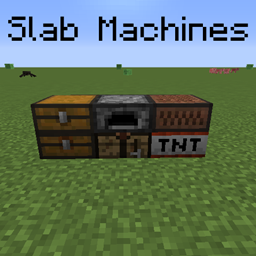
このMODは、バニラ(およびMOD製)の機械のスラブ版を追加することに特化しています。
現在、このMODには以下が含まれています:
- スラブ作業台(Fast Workbench MODと互換性あり)
- スラブかまど(Fast Furnace MODと互換性あり)
- スラブ音符ブロック
- スラブTNT
- スラブチェスト(およびトラップチェスト)
MODサポート:
- Tinkers' Construct(インストールすると、すべてのテーブルの種類のスラブ版が追加されます。(ツールフォージを含む)
- Just Enough Items(JEI)(インストールすると、+を使ってレシピを挿入できます)
- Crafting Tweaks(インストールすると、スラブ作業台にボタンが追加されます
1.12.2では、このMODにはMcMultiPartが必要です;
Slab Machinesの1.16+バージョンでは、現時点でスラブを混在させることはできません。
このMODはCrafting Slabsを基にしています。
サーバーが必要ですか?プロモコード「mrbysco」を使用すると、最初の月が20%オフになります
質問がある場合は、お気軽に私のDiscordにご参加ください。
Slab Machinesのインストール方法
With Millida Launcher
Install Millida Launcher
The launcher is free: download it at millida.net/launcher and sign in with any nickname.
Click “Install” on this page
The launcher opens and installs the mod for Minecraft 1.12.2–26.1.2 on Forge or NeoForge automatically.
Launch the game
A profile with it appears in the launcher: click “Play”.
Manually
Install Forge or NeoForge
The loader must match the game version of the mod file, for example Minecraft 26.1.2. After installing it, a separate profile appears in your launcher.
Download the file for your version
In the version list above, pick the file SlabMachines-26.1.2-11.0.0.jar (151 KB) for your game version and loader.
Put it in the mods folder
The folder is inside .minecraft (Windows: %appdata%\.minecraft\mods). If it does not exist, create it.
Launch the loader profile
Open “Mods” in the main menu: Slab Machines should be in the list.
バージョン
依存関係あり
| Minecraft | ローダー | ファイル | 日付 | 操作 |
|---|---|---|---|---|
| 26.1.2 | NeoForge | SlabMachines-26.1.2-11.0.0.jar151 KB | ||
| 1.21.1 | NeoForge | SlabMachines-1.21.1-6.1.1.jar154 KB | ||
| 1.20 | NeoForge, Forge | SlabMachines-1.20-2.1.1.jar140 KB | ||
| 1.20 | Forge | SlabMachines-1.20-2.1.0.jar140 KB | ||
| 1.12.2 | — | Slab_Machines-1.0.6.jar231 KB |
レビュー
Slab Machinesの最初の評価を書きませんか


