
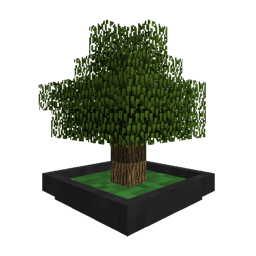
Sky Bonsais MODについて
Vadis365のSkyOrchards MODにBonsai Treesの統合を自動的に提供します。
カスタムリソースツリーごとにシェイプファイルをまだ作成する必要があります。
Sky Bonsaisのインストール方法
With Millida Launcher
Install Millida Launcher
The launcher is free: download it at millida.net/launcher and sign in with any nickname.
Click “Install” on this page
The launcher opens and installs the mod for Minecraft 1.12–1.12.2 automatically.
Launch the game
A profile with it appears in the launcher: click “Play”.
Manually
Download the file for your version
In the version list above, pick the file SkyBonsais-1.0.1.jar (11 KB) for your game version.
Put it in the mods folder
The folder is inside .minecraft (Windows: %appdata%\.minecraft\mods). If it does not exist, create it.
Launch the loader profile
Open “Mods” in the main menu: Sky Bonsais should be in the list.
Minecraft 1.12.2 runs on Java 8: with a different Java version the game may close right after launch.
バージョン
依存関係あり
| Minecraft | ローダー | ファイル | 日付 | 操作 |
|---|---|---|---|---|
| 1.12.1 | — | SkyBonsais-1.0.1.jar10.9 KB |
FAQ
Which Minecraft versions does Sky Bonsais work on?
There are files for 1.12.2, 1.12.1, 1.12. The newest is 1.12.2.
Which Java does Sky Bonsais need?
Minecraft 1.12.2 runs on Java 8. If the game closes right after launch, the usual cause is the wrong Java version in the profile settings.
Where can I download Sky Bonsais safely?
On this page: the file SkyBonsais-1.0.1.jar (11 KB) is stored on Millida’s server, with no link shorteners. SHA-1 checksum: 87d406c390d7e69f012f5eef5fa7963def7cc075.
レビュー
Sky Bonsaisの最初の評価を書きませんか


