

Minecraft 1.20.1, 1.12.2用Server Tab Info MOD
ゲームの平均ティック時間と1秒あたりのティック数(TPS)を表示する便利な方法を提供するクライアントおよび/またはサーバーMOD
 NeoForge
 Forge
ForgeServer Tab Info MODについて
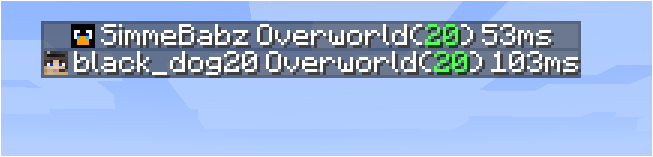
本当は Tab Info と呼ぶべきです。なぜなら、今はシングルプレイヤーでも動作するからです!
はじめに
これはクライアントとサーバーの両方にインストールできる MOD で、MOD がないクライアントや MOD がないサーバーで missing mods エラーを引き起こしません。サーバーに接続している場合、MOD はサーバーにも MOD があるときのみ動作します。サーバー側のバージョンはクライアント側のバージョンと一致している必要はありませんが、クライアントが古すぎるバージョンのサーバーに接続すると一部の機能が欠落します。
機能紹介
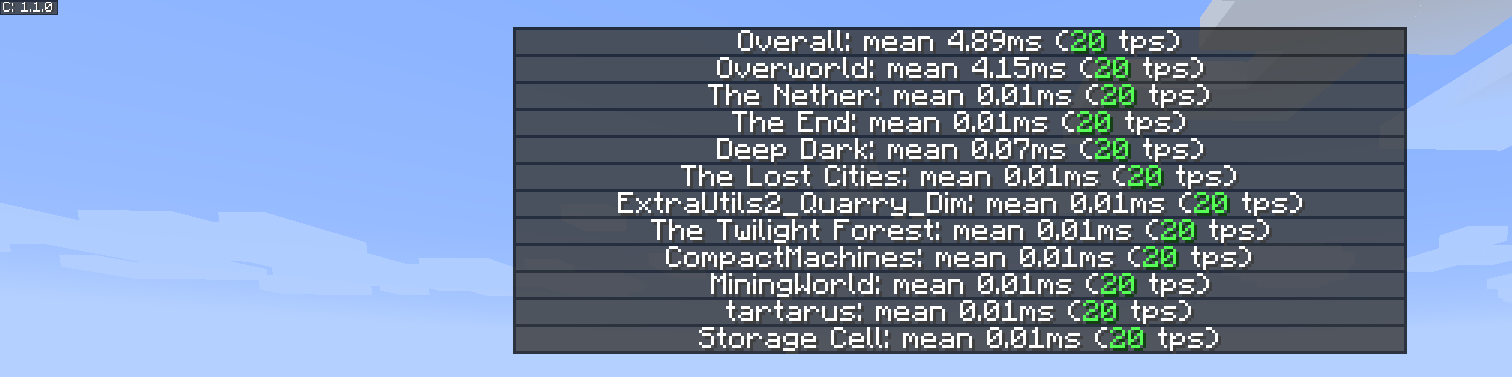
新しく改良されたディメンション別 tps リスト
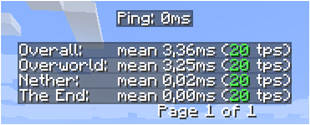
新しいプレイヤーリスト

着想
この MOD の着想とプレゼンテーションは、MineTogether の小さな機能に基づいています。それは、オプションの MOD がサーバーにインストールされていてクエリ機能が有効な場合、ワールド内の tps やエンティティなどの情報を表示できるというものです。この情報は、Tab + Ctrl を押したときのプレイヤータブリストのように表示されていました。
私にとってのきっかけは、それが動作しなくなったことでした。そこで、すべてのディメンションの tps を表示するこの小さな MOD を作りました。
GUI を有効にするには Tab + Ctrl を押します(標準ですが、キーバインドで設定可能)。すると、サーバー全体と各ディメンションの tps が表示されます。
既知の問題
- MineTogether がインストールされていて siv intregration が有効で、ServerInfoProvider がインストールされていない場合、tps ページのキーバインドを使うとラグの問題が発生することがあります。なぜなら、それらは同じキーバインドを使っているからです。
この問題を修正するには、MineTogether の siv intregration を無効にするか、tps ページのキーバインドを変更してください。
Server Tab Infoのインストール方法
With Millida Launcher
Install Millida Launcher
The launcher is free: download it at millida.net/launcher and sign in with any nickname.
Click “Install” on this page
The launcher opens and installs the mod for Minecraft 1.12–1.20.4 on Forge or NeoForge automatically.
Launch the game
A profile with it appears in the launcher: click “Play”.
Manually
Install Forge or NeoForge
The loader must match the game version of the mod file, for example Minecraft 1.20.4. After installing it, a separate profile appears in your launcher.
Download the file for your version
In the version list above, pick the file ServerTabInfo-1.20.4-1.3.8.jar (109 KB) for your game version and loader.
Put it in the mods folder
The folder is inside .minecraft (Windows: %appdata%\.minecraft\mods). If it does not exist, create it.
Launch the loader profile
Open “Mods” in the main menu: Server Tab Info should be in the list.
Minecraft 1.20.4 runs on Java 17: with a different Java version the game may close right after launch.
バージョン
依存関係あり
| Minecraft | ローダー | ファイル | 日付 | 操作 |
|---|---|---|---|---|
| 1.20.4 | NeoForge | ServerTabInfo-1.20.4-1.3.8.jar109 KB | ||
| 1.20.1 | Forge | ServerTabInfo-1.20-1.3.8.jar101 KB | ||
| 1.17.1 | Forge | ServerTabInfo-1.17.1-1.3.4-b2.jar102 KB | ||
| 1.16.1 | Forge | ServerTabInfo-1.16.1-1.2.7-alpha.jar71.3 KB | ||
| 1.12.1 | — | ServerTabInfo-1.12.2-1.2.6.jar53.5 KB | ||
| 1.13.2 | — | ServerTabInfo-1.13.2-1.2.4-beta.jar51.5 KB |
FAQ
Which Minecraft versions does Server Tab Info work on?
There are files for 1.12–1.20.4, 9 versions in total. The newest is 1.20.4.
Is Server Tab Info for Forge or Fabric?
There are files for Forge: 1.16.1–1.20.1 and for NeoForge: 1.20.4. There are no files for Fabric: a mod for another loader will not start.
Does Server Tab Info need other mods?
The author lists no required dependencies: the Forge or NeoForge loader is enough.
Which Java does Server Tab Info need?
Minecraft 1.20.4 runs on Java 17. If the game closes right after launch, the usual cause is the wrong Java version in the profile settings.
Where can I download Server Tab Info safely?
On this page: the file ServerTabInfo-1.20.4-1.3.8.jar (109 KB) is stored on Millida’s server, with no link shorteners. SHA-1 checksum: 10b7839c442bfb1d3ba61870a11344b0db072e3e.
レビュー
Server Tab Infoの最初の評価を書きませんか


