
概要
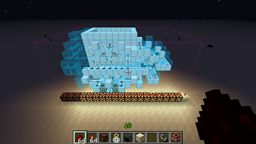
このMODは、再構築を容易にするために、schematicファイルから読み込んだホログラムを表示できます。また、自分の作成物をschematicファイルに保存して共有することもできます。
必要条件
- Minecraft Forge
- LunatriusCore (1.7.2以降のみ)
インストール
- ファイルをmodsフォルダに入れるだけです。以上です。
クラッシュレポート、翻訳、提案
- クラッシュレポート
- 翻訳
- 提案
Modpacks: modpackが無料(公開または非公開)であれば、あなたのmod packにこれらのMODを自由に含めることができます。作者として私を記載していただけると嬉しいですが、必須ではありません。Youtube/Streaming: このMODを使って制作した動画で収益化できます。
Schematicaのインストール方法
With Millida Launcher
Install Millida Launcher
The launcher is free: download it at millida.net/launcher and sign in with any nickname.
Click “Install” on this page
The launcher opens and installs the mod for Minecraft 1.9–1.12.2 automatically.
Launch the game
A profile with it appears in the launcher: click “Play”.
Manually
Download the file for your version
In the version list above, pick the file Schematica-1.12.2-1.8.0.169-universal.jar (328 KB) for your game version.
Put it in the mods folder
The folder is inside .minecraft (Windows: %appdata%\.minecraft\mods). If it does not exist, create it.
Launch the loader profile
Open “Mods” in the main menu: Schematica should be in the list.
Minecraft 1.12.2 runs on Java 8: with a different Java version the game may close right after launch.
バージョン
依存関係あり
| Minecraft | ローダー | ファイル | 日付 | 操作 |
|---|---|---|---|---|
| 1.12.2 | — | Schematica-1.12.2-1.8.0.169-universal.jar328 KB 1 | ||
| 1.9 | — | Schematica-1.9-1.7.7.145-universal.jar322 KB |
FAQ
Which Minecraft versions does Schematica work on?
There are files for 1.12.2, 1.9. The newest is 1.12.2.
Which Java does Schematica need?
Minecraft 1.12.2 runs on Java 8. If the game closes right after launch, the usual cause is the wrong Java version in the profile settings.
Where can I download Schematica safely?
On this page: the file Schematica-1.12.2-1.8.0.169-universal.jar (328 KB) is stored on Millida’s server, with no link shorteners. SHA-1 checksum: cc8c851bc47ecf314c3974e3b90acfa1a62105ac.
レビュー
Schematicaの最初の評価を書きませんか


