

 NeoForge
 Fabric
 Forge
ForgeScannable MODについて
Scannableは、賢い探検家(つまりあなた)のツールベルトへの小さな追加要素です。おまけに、見た目も楽しい。
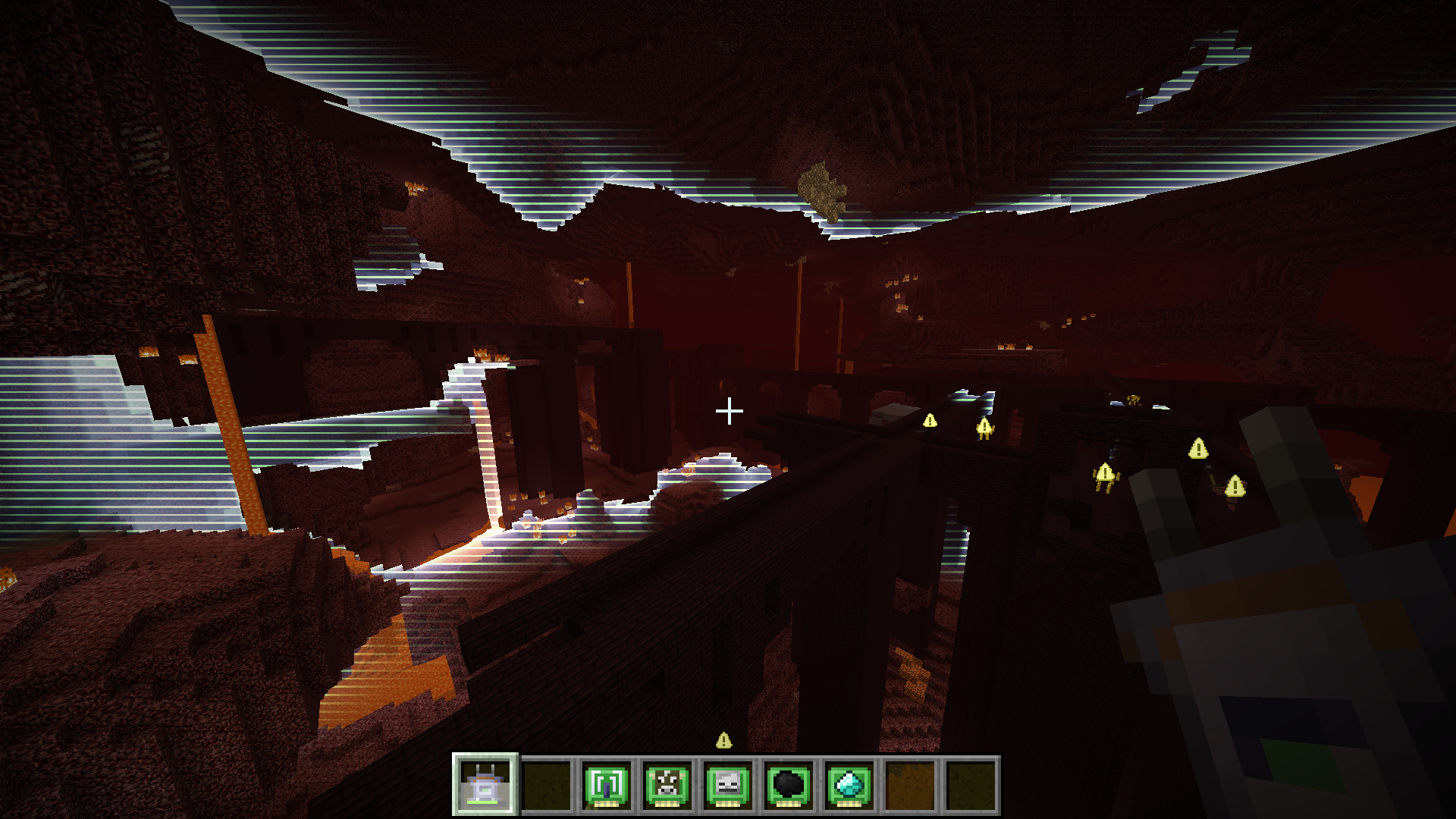
近くのエリアを調査して興味深いポイントを探せるスキャナーアイテムを提供します。スキャン結果はしばらくの間、クリーンで読みやすい形で可視化され、ワールド内のハイライトまたは適切に配置されたオーバーレイとして表示されます。見た目の楽しさについてもう言いましたっけ? 表示される結果はスキャナーに搭載されたモジュールによって決まります。同時に最大3つのモジュールをインストールできます。デフォルトのモジュールには以下が含まれます:
- 動物検出(例: 牛、豚)
- モンスター検出(例: ゾンビ、クリーパー)
- エンティティ検出(特定のエンティティに設定可能)
- 一般的な鉱石検出(例: 石炭、鉄)
- 希少な鉱石検出(例: 金、ダイヤモンド)
- 液体検出(例: 水、溶岩)
- ブロック検出(特定のブロックに設定可能)
- 範囲ブースター
コンフィグで無効化されていない限り、スキャナーはForge energy APIを使用する充電可能なアイテムとして機能します。各スキャンで消費されるエネルギーは、スキャナーにインストールされたモジュールによって異なります。スキャナーは、Forge energy APIと互換性のある任意の充電器MODブロックで再充電できます。
最後に大事なこととして、ご想像のとおり、見た目の楽しさがあります。このMODを紹介する短い動画がこちらです。
パフォーマンスについて少し: 素晴らしいです。実際のスキャン計算はサーバーが一切行わないため、スキャナーの使用がサーバーをラグらせることはありません(ただしクライアントは常にサーバー設定に従います)。さらに、スキャンは複数のティックに分散されるため(そのためスキャナー使用時の充電時間が発生します)、スキャナーを使用するクライアント側でも目立った影響はないはずです。レンダリングについては、スキャンウェーブ効果はシェーダーと単一のクワッドを使って描画されます。つまり非常に高速で、FPSに目立った影響を与えないはずです。また、非常に古いラップトップでもFPSの低下なしでテスト済みです。OptiFine使用時の結果は異なる場合があり、動作を保証するものではありません。
他のMODは、異なる種類のスキャン結果を生成する追加モジュールを提供できます。モジュールのアイデアがあれば、このプロジェクトのイシュートラッカーでイシューを開くか、他のMODが関わる場合はそのMODの作者にScannableへの対応追加を説得してみてください。きっと喜んでくれます。本当です。
Scannableのインストール方法
With Millida Launcher
Install Millida Launcher
The launcher is free: download it at millida.net/launcher and sign in with any nickname.
Click “Install” on this page
The launcher opens and installs the mod for Minecraft 1.12.2–1.21.11 on Fabric, Forge or NeoForge automatically.
Launch the game
A profile with it appears in the launcher: click “Play”.
Manually
Install Fabric, Forge or NeoForge
The loader must match the game version of the mod file, for example Minecraft 1.21.11. After installing it, a separate profile appears in your launcher.
Download the file for your version
In the version list above, pick the file scannable-MC1.21.11-neoforge-1.8.0+042da65.jar (383 KB) for your game version and loader.
Put it in the mods folder
The folder is inside .minecraft (Windows: %appdata%\.minecraft\mods). If it does not exist, create it.
Launch the loader profile
Open “Mods” in the main menu: Scannable should be in the list.
Minecraft 1.21.11 runs on Java 21: with a different Java version the game may close right after launch.
バージョン
依存関係あり
| Minecraft | ローダー | ファイル | 日付 | 操作 |
|---|---|---|---|---|
| 1.21.11 | NeoForge | Scannable-MC1.21.11-1.8.0383 KB 1 | ||
| 1.21.11 | Fabric | Scannable-MC1.21.11-1.8.0390 KB 9 | ||
| 1.20.4 | Forge | Scannable-MC1.20.4-1.7.13384 KB 2 | ||
| 1.12.2 | — | Scannable-MC1.12.2-1.6.3.26.jar247 KB |
FAQ
Which Minecraft versions does Scannable work on?
There are files for 1.21.11, 1.20.4, 1.12.2. The newest is 1.21.11.
Is Scannable for Forge or Fabric?
There are files for Fabric: 1.21.11, for Forge: 1.20.4 and for NeoForge: 1.21.11.
Does Scannable need other mods?
The author lists no required dependencies: the Fabric, Forge or NeoForge loader is enough.
Which Java does Scannable need?
Minecraft 1.21.11 runs on Java 21. If the game closes right after launch, the usual cause is the wrong Java version in the profile settings.
Where can I download Scannable safely?
On this page: the file scannable-MC1.21.11-neoforge-1.8.0+042da65.jar (383 KB) is stored on Millida’s server, with no link shorteners. SHA-1 checksum: 8e3f280f6c0b881a25d9768b207dc12697cd1992.
レビュー
Scannableの最初の評価を書きませんか


