
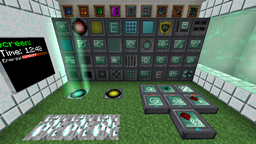
Minecraft 1.12.2用RFTools MOD
RFTools、Redfluxを支援するブロックとアイテム (ディメンションビルダー、クラフター、モニター、スキャナー、...)
RFTools MODについて
RFToolsはRF(Redflux)または一般的なテクノロジーに関連する様々なツールを含むMODです。現在のバージョンに含まれるブロックとアイテムは使用可能で、機能も完成しています。このMODは1.7.10、1.8.9、1.9、1.10.2に対応しています。このMODの主要な機能(2.00以降)はDimension Builderです。この装置を使えば、探索、採掘、建築などのための自分だけのディメンションを作成できます。
注意!このMODは1.14以降には存在しません。代わりにRFToolsBaseをはじめとする複数のMODに分割されました!
古い情報
注意!RFToolsにはMcJtyLibが必要です!
注意!ディメンションを使用したい場合は、Dimension BuilderがRFTools Dimensions MODに移動したため、そちらを入手する必要があります。また、RFToolsのもう一つのコンパニオンMODであるRFTools Controlもチェックしてみてください。強力な自動化機能を追加します。
注意!コメントは無効化されています。あまりに多くの場所で確認するのが難しいためです。バグ報告をしたい場合は「Issues」タブまたはこちらへ:RFTools Issue Tracker。RFTools全般について議論したい場合はこちらでどうぞ:RFTools on my discord
RFToolsはMODパックで制限なく使用できます。
https://www.patreon.com/McJty で支援することで私をサポートできます。
ありがとう!
Direwolf20によるRFToolsのスポットライト(全5部のうちパート1):
RFToolsのインストール方法
With Millida Launcher
Install Millida Launcher
The launcher is free: download it at millida.net/launcher and sign in with any nickname.
Click “Install” on this page
The launcher opens and installs the mod for Minecraft 1.12–1.12.2 automatically.
Launch the game
A profile with it appears in the launcher: click “Play”.
Manually
Download the file for your version
In the version list above, pick the file rftools-1.12-7.73.jar (2.8 MB) for your game version.
Put it in the mods folder
The folder is inside .minecraft (Windows: %appdata%\.minecraft\mods). If it does not exist, create it.
Launch the loader profile
Open “Mods” in the main menu: RFTools should be in the list.
Minecraft 1.12.2 runs on Java 8: with a different Java version the game may close right after launch.
バージョン
依存関係あり
| Minecraft | ローダー | ファイル | 日付 | 操作 |
|---|---|---|---|---|
| 1.12.2 | — | RFTools - 1.12-7.732.8 MB 2 | ||
| 1.12.2 | — | RFTools - 1.12-7.50-alpha2.7 MB | ||
| 1.12 | — | rftools-1.12-6.10beta4.jar2.9 MB |
FAQ
Which Minecraft versions does RFTools work on?
There are files for 1.12.2, 1.12. The newest is 1.12.2.
Which Java does RFTools need?
Minecraft 1.12.2 runs on Java 8. If the game closes right after launch, the usual cause is the wrong Java version in the profile settings.
Where can I download RFTools safely?
On this page: the file rftools-1.12-7.73.jar (2.8 MB) is stored on Millida’s server, with no link shorteners. SHA-1 checksum: 16a4e8c1907bdaac546ab3fd56904d202da427f3.
レビュー
RFToolsの最初の評価を書きませんか


