
 NeoForge
 Forge
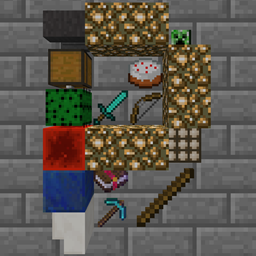
ForgePlonk MODについて
1.7.10、1.12.2、1.14.4、1.15.2、1.16.5、1.18.2、1.19.2、1.19.4、1.20.1、1.21.1、26.1.xで利用可能です(ファイル(上部)> すべて表示 > ゲームバージョン)。対応バージョンは太字で示しています(ただし、無理のない範囲で他のバージョンにも対応するよう努めます)。
ブロックを見ながらPキーを押すとアイテムを設置できます。 Sneak + Pで全体を回転。Sneak + 使用でアイテムを回転。(両手が空いている必要があります)
- 注意(1.16.4以降):Plonkが使用するPキーはソーシャルインタラクション画面のキーと競合するため、どちらかを変更する必要があります!
このMODはどのMODパックでも自由に使用できます(許可を求める必要はありません!)。
アイテム設置キー(デフォルトはP)を使って、任意のブロックの側面に最大4スタックのアイテムを設置できます。(各スタックの最大サイズは設定可能で、StackUpにも対応しています!)
アイテムは個別に16方向へ回転できます(両手が空いた状態でSneak + 右クリック)。
アイテムのタイル全体をまとめて4方向へ回転できます(両手が空いた状態でSneak + アイテム設置キー)。
アイテムは自動化によって取り出すことはできますが、挿入することはできません。
液体で流されることはなくなりました。設置されたアイテムは液体で流される可能性があります。ウォーターログに対応しています(MC1.16.3以降)。
設定はconfig/plonk.cfg(MC 1.13以前)または[save folder]/serverconfig/plonk-server.toml(MC 1.13以降)にあります
設置されたアイテムの見た目と仕組みは現在変更される可能性があります。
この動画はかなり古くなっています
既知のバグ:
三人称カメラがブロックと衝突する(1.7.10および1.12.2のみ)。三人称のレイトレースを通過させる方法が分かりません(1.13以降にはRayTraceContext.Visualがあります)。半透明のアイテム(例:色付きガラス)があると、その背後にある他の半透明のものが正しく描画されません。(MC 1.16以前)
Plonkのインストール方法
With Millida Launcher
Install Millida Launcher
The launcher is free: download it at millida.net/launcher and sign in with any nickname.
Click “Install” on this page
The launcher opens and installs the mod for Minecraft 1.18–26.1.2 on Forge or NeoForge automatically.
Launch the game
A profile with it appears in the launcher: click “Play”.
Manually
Install Forge or NeoForge
The loader must match the game version of the mod file, for example Minecraft 26.1.2. After installing it, a separate profile appears in your launcher.
Download the file for your version
In the version list above, pick the file plonk-26.1.2-10.0.10-neo.jar (162 KB) for your game version and loader.
Put it in the mods folder
The folder is inside .minecraft (Windows: %appdata%\.minecraft\mods). If it does not exist, create it.
Launch the loader profile
Open “Mods” in the main menu: Plonk should be in the list.
バージョン
依存関係あり
| Minecraft | ローダー | ファイル | 日付 | 操作 |
|---|---|---|---|---|
| 26.1 | NeoForge | plonk-26.1.2-10.0.10-neo.jar162 KB | ||
| 26.1 | NeoForge | plonk-26.1.1-10.0.8-neo.jar162 KB | ||
| 1.20.1 | NeoForge, Forge | plonk-1.20.1-10.0.5-forge.jar148 KB | ||
| 1.18.1 | Forge | plonk-1.18.1-10.0.1.jar147 KB |
FAQ
Which Minecraft versions does Plonk work on?
There are files for 1.18–26.1.2, 7 versions in total. The newest is 26.1.2.
Is Plonk for Forge or Fabric?
There are files for Forge: 1.18–1.20.1 and for NeoForge: 1.20–26.1.2. There are no files for Fabric: a mod for another loader will not start.
Does Plonk need other mods?
The author lists no required dependencies: the Forge or NeoForge loader is enough.
Where can I download Plonk safely?
On this page: the file plonk-26.1.2-10.0.10-neo.jar (162 KB) is stored on Millida’s server, with no link shorteners. SHA-1 checksum: 4c8d57969618899ad01a7f182a680245070bcd7d.
レビュー
Plonkの最初の評価を書きませんか


