

Minecraft 1.20.1, 1.21.1用Particle Effects MOD
バニラMinecraftのあらゆるエフェクトにユニークなテクスチャのパーティクルを追加するビジュアルMod!
 NeoForge
 Fabric
 Forge
Forge💬 説明
Particle Effects は、バニラの Minecraft のすべてのエフェクトに独自のテクスチャ付きパーティクルを追加する、シンプルなクライアント側の視覚系 MOD です!マルチプレイでも動作します ^^

✨ パーティクル
ここでは、各エフェクトごとの独自のパーティクルをすべて確認できます:
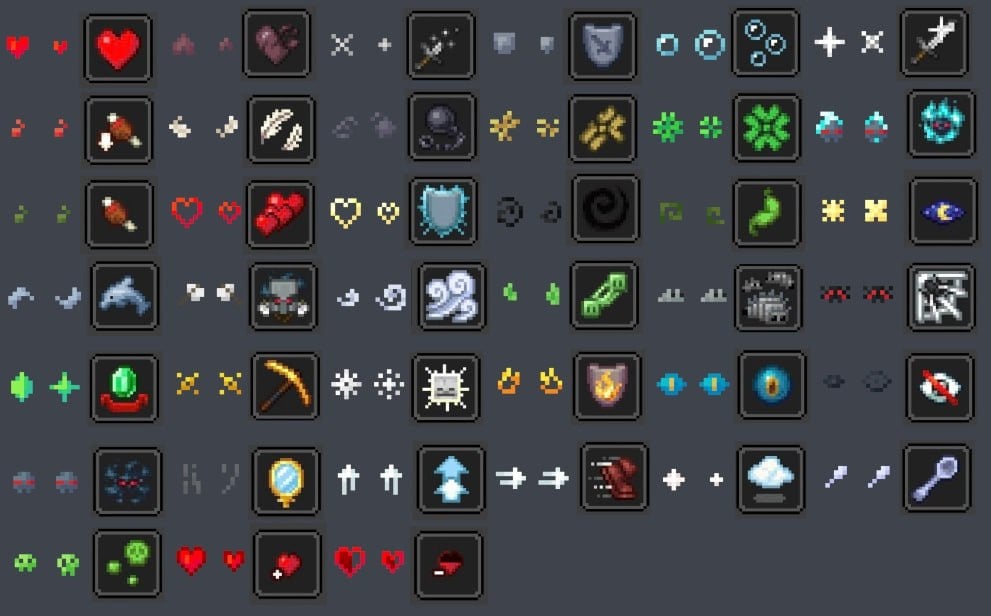
🌟 リソースパック
元の MOD のパーティクルの見た目を少し変更するリソースパックもいくつかあります。
- Particles Updated by zed1ker
- Updated Particles by Timofeii7547
- Bare Bones x Particle Effects by Dezert3

Particle Effectsのインストール方法
With Millida Launcher
Install Millida Launcher
The launcher is free: download it at millida.net/launcher and sign in with any nickname.
Click “Install” on this page
The launcher opens and installs the mod for Minecraft 1.20.1–26.3 on Fabric, Forge or NeoForge automatically, together with its dependencies: Fabric API.
Launch the game
A profile with it appears in the launcher: click “Play”.
Manually
Install Fabric, Forge or NeoForge
The loader must match the game version of the mod file, for example Minecraft 26.3. After installing it, a separate profile appears in your launcher.
Download the file for your version
In the version list above, pick the file ParticleEffects-1.6.0+26.3+neoforge.jar (304 KB) for your game version and loader.
Put it in the mods folder
The folder is inside .minecraft (Windows: %appdata%\.minecraft\mods). If it does not exist, create it. Required dependencies go there too: Fabric API.
Launch the loader profile
Open “Mods” in the main menu: Particle Effects should be in the list.
Particle Effects works on the player’s side only: there is no need to install it on a server.
バージョン
依存関係あり
| Minecraft | ローダー | ファイル | 日付 | 操作 |
|---|---|---|---|---|
| 1.20.1 | Forge | 1.20.1491 KB 28 | ||
| 26.3 | NeoForge | 26.3304 KB 3 | ||
| 26.2 | NeoForge | 26.2304 KB 1 | ||
| 26.2 | NeoForge | 26.2304 KB 3 | ||
| 1.21.11 | NeoForge | 1.21.11304 KB 6 | ||
| 1.21.1 | NeoForge | 1.21.1303 KB 35 | ||
| 26.3 | Fabric | 26.3307 KB 135 | ||
| 26.2 | Fabric | 26.2308 KB 51 |
動作に必要なもの
FAQ
Which Minecraft versions does Particle Effects work on?
There are files for 1.20.1–26.3, 8 versions in total. The newest is 26.3.
Is Particle Effects for Forge or Fabric?
There are files for Fabric: 26.2–26.3, for Forge: 1.20.1 and for NeoForge: 1.21.1–26.3.
What does Particle Effects need to work?
Required: Fabric API. Without it the mod will not start: dependencies go into the same mods folder. Optional: YetAnotherConfigLib (YACL), Mod Menu.
Do I need to install Particle Effects on a server?
No. Particle Effects works on the player’s side only: there is no need to install it on a server.
Where can I download Particle Effects safely?
On this page: the file ParticleEffects-1.6.0+26.3+neoforge.jar (304 KB) is stored on Millida’s server, with no link shorteners. SHA-1 checksum: 02c8dc2c2a3ae5761513b10d02526a3b940f6dc3.
レビュー
Particle Effectsの最初の評価を書きませんか


