

- 閲覧
- 5 閲覧
- 更新日
- 更新日 18.10.2026
- 1.17.1 — 1.21.1
 Fabric
Oxidized MODについて
Oxidizedは、バニラの銅にさらなる用途を提供することを目的としています。各機能は、バニラのMinecraftに合うか、それに近い形で設計されています。
概要:
Copper Pulsar: このアイテムは電磁石にインスパイアされたツールです。プレイヤーのインベントリにある間、pulsarは通常の回収範囲より最大10倍遠くから経験値オーブやアイテムを拾えるようにします。右クリックでオンとオフを切り替えられます。
Copper Rail: Copper Railはパワードレールとほぼ同じように機能します。違いは、接続された銅レールのチェーンがパワードレールの8ブロックと比べて最大100ブロックまでパワーを維持できることです。
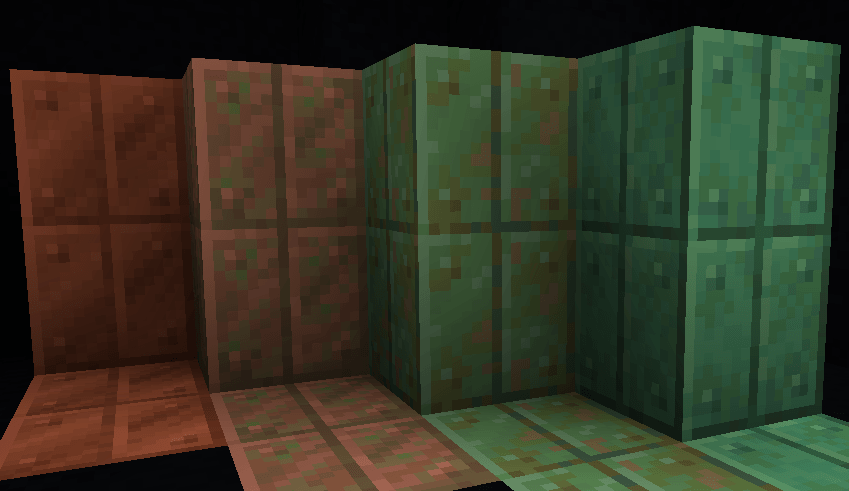
Vertical Cut Copper: Vertical cut copperは、中央に線が入った銅ブロックのようなデザインの建築ブロックです。これは後に正式リリースで変更された元のcut copperのデザインにインスパイアされています。Vertical cut copperは通常の銅のように酸化しますが、ハニカムでワックスをかけるとこの過程を止められます。
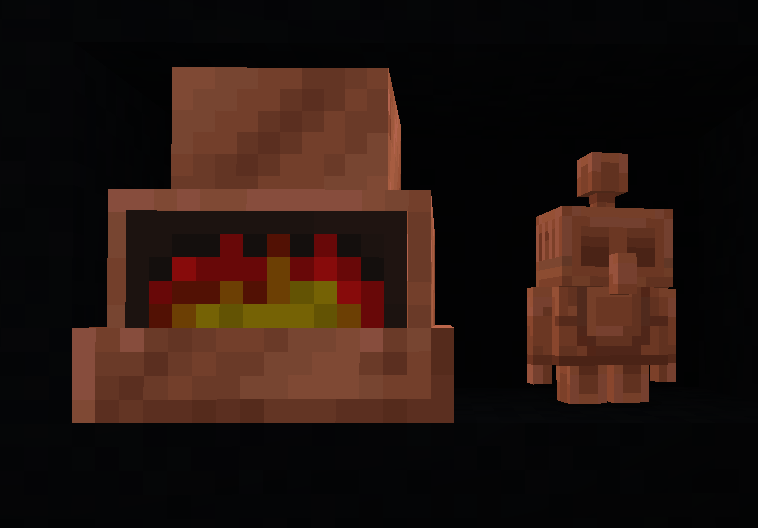
Copper Kiln: Copper Kilnは新しいユニークなかまどの一種です。この窯は丸石、粘土、砂、原木を非常に高速で精錬できます。この窯はテラコッタ、レンガ、石、木炭、ガラスを素早く建築用に入手するためのものです。スモーカーや溶鉱炉のように機能します。
Copper Lantern: Copper Lanternは緑色の炎を放つ新しいランタンの一種です。単一の松明の周りに8個の銅ナゲットでクラフトできます。Copper lanternは通常のランタンと同じように機能します。(銅ナゲットは銅インゴットをクラフティングテーブルに入れることで入手できます)
Rose Gold Tools: Rose Goldは、鍛冶台で作れる新しいツール素材です。Rose Goldインゴットは存在せず、鍛冶台でRose Gold Upgrade Template、銅インゴット、金のツールをクラフトして作ります。Rose goldツールは鉄のツールと同程度の耐久性と採掘レベルを提供しますが、金のツールと同じくらい速く、エンチャントも可能です。
Copper Pan: Copper Panは、プレイヤーが粘土や鉄ナゲットなどの資源を自動で選鉱できるユニークなブロックです。このパンは水の中、かつ砂または砂利のブロックの上に置かれた場合のみ機能します。時間の経過とともにパンはふるいにかけ、見つけたアイテムを放出します。現在のルートプールには以下が含まれます: Iron Nugget (15%)、Gold Nugget (15%)、Sand (24%)、Emerald (2%)、Gravel (12%)、Clay Ball (32%)。パンがアイテムを見つける速度はランダムティックスピードに比例します。
Copper Golem: Copper GolemはMinecraft Mob Vote 2021に基づいたモブです。下に銅ブロックまたはcut copperブロック、中央にカボチャランタン、上に避雷針を置くことで作成できます。ゴーレムは歩き回り、近くの銅ボタンを押せます(Copper Buttonは追加されていますが、サバイバルではまだ入手できません)。Copper Golemは長期間かけて酸化しますが、雷雨の際は避雷針に向かって歩き、雷に打たれると酸化が戻ります。
Copper Trap: Copper Trapは、設置できる熊罠のようなブロックです。6個の銅インゴットと2個の火打石でクラフトします。踏むと、罠は5のダメージを与え、犠牲者が離れるのを止めます。罠は閉じた後3秒で再び開きます。右クリックまたはレッドストーン(レバー、ボタンなど)で手動で切り替えられます。
[1.19.3+] Copper Barometer: Copper Barometerは、銅インゴット、レッドストーン、ガラスでクラフトする天気予報ツールです。右クリックすると、barometerは今後の天気や現在の降水がいつ終わるかについての情報を提供します。
バージョン
1.17+のFabric modloaderで利用可能
クレジット:
rose goldツールのテクスチャについてzacthornetvにクレジット
Oxidizedのインストール方法
With Millida Launcher
Install Millida Launcher
The launcher is free: download it at millida.net/launcher and sign in with any nickname.
Click “Install” on this page
The launcher opens and installs the mod for Minecraft 1.17.1–1.21.1 on Fabric automatically.
Launch the game
A profile with it appears in the launcher: click “Play”.
Manually
Install Fabric
The loader must match the game version of the mod file, for example Minecraft 1.21.1. After installing it, a separate profile appears in your launcher.
Download the file for your version
In the version list above, pick the file oxidized-1.8.4.jar (169 KB) for your game version.
Put it in the mods folder
The folder is inside .minecraft (Windows: %appdata%\.minecraft\mods). If it does not exist, create it.
Launch the loader profile
Open “Mods” in the main menu: Oxidized should be in the list.
Minecraft 1.21.1 runs on Java 21: with a different Java version the game may close right after launch.
バージョン
依存関係あり
| Minecraft | ローダー | ファイル | 日付 | 操作 |
|---|---|---|---|---|
| 1.21.1 | Fabric | Oxidized 1.8.4 (1.21.1)169 KB | ||
| 1.17.1 | Fabric | Oxidized 1.5.0-alpha (1.17.1)159 KB |
FAQ
Which Minecraft versions does Oxidized work on?
There are files for 1.21.1, 1.17.1. The newest is 1.21.1.
Is Oxidized for Forge or Fabric?
Only for Fabric: 1.17.1–1.21.1. There are no files for Forge or NeoForge: a mod for another loader will not start.
Does Oxidized need other mods?
The author lists no required dependencies: the Fabric loader is enough.
Which Java does Oxidized need?
Minecraft 1.21.1 runs on Java 21. If the game closes right after launch, the usual cause is the wrong Java version in the profile settings.
Where can I download Oxidized safely?
On this page: the file oxidized-1.8.4.jar (169 KB) is stored on Millida’s server, with no link shorteners. SHA-1 checksum: 230f84079defc3896b561cce6e830e4565f5f839.
レビュー
Oxidizedの最初の評価を書きませんか


