
Natura MODについて
Naturaは、興味深いワールド生成で世界に彩りを添えることを目的としたMODです。いくつかの小さな追加要素により、序盤でも動物を狩ることだけに頼らずに食料を確保できるようになります。このMODはほとんどが直感的で、すべてが理にかなっているか、ゲーム内で説明されています。
NaturaはTinkers' Constructのワールド生成コンパニオンです。このMODはExtraBiomesXLやBiomes O' Plentyと相性が良いですが、最高の体験のためにどちらも必須ではありません。
このMODにはMantleが必要です。
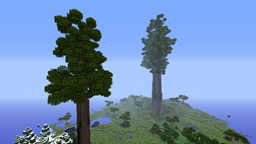
スクリーンショットをいくつか:
Naturaのインストール方法
With Millida Launcher
Install Millida Launcher
The launcher is free: download it at millida.net/launcher and sign in with any nickname.
Click “Install” on this page
The launcher opens and installs the mod for Minecraft 1.10.2–1.12.2 automatically.
Launch the game
A profile with it appears in the launcher: click “Play”.
Manually
Download the file for your version
In the version list above, pick the file natura-1.12.2-4.3.2.69.jar (1.1 MB) for your game version.
Put it in the mods folder
The folder is inside .minecraft (Windows: %appdata%\.minecraft\mods). If it does not exist, create it.
Launch the loader profile
Open “Mods” in the main menu: Natura should be in the list.
Minecraft 1.12.2 runs on Java 8: with a different Java version the game may close right after launch.
バージョン
依存関係あり
| Minecraft | ローダー | ファイル | 日付 | 操作 |
|---|---|---|---|---|
| 1.12.2 | — | natura-1.12.2-4.3.2.69.jar1.1 MB 1 | ||
| 1.10.2 | — | natura-1.10.2-4.1.0.82.jar994 KB | ||
| 1.12 | — | Natura-1.12-4.3.0.16.jar1.1 MB |
FAQ
Which Minecraft versions does Natura work on?
There are files for 1.12.2, 1.12, 1.10.2. The newest is 1.12.2.
Which Java does Natura need?
Minecraft 1.12.2 runs on Java 8. If the game closes right after launch, the usual cause is the wrong Java version in the profile settings.
Where can I download Natura safely?
On this page: the file natura-1.12.2-4.3.2.69.jar (1.1 MB) is stored on Millida’s server, with no link shorteners. SHA-1 checksum: 1485d9f3378eae092fb6ba690f1cb4484a1ce42c.
レビュー
Naturaの最初の評価を書きませんか


