
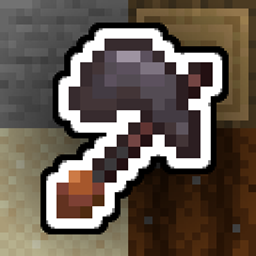
Minecraft 1.20.1, 1.21.1用Multitools Enhanced MOD
すべてのツール(ツルハシ、斧、シャベル、クワ)を1つのアイテムにまとめてインベントリのスペースを節約します。
 NeoForge
 Fabric
 Quilt
Quilt Forge
ForgeMultitools, done right for the newer versions!

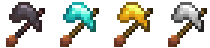
Multitools are a new tool type that combines all primary tools (pickaxe, axe, shovel, hoe) into one item to save up on inventory space. To balance this out, multitools have half the durability of all combined tools (configurable). They come in 4 materials: Netherite, Diamond, Gold, Iron.
Crafting
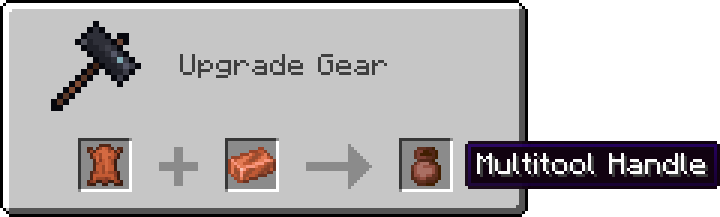
First step of crafting a multitool is smithing the handle first. Applying a copper ingot to leather in a smithing table will result in a Multitool Handle!
NOTE: For versions 1.20+ use the crafting table instead of the smithing table.
And lastly combining the handle with all the tools or a block of desired material will result in a Multitool!

or
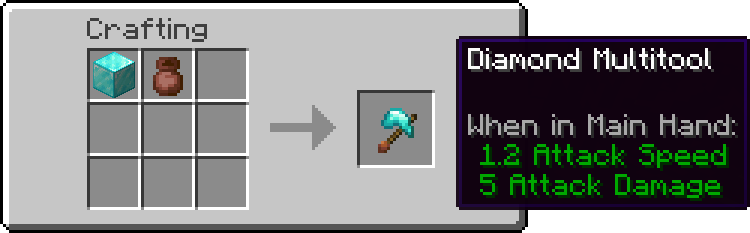
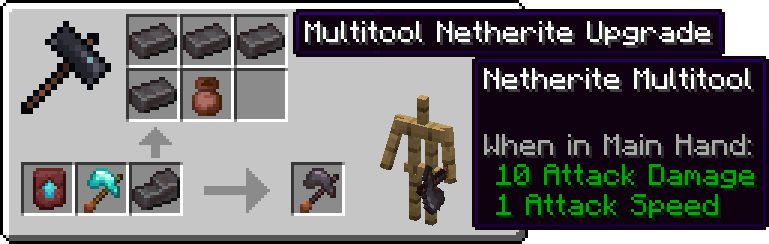
and upgrading from Diamond to Netherite:
Stripping, Deoxidizing, Unwaxing, Pathing and Tilling
Axe right click actions (stripping, deoxidizing and unwaxing) all work with the multitool. Simply right click a log or a copper block to see it in action!
While stading, right clicking a variant of dirt block will use the shovel, creating a path. To till the ground instead, hold shift (or your crouching button) and then right click.
Multitools Enhancedのインストール方法
With Millida Launcher
Install Millida Launcher
The launcher is free: download it at millida.net/launcher and sign in with any nickname.
Click “Install” on this page
The launcher opens and installs the mod for Minecraft 1.20.1–1.21.1 on Fabric, Forge, NeoForge or Quilt automatically.
Launch the game
A profile with it appears in the launcher: click “Play”.
Manually
Install Fabric, Forge, NeoForge or Quilt
The loader must match the game version of the mod file, for example Minecraft 1.21.1. After installing it, a separate profile appears in your launcher.
Download the file for your version
In the version list above, pick the file multitools-neoforge-1.21.1-2.0.1.jar (46 KB) for your game version and loader.
Put it in the mods folder
The folder is inside .minecraft (Windows: %appdata%\.minecraft\mods). If it does not exist, create it.
Launch the loader profile
Open “Mods” in the main menu: Multitools Enhanced should be in the list.
Minecraft 1.21.1 runs on Java 21: with a different Java version the game may close right after launch.
バージョン
依存関係あり
| Minecraft | ローダー | ファイル | 日付 | 操作 |
|---|---|---|---|---|
| 1.21.1 | NeoForge | Multitools Enhanced 2.0.1 for NeoForge 1.21.146.3 KB 4 | ||
| 1.21.1 | Fabric, Quilt | Multitools Enhanced 2.0.1 for Fabric 1.21.146.6 KB 2 | ||
| 1.20.1 | NeoForge, Forge | Multitools Enhanced 2.0.1 for Forge 1.20.146.2 KB 5 |
FAQ
Which Minecraft versions does Multitools Enhanced work on?
There are files for 1.21.1, 1.20.1. The newest is 1.21.1.
Is Multitools Enhanced for Forge or Fabric?
There are files for Fabric: 1.21.1, for Forge: 1.20.1, for NeoForge: 1.20.1–1.21.1 and for Quilt: 1.21.1.
Does Multitools Enhanced need other mods?
The author lists no required dependencies: the Fabric, Forge, NeoForge or Quilt loader is enough.
Which Java does Multitools Enhanced need?
Minecraft 1.21.1 runs on Java 21. If the game closes right after launch, the usual cause is the wrong Java version in the profile settings.
Where can I download Multitools Enhanced safely?
On this page: the file multitools-neoforge-1.21.1-2.0.1.jar (46 KB) is stored on Millida’s server, with no link shorteners. SHA-1 checksum: adaaa3dae627711a78fd467fd4d4bcdc8627448f.
レビュー
Multitools Enhancedの最初の評価を書きませんか


