
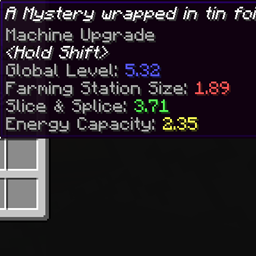
Loot Capacitor Tooltips MODについて
ダンジョンで見つかるルートキャパシターがどれほど優秀なのか知りたいのに、調べるのが面倒だったことはありませんか? このMODはまさにそのためのものです。
modsフォルダに追加するだけで、その秘密が明らかになります。
参考までに、基本キャパシターはレベル1、ダブルは2、オクタディックは3です。
読みやすさのためにフレーバーテキストをオフにできる設定があります。
注意:クライアント側専用のMODで、サーバーでは無視されます。
連絡先
私のすべてのプロジェクトのDiscord:https://discord.gg/T6xdX7G
Loot Capacitor Tooltipsのインストール方法
With Millida Launcher
Install Millida Launcher
The launcher is free: download it at millida.net/launcher and sign in with any nickname.
Click “Install” on this page
The launcher opens and installs the mod for Minecraft 1.12.2 automatically.
Launch the game
A profile with it appears in the launcher: click “Play”.
Manually
Download the file for your version
In the version list above, pick the file lootcapacitortooltips-1.3.jar (9 KB) for your game version.
Put it in the mods folder
The folder is inside .minecraft (Windows: %appdata%\.minecraft\mods). If it does not exist, create it.
Launch the loader profile
Open “Mods” in the main menu: Loot Capacitor Tooltips should be in the list.
Minecraft 1.12.2 runs on Java 8: with a different Java version the game may close right after launch.
バージョン
依存関係あり
| Minecraft | ローダー | ファイル | 日付 | 操作 |
|---|---|---|---|---|
| 1.12.2 | — | lootcapacitortooltips-1.3.jar9.3 KB |
FAQ
Which Minecraft versions does Loot Capacitor Tooltips work on?
Only Minecraft 1.12.2: there are no files for other versions.
Which Java does Loot Capacitor Tooltips need?
Minecraft 1.12.2 runs on Java 8. If the game closes right after launch, the usual cause is the wrong Java version in the profile settings.
Where can I download Loot Capacitor Tooltips safely?
On this page: the file lootcapacitortooltips-1.3.jar (9 KB) is stored on Millida’s server, with no link shorteners. SHA-1 checksum: f5e36c3d1264202edb6469cacb506636ab2dda72.
レビュー
Loot Capacitor Tooltipsの最初の評価を書きませんか


