
 Fabric
 NeoForge
 Forge
ForgeKeybindsPurger
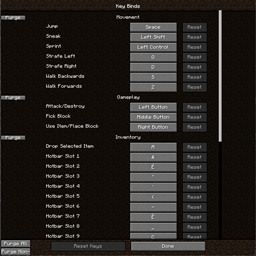
KeybindsPurgerは、カテゴリ内のすべてのキーバインド、すべてのカテゴリ、またはバニラ以外のカテゴリのキーバインドをすべて解除できる小さなユーティリティModです。それだけです
使い方
このModはいくつかのボタンを追加します。キーバインドメニューのカテゴリ名の左側に2つのボタンがあり、「x」はカテゴリを一括解除し、「r」はリセットします。画面の左下にも2つのボタンがあります。「A」はすべてのキーバインドを解除し、「M」はModのキーバインドのみを対象にします
なぜ?
新しいModパックを始めるとき、私はすべてのキーバインドを解除し、必要になったときだけ設定するようにしています。そのほうが私にとって簡単なので、この作業を楽にするModがもっと多くの人の役に立つかもしれないと思いました
KeybindsPurgerのインストール方法
With Millida Launcher
Install Millida Launcher
The launcher is free: download it at millida.net/launcher and sign in with any nickname.
Click “Install” on this page
The launcher opens and installs the mod for Minecraft 1.20.1–26.1.2 on Fabric, Forge or NeoForge automatically.
Launch the game
A profile with it appears in the launcher: click “Play”.
Manually
Install Fabric, Forge or NeoForge
The loader must match the game version of the mod file, for example Minecraft 26.1.2. After installing it, a separate profile appears in your launcher.
Download the file for your version
In the version list above, pick the file KeybindsPurger-1.4.0-fabric-26.1.2.jar (39 KB) for your game version and loader.
Put it in the mods folder
The folder is inside .minecraft (Windows: %appdata%\.minecraft\mods). If it does not exist, create it.
Launch the loader profile
Open “Mods” in the main menu: KeybindsPurger should be in the list.
バージョン
依存関係あり
| Minecraft | ローダー | ファイル | 日付 | 操作 |
|---|---|---|---|---|
| 26.1.2 | Fabric | KeybindsPurger-1.4.0-fabric-26.1.2.jar39.2 KB 3 | ||
| 26.1.2 | NeoForge | KeybindsPurger-1.4.0-neoforge-26.1.2.jar39.2 KB | ||
| 1.20.1 | Forge | KeybindsPurger-1.4.0-forge-1.20.1.jar39.1 KB 1 |
レビュー
KeybindsPurgerの最初の評価を書きませんか


