
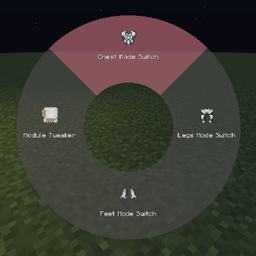
Minecraft 1.20.1, 26.1.2用KeyBind Bundles MOD
キーバインドが多すぎてキーが足りない?このMODでは独自のキーバンドルを作成でき、複数のキーを簡単に使えるラジアルメニューにまとめられます
 NeoForge
 Forge
ForgeKeyBind Bundles MODについて
キーバインドが多すぎて、すべてに割り当てる物理キーが足りないことはありませんか? ほとんど使わないキーを別のバインドに変え続けるのにうんざりしていませんか? どのキーが何をするのか覚えるのが大変すぎませんか? そんなあなたのためのMODです。
このMODはキーバンドルを追加します。これは基本的に、複数のキーバインドを1つのキーにまとめたものです。
バンドルの作成
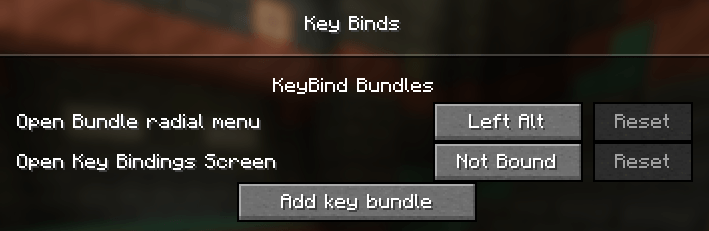
新しいバンドルを作成するには、キーバインド画面を開き、KeyBind Bundlesカテゴリ(最初にあるはずです)の下にあるAdd key bundleボタンをクリックし、バンドルの名前を入力します。
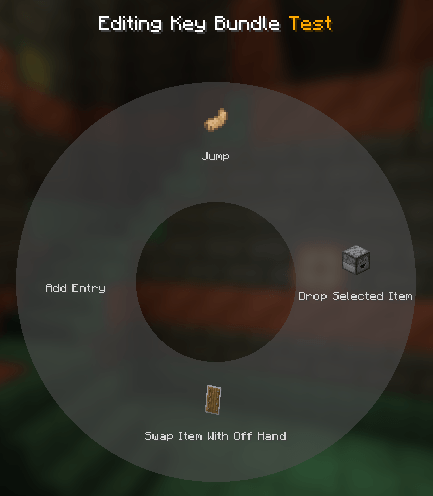
その後、バンドルのEditボタンをクリックします。新しい画面で中央のラジアルメニューにカーソルを合わせ、Add entryをクリックします。すると再びキーバインド画面が開きますが、今度は各キーバインドにselectボタンが付いています。ここでバンドルに追加したいバインドを選択できます。
バインドを選択した後、ラジアルメニューの各エントリを編集して、カスタム名とアイテムアイコンを設定できます。
バンドルの使用
escapeを押して編集メニューを終了し、バンドルをキーに割り当てます。その後、ゲーム内で割り当てたキーを押し続けるとラジアルメニューが表示されます。エントリにカーソルを合わせて左クリックすると、そのキーバインドが実行されます。とても簡単です!
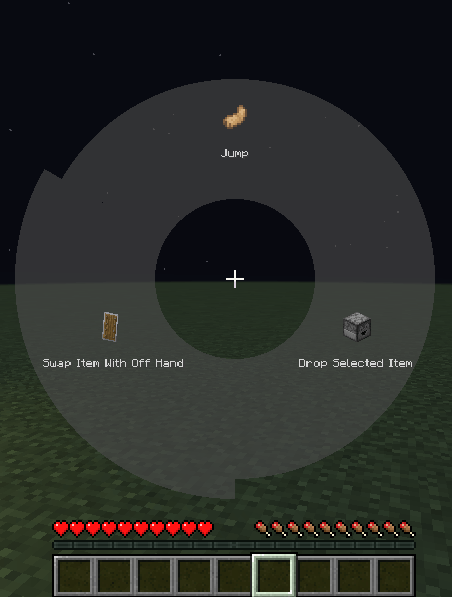
キーマッピングを右クリックするとブックマークすることもできます。ブックマークすると、バンドルに割り当てたキーを押すだけでラジアルメニューを開かずにそのマッピングが即座に実行されます。キーがブックマークされている場合、ラジアルメニューはRadial menu modifier(デフォルトではLeft alt)を押し続けることで再び開けます。現在ブックマークされているキーはラジアルメニュー内で赤くハイライトされます。
このMODはControllingと互換性があります
KeyBind Bundlesのインストール方法
With Millida Launcher
Install Millida Launcher
The launcher is free: download it at millida.net/launcher and sign in with any nickname.
Click “Install” on this page
The launcher opens and installs the mod for Minecraft 1.20.1–26.1.2 on Forge or NeoForge automatically.
Launch the game
A profile with it appears in the launcher: click “Play”.
Manually
Install Forge or NeoForge
The loader must match the game version of the mod file, for example Minecraft 26.1.2. After installing it, a separate profile appears in your launcher.
Download the file for your version
In the version list above, pick the file keybindbundles-2.0.0.jar (90 KB) for your game version and loader.
Put it in the mods folder
The folder is inside .minecraft (Windows: %appdata%\.minecraft\mods). If it does not exist, create it.
Launch the loader profile
Open “Mods” in the main menu: KeyBind Bundles should be in the list.
バージョン
依存関係あり
| Minecraft | ローダー | ファイル | 日付 | 操作 |
|---|---|---|---|---|
| 26.1.2 | NeoForge | 26.1.2 - keybindbundles-2.0.0.jar90.2 KB 1 | ||
| 1.20.1 | NeoForge, Forge | keybindbundles-1.20.1-1.1.0.jar267 KB 1 |
FAQ
Which Minecraft versions does KeyBind Bundles work on?
There are files for 26.1.2, 1.20.1. The newest is 26.1.2.
Is KeyBind Bundles for Forge or Fabric?
There are files for Forge: 1.20.1 and for NeoForge: 1.20.1–26.1.2. There are no files for Fabric: a mod for another loader will not start.
Does KeyBind Bundles need other mods?
The author lists no required dependencies: the Forge or NeoForge loader is enough.
Where can I download KeyBind Bundles safely?
On this page: the file keybindbundles-2.0.0.jar (90 KB) is stored on Millida’s server, with no link shorteners. SHA-1 checksum: 20527d7c26ca72188fab72f860d31d5149f02c90.
レビュー
KeyBind Bundlesの最初の評価を書きませんか


